
Home · Steam games · SuchArt: Genius Artist Simulator
SuchArt: Genius Artist Simulator
How to receive the gift
- Pay for the order and enter a link to your Steam profile on the delivery page (steamcommunity.com/id/… or steamcommunity.com/profiles/…).
- The bot will send the gift to this account.
- Accept the gift in Steam (a notification arrives in the client and by e-mail) — the game will appear in your library.
The gift region must match your Steam account region — otherwise the gift cannot be accepted.
- Developer
- Goose Minded
- Publisher
- HypeTrain Digital
- Release date
- 13 Oct, 2022
- Genres
- Adventure, Casual, Indie, Simulation
- Russian language
- Yes, interface and subtitles
- Steam App ID
- 1293180
Game languages
- Russian
- English
- French
- German
- Polish
- Turkish
- Japanese
- Korean
- Китайский (упр.)
- Испанский (Латинская Америка)
- Portuguese (Brazil)
Languages are listed according to Steam data. Check them before buying: no refund is possible once the game has been sent.
About the game
In SuchArt you are a genius artist living in the year 2130. Make the best of the space studio you own. Create art with a large variety of tools, sell your works, get famous and upgrade your studio! Let your imagination run wild and create the art of your dreams!
PAINT EVERYWHERE
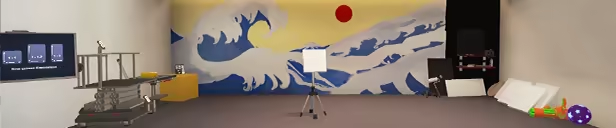
Turn the world around you into a huge canvas and do whatever you please with it — add some red to that gloomy wall, spill paint on the floor and call it abstract expressionism, or start a collection of alphabet paintings from A to Z: this place is yours after all! Wait, how did you mess up your studio that much that fast?
UPGRADE AND DESIGN YOUR STUDIO
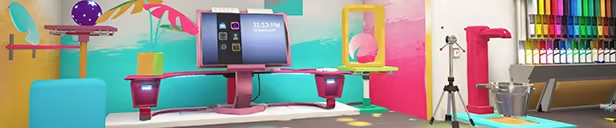
Not satisfied with the initial look and/or functionality of your studio? That’s okay, because you can always unlock new rooms, buy some furniture and decorations, and place those however and wherever you want — make yourself at home! Wait, what do you mean you don’t have enough money?!
SELL AND EXPOSE YOUR ART
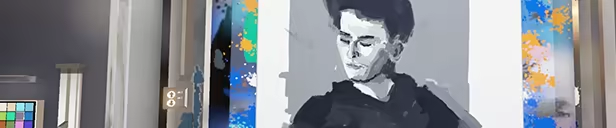
Sell your paintings at the marketplace, fulfill all your clients' orders, and receive a generous reward, or maybe a gift! Or maybe some exposure, the best of all currencies out there. Don't forget that you can exhibit your amazing art and see what critics have to say about it.
REALISTIC PAINTING
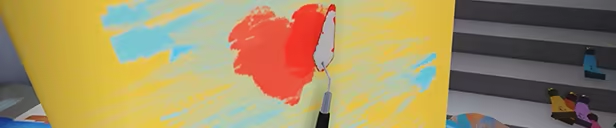
Painting in SuchArt feels just like in real life, but without the downsides. The colors mix as you would naturally expect them to, so you can easily achieve the result you dreamed about. The paint has realistic texture, and each instrument alters it a bit with different strokes. There’s plenty of instruments to choose from: brushes, palette knives, stencils or even flamethrowers to create your next masterpiece.
PICK YOUR SIDE
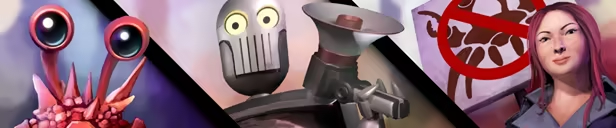
They say down on Earth the robots are revolting and the Crabuxes covet the planet’s saltwater. But surely that’s none of your business. Or, is it?
System requirements
WindowsCommon questions
Does SuchArt: Genius Artist Simulator have Russian language support?
Interface and subtitles: Russian, English, French, German, Polish, Turkish, Japanese, Korean, Китайский (упр.), Испанский (Латинская Америка), Portuguese (Brazil).
What is a Steam gift and how is it different from a key?
A gift is a present our bot sends straight to your Steam account via your profile link: no code to enter, the game appears in your library once you accept the gift. A key is an activation code you enter yourself in the Steam client.
Which gift region should I choose?
The one your Steam account is registered in: Steam will not accept a gift from another region. The region is shown in your Steam account settings under "Store country". "CIS countries" means Belarus, Armenia, Georgia and other CIS countries.
How will I receive the gift?
After payment you enter a link to your Steam profile and the bot sends the gift straight to the account — you only need to accept it in Steam. It usually takes 2–5 minutes, around the clock.
What if the account already has this game?
Steam will not let you accept a gift of a game already in your library — check the library before buying. If it happens, write in the order chat: we will refund you.
Countries where the key activates
Key region: —
Similar items
 RU
RU
 RU
RU
 RURU
RURU
 RU
RU
 RU
RU
 RU
RU
 RU
RU
 −68%
−68%
 RU
RU
 −50%
−50%
 RU
RU
 RURU
RURU
 RU
RU