Home · Steam games · GEX Trilogy
GEX Trilogy
How to receive the gift
- Pay for the order and enter a link to your Steam profile on the delivery page (steamcommunity.com/id/… or steamcommunity.com/profiles/…).
- The bot will send the gift to this account.
- Accept the gift in Steam (a notification arrives in the client and by e-mail) — the game will appear in your library.
The gift region must match your Steam account region — otherwise the gift cannot be accepted.
- Developer
- Limited Run Games, Crystal Dynamics
- Publisher
- Limited Run Games
- Release date
- 16 Jun, 2025
- Genres
- Action, Adventure
- Russian language
- No
- Steam App ID
- 3183970
Game languages
- English
- English
- Spanish
- French
- German
- Italian
- Испанский (Латинская Америка)
Languages are listed according to Steam data. Check them before buying: no refund is possible once the game has been sent.
About the game
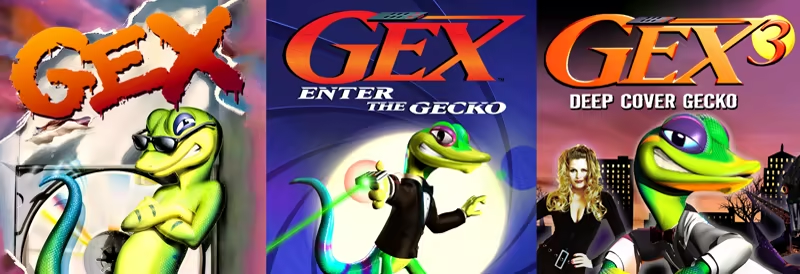

Exploding into the modern era like a pro wrestler from the top rope—it’s GEX! The fast-talking gecko who doesn’t want to sell you insurance! That’s right, the greatest gaming hero of the 1990s has returned for the 2020s through the raw, unbridled power of the Carbon Engine.
GEX Trilogy reproduces all three original games in exacting detail, precisely the way you remember them. Assuming you’ve gone senile and remember them having high-definition native 16:9 widescreen visuals and fully analog controls. Which they didn’t. No, this is the Gex series the way it was meant to be played. The Man didn’t think you were ready back then. He kept this version locked away. But the moment has finally arrived. Down with The Man! Up with Gex! GEX Trilogy is Gex, the next-gen version. The Gex’t-gen version. The Gexiest version of all.
And just like the tightest red carpet attire on Oscar night, the GEX Trilogy is totally stuffed… with tons of bonus features, including a music player featuring every track from each game (even the tunes that are kind of annoying), a massive museum filled with key art, a collection of classic TV commercials for the media-addled idiots in the audience, and an all-new interview with the voice of Gex.
That’s Gould, Jerry, Gould! (Dana Gould, to be precise.)

The classic 2D platformer, originally released for the 3DO console, returns with new features!
- Display options! Optional CRT filters, borders, and screen sizes.
- Rewind and save anywhere.

Gex's first 3D adventure is back for prime-time with a host of notable upgrades:
- Brand new analog controls! Completely rebuilt 360-degree analog controls bring a higher fidelity of control and responsiveness to this classic game. (The original 8-way digital controls are here as an option).
- Enhanced resolution over the original version!
- Native 16:9 widescreen!
- Rewind and save anywhere!

Gex's final 3D adventure is better than ever before:
- Brand new analog controls! Completely rebuilt 360-degree analog controls bring a higher fidelity of control and responsiveness to this classic game. (The original 8-way digital controls are here as an option).
- Enhanced resolution and performance over the original version!
- Native 16:9 widescreen!
- Rewind and save anywhere!
System requirements
WindowsRequires a 64-bit processor and operating system
Common questions
Does GEX Trilogy have Russian language support?
Voice-over: English. Interface and subtitles: English, Spanish, French, German, Italian, Испанский (Латинская Америка).
What is a Steam gift and how is it different from a key?
A gift is a present our bot sends straight to your Steam account via your profile link: no code to enter, the game appears in your library once you accept the gift. A key is an activation code you enter yourself in the Steam client.
Which gift region should I choose?
The one your Steam account is registered in: Steam will not accept a gift from another region. The region is shown in your Steam account settings under "Store country". "CIS countries" means Belarus, Armenia, Georgia and other CIS countries.
How will I receive the gift?
After payment you enter a link to your Steam profile and the bot sends the gift straight to the account — you only need to accept it in Steam. It usually takes 2–5 minutes, around the clock.
What if the account already has this game?
Steam will not let you accept a gift of a game already in your library — check the library before buying. If it happens, write in the order chat: we will refund you.
Countries where the key activates
Key region: —
Similar items
 Sold: 6
RU
Sold: 6
RU
 −48%
RU
−48%
RU
 −39%
RU
−39%
RU
 −50%
RURU
−50%
RURU
 RU
RU
 RU
RU
 RU
RU
 RU
RU
 RU
RU
 RU
RU
 RU
RU
 RU
RU
 RU
RU