
Home · Steam games · Plants vs. Zombies: Battle for Neighborville
Plants vs. Zombies: Battle for Neighborville
How to receive the gift
- Pay for the order and enter a link to your Steam profile on the delivery page (steamcommunity.com/id/… or steamcommunity.com/profiles/…).
- The bot will send the gift to this account.
- Accept the gift in Steam (a notification arrives in the client and by e-mail) — the game will appear in your library.
The gift region must match your Steam account region — otherwise the gift cannot be accepted.
- Developer
- PopCap
- Publisher
- Electronic Arts
- Release date
- 4 Jun, 2020
- Genres
- Action, Casual, Strategy
- Russian language
- Yes, interface and subtitles
- Steam App ID
- 1262240
Game languages
- Russian
- English
- Spanish
- French
- German
- Italian
- Polish
- Japanese
- Korean
- Китайский (упр.)
- Arabic
- Испанский (Латинская Америка)
- Китайский (трад.)
- Portuguese (Brazil)
Languages are listed according to Steam data. Check them before buying: no refund is possible once the game has been sent.
About the game
Welcome to Neighborville, where all is well. Except that a crazy, new, coniferous conflict between brain-less and botanicals is brewing! What are you gonna do, call the crops? Soil your plants? Prepare to kick some grass in a plant-on-zombie conflict that will take you to the outer edges of Neighborville and back again.
KEY FEATURES
- Go All Out in Online Multiplayer - Jump into the fray with up to 24 players in online multiplayer across a gigantic suburban skirmish. Bring the unique abilities of each character class to 6 PvP modes–including the new Battle Arena–and experience the unbeleafable thrills of combat.
- Venture to the Outer Edges of Neighborville - The tension across the terra has expanded with free-roam regions that extend beyond the town of Neighborville. Squad up with up to 3 friends in the Giddy Park social region and take back Weirding Woods, Mount Steep and Neighborville Town Centre. It’s grow time!
- Customize Every Character for Battle - Join the newest bloom in the age-old battle between plants and zombies with 20 fully customizable classes at launch, including a Team Play class for each faction. Deck every character out with ludicrous looks and wacky weapons that show off your unique personality.
NOTE: SPLIT SCREEN COUCH CO-OP NOT AVAILABLE ON PC VERSION.
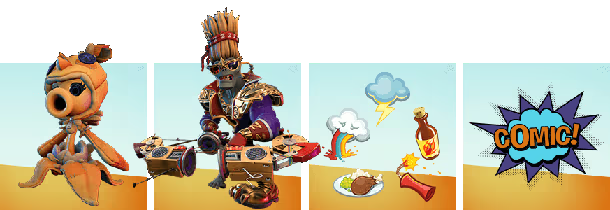
The Deluxe Edition includes the base game and outrageous exclusive content. Rock out with the Judge Z costume for 80s Action Hero, peck your battles with Peashooter’s Chickpea costume, express yourself with 5 explosive emojis, and learn about Battle for Neighborville in a special digital comic.
Deluxe Edition exclusive content includes:
- Plants vs. Zombies: Battle for Neighborville Standard Edition
- Legendary Chickpea costume for Peashooter
- Legendary Judge Z costume for 80s Action Hero
- Digital comic
- 5 emojis
System requirements
WindowsRequires a 64-bit processor and operating system
Common questions
Does Plants vs. Zombies: Battle for Neighborville have Russian language support?
Interface and subtitles: Russian, English, Spanish, French, German, Italian, Polish, Japanese, Korean, Китайский (упр.), Arabic, Испанский (Латинская Америка), Китайский (трад.), Portuguese (Brazil).
What is a Steam gift and how is it different from a key?
A gift is a present our bot sends straight to your Steam account via your profile link: no code to enter, the game appears in your library once you accept the gift. A key is an activation code you enter yourself in the Steam client.
Which gift region should I choose?
The one your Steam account is registered in: Steam will not accept a gift from another region. The region is shown in your Steam account settings under "Store country". "CIS countries" means Belarus, Armenia, Georgia and other CIS countries.
How will I receive the gift?
After payment you enter a link to your Steam profile and the bot sends the gift straight to the account — you only need to accept it in Steam. It usually takes 2–5 minutes, around the clock.
What if the account already has this game?
Steam will not let you accept a gift of a game already in your library — check the library before buying. If it happens, write in the order chat: we will refund you.
Countries where the key activates
Key region: —
Similar items
 −35%
−35%
 −70%
−70%
 RURU
RURU
 −67%
−67%
 RU
RU
 RURU
RURU
 RU
RU
 −89%
−89%
 −75%
−75%
 RU
RU
 RU
RU
 RU
RU
 RU
RU
 RU
RU