


Home · Steam games · Train Valley
Steam·activation key
Train Valley
How to redeem the key
- 1Open Steam and sign in to your account.
- 2In the top menu choose “Games” → “Activate a Product on Steam…”.
- 3Enter the code you received and confirm the activation.
- 4Once activated, the game appears in your library — download it and play.
Before buying, make sure the country of your account is supported by the key region.
Details and languages
- Developer
- Alexey Davydov, Sergey Dvoynikov, Timofey Shargorodskiy, Flazm
- Publisher
- Flazm, META Publishing
- Release date
- 16 Sep 2015
- Genres
- Action, Adventure, Casual, Indie, Simulation, Strategy
- Russian language
- Yes, interface and subtitles
- Steam App ID
- 353640
Voice-over
Interface and subtitles
- Russian
- English
- Spanish
- French
- German
- Italian
- Polish
- Turkish
- Japanese
- Simplified Chinese
- Portuguese (Brazil)
- Romanian
- Czech
No information about supported languages.
Languages are listed as reported by Steam. Please check them before buying: a key cannot be refunded once activated.
Before you buy Train Valley
- Game modes
- Single-player only.
- Scores
- 2,617 reviews on Steam.
- System
- Windows, macOS and Linux.
About the game
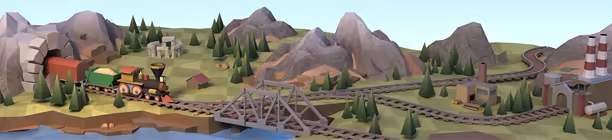
- Build railroads in order to connect cities, tunnels and bridges. New railways are cheap when laid across bare fields, but can be expensive when demolishing forests, villages and other existing structures.
- Manage increasing traffic by constructing, switches, sidings and spurs so that multiple trains can run without delays, at the same time.
- Stay accident-free by precisely controlling trains during crucial moments, using pause for planning (you can build railways and schedule trains while on pause).
- Play through 4 seasons: Europe (1830–1980), America (1840–1960), USSR (1880–1980) and Japan (1900–2020).
- Complete the story mode featuring such real-life events as the Gold Rush of 1849, the construction of the Florida Overseas Railroad, World War II, the Cold War, the launch of the first manned space flight Vostok 1 and more.
- Explore the game in different game modes: in story mode (5-10 minutes), in random mode (15-20 minutes – the level looks and develops differently every time you launch) or in sandbox-like regime (can be turned on for both story and random modes. It allows to play without time and money limits).
- Discover 15 types of trains – from early steam-powered locomotives to modern high-speed trains, driving 18 types of cars – from old-time passenger cars to hoppers and cisterns and to military-use tank and gun platforms.
System requirements
WindowsQuestions and answers
Does Train Valley have Russian language support?
Interface and subtitles: Russian, English, Spanish, French, German, Italian, Polish, Turkish, Japanese, Simplified Chinese, Portuguese (Brazil), Romanian, Czech.
Which regions does the key activate in?
The key activates with no regional restrictions — in any country, on a Steam account from any region. Once activated, the game stays on your account for good.
How soon does the code arrive after payment?
Keys are issued automatically, around the clock: the code appears on the order page within 2–3 minutes.
What to do if the key does not activate?
First check your Steam account region: the key activates in the countries of its own region, and a mismatch is the most common reason activation fails. If the region is right, open “Orders” in the site header, pick the order and write in the chat — you can attach a screenshot of the error, and an operator will help you.
Completed orders only
Customer reviews
There are no reviews of Train Valley yet. The store has 35 reviews of completed orders, 21 of them about Steam products.
Read reviewsSteam · PC
Similar games








Countries where the key activates
Key region: —