


Home · Steam games · Smalland: Survive the Wilds
Steam·activation key
Smalland: Survive the Wilds
How to redeem the key
- 1Open Steam and sign in to your account.
- 2In the top menu choose “Games” → “Activate a Product on Steam…”.
- 3Enter the code you received and confirm the activation.
- 4Once activated, the game appears in your library — download it and play.
Before buying, make sure the country of your account is supported by the key region.
Details and languages
- Developer
- Max Ent Games Ltd
- Publisher
- Max Ent Games Ltd
- Release date
- 15 Feb 2024
- Genres
- Action, Adventure, Indie, RPG
- Russian language
- Yes, interface and subtitles
- Steam App ID
- 768200
Voice-over
Interface and subtitles
- Russian
- English
- Spanish
- French
- German
- Japanese
- Korean
- Simplified Chinese
- Traditional Chinese
- Portuguese (Brazil)
No information about supported languages.
Languages are listed as reported by Steam. Please check them before buying: a key cannot be refunded once activated.
Before you buy Smalland: Survive the Wilds
- Which key
- The “Global” region key: 660 ₽, can be activated in Russia.
- Game modes
- Single-player, co-op online.
- Gamepad
- Full support.
- Scores
- 8,048 reviews on Steam.
About the game
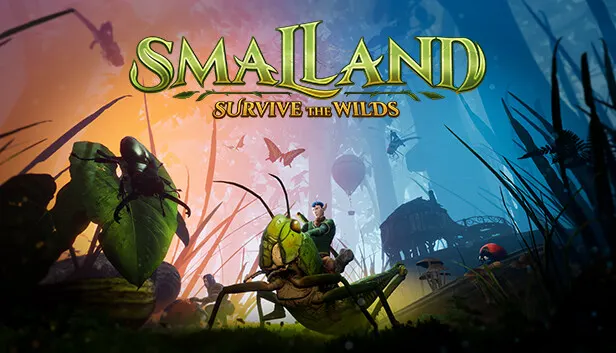
Smalland: Survive the Wilds takes place in a world that once belonged to people until the giants took it over; the giants are now gone, and the Vanguard is sent back out into the wilds on an urgent mission. The hero is a tiny creature, and the open world is shown at that scale, with puddles the size of lakes, trees that reach the sky and road cracks that open into canyons. While travelling through forests, swamps and ancient ruins, the hero meets friends and foes and learns more about this unfamiliar world. Some creatures can be tamed and ridden, so a Damselfly, a Grasshopper or a Spider carries the hero across the surroundings. Survival rests on scavenging and refining resources, raising encampments on the ground or among the trees, and crafting armour sets with different resistances and abilities, including winged armour for gliding and a grappling hook for swinging between trees. Most inhabitants see the hero as lower on the food chain, and shifting weather and seasons make preparation essential. The game can be played alone or in online co-op with up to 10 players, who explore, fight, build and help each other survive.
Description from Steam
Explore the vast “Land of the Small"
Traverse lake sized puddles, scale skyscraper sized trees, scramble through cavernous cracks in roads, as you experience a huge open world from a new perspective. Explore dense forests, hazardous swamps and strange ruins left over from the time before. Uncover lore and knowledge from hidden NPCs scattered throughout the world and learn to survive in this vast wilderness.
Tame and ride creatures
Uncover recipes that will let you tame and ride an array of critters. Leap huge distances on the back of a Grasshopper, zoom around on a Damselfly, scurry from place-to-place on a Spider. This world and its inhabitants are yours to conquer.
Survive together
Play alongside friends with support for up to 10 players in multiplayer. Explore together, fight together, build together and survive the wilds as a team.
Build encampments on the ground or amongst the trees
Scavenge or refine resources to build your encampment with multiple material tiers, from leaves and twigs to sturdy stone. Pick your favourite spot in the world and build, or scale vast trees and claim your own settlement at the top.
Craft powerful armour sets
Collect powerful armours that provide you with resistances and abilities and mix them up to personalise your appearance. Glide through the skies in winged armour, swing from tree to tree with the grappling hook and many more.
Survive the Wilds
Most of the creatures you encounter will see you as lower on the food chain – Ants, Cockroaches, Beetles, Wasps, and Spiders all view you as a potential meal. Weather conditions and seasons are in constant flux so if you want to survive for another day, preparation is key.
System requirements
WindowsRequires a 64-bit processor and operating system
Questions and answers
Does Smalland: Survive the Wilds have Russian language support?
Interface and subtitles: Russian, English, Spanish, French, German, Japanese, Korean, Simplified Chinese, Traditional Chinese, Portuguese (Brazil).
Which regions does the key activate in?
The key activates with no regional restrictions — in any country, on a Steam account from any region. Once activated, the game stays on your account for good.
How soon does the code arrive after payment?
Keys are issued automatically, around the clock: the code appears on the order page within 2–3 minutes.
What to do if the key does not activate?
First check your Steam account region: the key activates in the countries of its own region, and a mismatch is the most common reason activation fails. If the region is right, open “Orders” in the site header, pick the order and write in the chat — you can attach a screenshot of the error, and an operator will help you.
Completed orders only
Customer reviews
There are no reviews of Smalland: Survive the Wilds yet. The store has 35 reviews of completed orders, 21 of them about Steam products.
Read reviewsSteam · PC
Similar games








Countries where the key activates
Key region: —