


Home · Steam games · Expeditions: A MudRunner Game
Steam·gift
Expeditions: A MudRunner Game
How to receive the gift
- 1Pay for the order and enter a link to your Steam profile on the delivery page (steamcommunity.com/id/… or steamcommunity.com/profiles/…).
- 2The bot will send the gift to this account.
- 3Accept the gift in Steam (a notification arrives in the client and by e-mail) — the game will appear in your library.
The gift region must match your Steam account region — otherwise the gift cannot be accepted.
Details and languages
- Developer
- Saber Interactive
- Publisher
- Focus Entertainment
- Release date
- 5 Mar 2024
- Genres
- Adventure, Racing, Simulation
- Russian language
- Yes, interface and subtitles
- Steam App ID
- 2477340
Voice-over
Interface and subtitles
- Russian
- English
- Spanish
- French
- German
- Italian
- Polish
- Japanese
- Korean
- Simplified Chinese
- Traditional Chinese
- Portuguese (Brazil)
- Czech
No information about supported languages.
Languages are listed according to Steam data. Check them before buying: no refund is possible once the game has been sent.
Before you buy Expeditions: A MudRunner Game
- Game modes
- Single-player, co-op online.
- Gamepad
- Full support, including DualSense and DualShock.
- Scores
- 2,986 reviews on Steam.
About the game
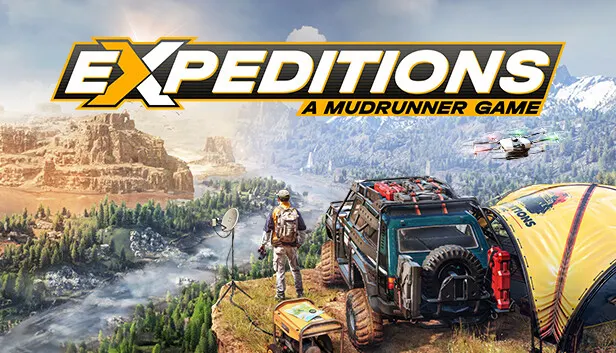
Scientific expeditions in Expeditions: A MudRunner Game take place across the open lands of Arizona and the Carpathians, where treasures and forgotten ruins await discovery. The player drives all-terrain vehicles, uses high-tech tools and manages a camp and crew of specialists. Preparation shapes the outcome: a drone and metal detector are used to scout routes, while profits from expeditions fund expanded home bases, support structures, supplies and new vehicles. Available equipment includes a winch and portable anchors for intricate maneuvers, a jackscrew for righting a flipped vehicle and an echo sounder for probing water depth. In the garage, vehicles are customized among nimbler scout vehicles, off-road machines and large trucks. Missions can be played alone or in online co-op, and archaeological sites, dinosaur fossils and natural curiosities may lead to scientific breakthroughs.
Description from Steam
From Arizona to the Carpathians, chart through expansive open worlds in search of hidden treasures and forgotten ruins. Expeditions: A MudRunner Game is a groundbreaking off-road simulation crafted by Saber Interactive, creators of the critically acclaimed SnowRunner.
Lead research missions as you drive a variety of all-terrain vehicles, using high-tech tools and managing your camp and crew to ensure your success in the wild. Embark on ever-rewarding scientific expeditions as you adapt to nature's challenges. Unravel the mysteries of uncharted lands, whether you're alone behind the wheel of your vehicle, or with fellow travelers in the online co-op mode for up to 4 players.
Expeditions: A MudRunner Game builds on the legacy of Saber Interactive’s off-road simulations with its advanced physics-based gameplay systems, perfectly encapsulating the feel of driving through the wilderness. Whether you’re a long-time player of MudRunner games or a newcomer, you are in for a thrilling scientific adventure.
Success depends on preparation. Plan your missions carefully and hire a team of Specialists to improve your skills in the field. With the drone and metal detector, scout your itinerary and locate points of interest. Invest the profits from each expedition to expand your home bases by building support structures to gain useful supplies and summon new vehicles.
Equip your vehicles with state-of-the-art technologies and cutting-edge gadgets to ensure success in the wild. Use the winch and portable anchors to perform intricate maneuvers, and traverse treacherous rivers with the echo sounder. Choose strategically, as the tools at your disposal can make or break an expedition.
- Winch: Get your vehicle unstuck from the mud or rappel down steep cliffs
- Jackscrew: Turn your vehicle back on its wheels after accidental flips
- Echo sounder: Avoid sinking by probing the depth of the water around your vehicle
- And much more…
Customize your vehicles in the garage, choosing between nimbler scout vehicles, off-road machines or large trucks. Tailor your approach for light and fast exploration or slower, equipment-heavy trucking. Successful expeditions allow you to invest in new accessories, such as storage extensions, spare parts, and measuring tools.
From arid deserts to rugged forests and steep mountains, explore vast, uncharted lands brimming with hidden wonders and forgotten ruins. Archaeological sites, dinosaur fossils and natural curiosities can be found in numbers across Arizona and the Carpathians, and each discovery can be the key to groundbreaking scientific breakthroughs.
System requirements
WindowsRequires a 64-bit processor and operating system
Questions and answers
Does Expeditions: A MudRunner Game have Russian language support?
Interface and subtitles: Russian, English, Spanish, French, German, Italian, Polish, Japanese, Korean, Simplified Chinese, Traditional Chinese, Portuguese (Brazil), Czech.
What is a Steam gift and how is it different from a key?
A gift is a present our bot sends straight to your Steam account via your profile link: no code to enter, the game appears in your library once you accept the gift. A key is an activation code you enter yourself in the Steam client.
Which gift region should I choose?
The one your Steam account is registered in: Steam will not accept a gift from another region. The region is shown in your Steam account settings under "Store country". "CIS countries" means Belarus, Armenia, Georgia and other CIS countries.
How will I receive the gift?
After payment you enter a link to your Steam profile and the bot sends the gift straight to the account — you only need to accept it in Steam. It usually takes 2–5 minutes, around the clock.
What if the account already has this game?
Steam will not let you accept a gift of a game already in your library — check the library before buying. If it happens, write in the order chat: we will refund you.
Completed orders only
Customer reviews
There are no reviews of Expeditions: A MudRunner Game yet. The store has 35 reviews of completed orders, 21 of them about Steam products.
Read reviewsSteam · PC
Similar games















Countries where the key activates
Key region: —