


Home · Steam games · Microsoft Flight Simulator (2020) 40th Anniversary Edition
Steam·gift
Microsoft Flight Simulator (2020) 40th Anniversary Edition
How to receive the gift
- 1Pay for the order and enter a link to your Steam profile on the delivery page (steamcommunity.com/id/… or steamcommunity.com/profiles/…).
- 2The bot will send the gift to this account.
- 3Accept the gift in Steam (a notification arrives in the client and by e-mail) — the game will appear in your library.
The gift region must match your Steam account region — otherwise the gift cannot be accepted.
Details and languages
- Developer
- Asobo Studio
- Publisher
- Xbox Game Studios
- Release date
- 25 Aug 2026
- Genres
- Simulation
- Russian language
- Yes, interface and subtitles
- Steam App ID
- 1250410
Voice-over
- English
- French
- German
- Portuguese (Brazil)
Interface and subtitles
- Russian
- English
- Spanish
- French
- German
- Italian
- Polish
- Japanese
- Dutch
- Norwegian
- Portuguese (Brazil)
- Finnish
- Swedish
No information about supported languages.
Languages are listed according to Steam data. Check them before buying: no refund is possible once the game has been sent.
Before you buy Microsoft Flight Simulator (2020) 40th Anniversary Edition
- Game modes
- Single-player, multiplayer.
- Gamepad
- Full support.
- In-game purchases
- Yes.
- Scores
- 70,003 reviews on Steam.
- Age rating
- 3+
About the game
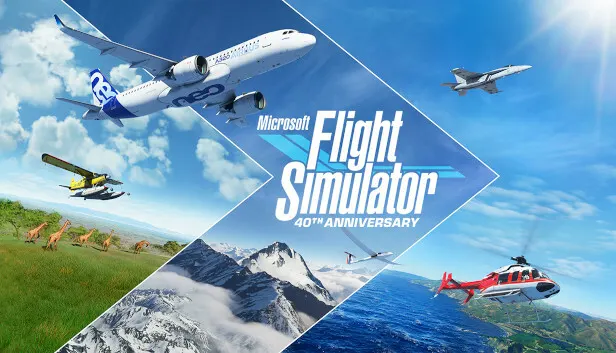
Microsoft Flight Simulator 40th Anniversary Edition is an anniversary edition of the flight simulator by Asobo Studio and Xbox Game Studios that lets players fly across the entire planet. The world is filled with mountains, rivers, roads and huge numbers of buildings and trees, while weather, air traffic and animals change in real time. The aircraft roster covers 37 airplanes, gliders and helicopters, each with its own flight model and faithfully recreated cockpits and instruments. Flying suits different skill levels, since difficulty ranges from fully manual piloting to instrument guidance and checklists. Airfields of several kinds are provided, including handcrafted ones, and the physics model handles more than 1000 control surfaces per aircraft. The edition adds an Airbus A310, helicopters, gliders, historical machines such as the Hughes H-4 Hercules and 24 missions from earlier entries; single-player and multiplayer are both available.
Description from Steam
From light planes to wide body jets to gliders and helicopters, fly highly detailed and accurate aircraft in the Microsoft Flight Simulator 40th Anniversary Edition. The world is at your fingertips.
Microsoft Flight Simulator 40th Anniversary Edition features 37 airplanes, gliders, and helicopters with unique flight models, 25 handcrafted airports, 4 classic commercial airports, 14 heliports and 15 glider airports.
Explore Your World
• Vivid and Detailed Landscapes - Immerse yourself in the vast and beautiful world that is our planet with over 1.5 billion buildings, 2 trillion trees, mountains, roads, rivers and more.
• Living World - The Earth is vibrant and ever-changing and so is the world of Microsoft Flight Simulator, which includes live traffic, real-time weather, and animals.
Earn Your Wings
• Aircraft - Hone your pilot skills in a variety of aircraft from light planes to commercial jets with comprehensive flight models. Every aircraft includes highly detailed and accurate cockpits with realistic instrumentation.
• Checklist System - From pro to beginner, scale your level from full manual to full assist with interactive and highlighted instrument guidance and checklist.
Test Your Skill
• Live Weather -The weather engine enables users to switch on the live weather mode to experience real-time weather including accurate wind speed and direction, temperature, humidity, rain and more.
• Day and Night Engine - Experience flight at any time of day or year allowing for night VFR, visual flight rules, navigation.
• Aerodynamic Modeling - A state-of-the-art physics engine with over 1000 control surfaces per plane allows for a truly realistic experience.
Microsoft Flight Simulator has fulfilled the aspirations of aviators worldwide for 40 years. Celebrate the award-winning franchise with the 40th Anniversary Edition, loaded with all-new features, aircraft and content that span the history of aviation.
The 40th Anniversary Edition update introduces:
• 1 true-to-life Airbus A310 Airliner
• 2 helicopters and 14 heliports
• 2 gliders and 15 glider airports
• 7 famous historical aircraft including the Hughes H-4 Hercules (aka the Spruce Goose)
• 4 classic commercial airports
• 24 classic missions from the franchise’s past
The Deluxe Edition includes everything from the Standard Edition plus 5 additional highly accurate planes with unique flight models and 5 additional handcrafted international airports.
Deluxe Additional Aircraft
• Diamond Aircraft DA40-TDI
• Diamond Aircraft DV20
• Textron Aviation Beechcraft Baron G58
• Textron Aviation Cessna 152 Aerobat
• Textron Aviation Cessna 172 Skyhawk
Deluxe Additional Handcrafted Airports
• Amsterdam Airport Schiphol (Netherlands)
• Cairo International Airport (Egypt)
• Cape Town International Airport (South Africa)
• O’Hare International Airport (USA)
• Adolfo Suárez Madrid–Barajas Airport (Spain)
The Premium Deluxe Edition includes everything from the Deluxe Edition plus 5 additional highly accurate planes with unique flight models and 5 additional handcrafted international airports.
Premium Deluxe Additional Aircraft
• Boeing 787-10 Dreamliner
• Cirrus Aircraft SR22
• Pipistrel Virus SW 121
• Textron Aviation Cessna Citation Longitude
• Zlin Aviation Shock Ultra
Premium Deluxe Additional Airports
• Denver International Airport (USA)
• Dubai International Airport (United Arab Emirates)
• Frankfurt Airport (Germany)
• Heathrow Airport (United Kingdom)
• San Francisco International Airport (USA)
System requirements
WindowsRequires a 64-bit processor and operating system
Questions and answers
Does Microsoft Flight Simulator (2020) 40th Anniversary Edition have Russian language support?
Voice-over: English, French, German, Portuguese (Brazil). Interface and subtitles: Russian, English, Spanish, French, German, Italian, Polish, Japanese, Dutch, Norwegian, Portuguese (Brazil), Finnish, Swedish.
What is a Steam gift and how is it different from a key?
A gift is a present our bot sends straight to your Steam account via your profile link: no code to enter, the game appears in your library once you accept the gift. A key is an activation code you enter yourself in the Steam client.
Which gift region should I choose?
The one your Steam account is registered in: Steam will not accept a gift from another region. The region is shown in your Steam account settings under "Store country". "CIS countries" means Belarus, Armenia, Georgia and other CIS countries.
How will I receive the gift?
After payment you enter a link to your Steam profile and the bot sends the gift straight to the account — you only need to accept it in Steam. It usually takes 2–5 minutes, around the clock.
What if the account already has this game?
Steam will not let you accept a gift of a game already in your library — check the library before buying. If it happens, write in the order chat: we will refund you.
Completed orders only
Customer reviews
There are no reviews of Microsoft Flight Simulator (2020) 40th Anniversary Edition yet. The store has 35 reviews of completed orders, 21 of them about Steam products.
Read reviewsSteam · PC
Similar games








Countries where the key activates
Key region: —