You can buy Robux from Russia in four ways: with a Roblox gift card or code, in the iPhone app from an Apple Account balance, through a seller who delivers Robux by game pass, group payout or a login to your account, or with a foreign bank card on the Roblox website. The first way is the safest. You pay an intermediary in rubles, enter the code on the Roblox site yourself and share your password with nobody. The Robux or credit land on your account as soon as Roblox accepts the code.
Paying with a Russian card directly does not work: Roblox has not accepted cards from Russian banks since 2022. Google stopped its payment system in Google Play for Russian users on 10 March 2022, and since 1 April 2026 Russian Apple accounts can no longer pay for digital purchases from a phone bill.
The platform itself is back. Roskomnadzor blocked access to Roblox on 3 December 2025, and on 10 June 2026 the Ministry of Digital Development announced that the company had met the legal requirements and the service was available. Payments did not come back with it. Many older instructions are out of date too: Roblox stopped selling the Premium subscription on 30 April 2026 and replaced it with Roblox Plus.
A Roblox gift card or code
This is the simplest route and the calmest one for your account. You pay an intermediary in rubles, get a code by email or on the order page, and enter it on the Roblox site yourself. Your login, password and verification codes stay with you. Roblox's community rules list buying Robux through third-party services as a violation, but gift cards are a direct exception.
A Robux code or a card with credit
There are two kinds of codes, and people mix them up. A Robux code adds a fixed number of Robux to your balance: enter a code for 800 Robux and you get exactly 800. A gift card with an amount in a currency, such as dollars or euros, gives you Roblox credit rather than Robux. You then spend the credit on a Robux pack or on Roblox Plus for 3, 6 or 12 months, and you buy items with Robux as usual.
Credit has an upside. According to Roblox itself, it gets you up to 25% more Robux than buying on other platforms, such as app stores. The one inconvenience is an extra step after you enter the code: choosing a pack. You do not have to hurry, because Roblox gift cards have no expiry date.
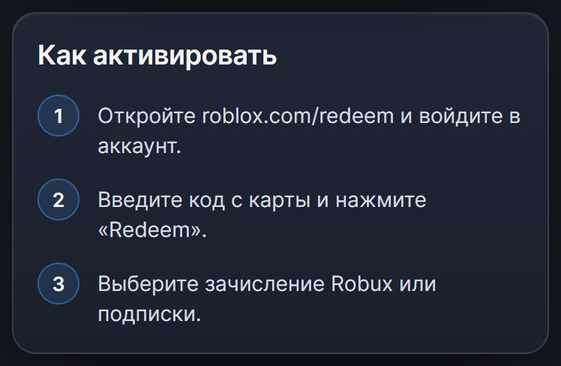
How to redeem a code
- Open the Roblox site in a browser and sign in to the account you want to top up. Check the profile name first, because a code can be redeemed only once.
- Go to the code redemption page and enter the code. You cannot redeem a code in the regular mobile app or on consoles. Roblox makes an exception only for the app on Samsung devices.
- Click "Redeem". A Robux code tops up your balance at once. If you got credit, click Get Robux and choose a pack, or pay for Roblox Plus with the credit.
If you have several codes, enter them one at a time. You cannot split one card between two accounts: it is redeemed for its full amount.
Code region
Roblox's rules have changed here. The official Roblox gift card page now says you can redeem a card in any currency on any account, and the platform converts the amount into the account's currency. In 2023, though, the company warned owners of accounts outside the US that it would accept only cards in the currency of the account's country. That is why sellers still ask you to match the code's region to your account's region, and it is not worth arguing with.
Global Robux codes raise the fewest questions: they are meant for an account in any country.
The downsides are the usual ones for intermediaries. A markup is added to the face value, and the denominations are fixed, so you cannot make the amount match the exact price of an item. Who it suits: almost everyone, and for a child or a friend a code is the easiest way to give Robux as a gift.
Buying in the iPhone app
In the mobile app, an app store sells the Robux and the payment goes through it. On Android with a Russian Google Play account this will not work: since March 2022, in-app purchases by users in Russia are declined with an error.
On an iPhone you pay for Robux from your Apple Account balance. The Roblox app has not been removed from the Russian App Store, and in-app purchases paid from an Apple Account balance still go through in Russia. Since Russian accounts no longer pay from a phone bill, you top up the balance with App Store gift codes. The country of the code must match the country of your Apple Account, so for a Russian account you take ruble App Store codes. Which Robux packs are available to your account, and at what price, is visible only inside the app. Before you buy a code, open the Robux purchase section in Roblox and make sure the pack you want is there.
The convenience is that the purchase happens in an app you already use and you do not need a browser. There are two downsides. The markup on the App Store code stacks on top of the app store's Robux price. And you get fewer Robux for the same money than you would with credit from a Roblox gift card.
Who it suits: people who play only on an iPhone and already keep money on their Apple balance.
Delivery by a seller: game pass, group, account login
On marketplaces, Robux are also sold without codes: the seller delivers them to your account himself. There are three delivery methods, and the method decides both the wait and the risk.
- Game pass. You create a paid pass for free in the creator section, set the price the seller names and send him the link. The seller buys the pass, and you receive 70% of its price while Roblox keeps the rest. Roblox holds the revenue from sales for review for three to seven days, so the Robux do not arrive right away.
- Group payout. You join the seller's group and wait about two weeks until he can transfer Robux to you from the group's funds.
- Account login. You give the seller your login, password and verification code, and he signs in and pays for the Robux with his foreign card. It is fast, but a stranger has been inside your account, so you will have to change the password after the order.
One more option appeared in spring 2026. Roblox Plus subscribers can transfer Robux to other players without a fee, and the recipient does not need a subscription. That works well for a gift from a friend, but if a stranger transfers Robux to you for money, it is the same purchase through a third-party service.
The main downside of all these schemes is written into Roblox's rules. Buying, selling and exchanging Robux through third-party services is listed there among the violations for which measures can be taken against the account, and the only exception is for gift cards. The rules allow group payouts only as payment for joint work on games.
Who it suits: people who are ready to wait and take this risk knowingly. For a child's account, a code is the calmer choice.
A foreign bank card
On the Roblox site you can pay with a bank card or through PayPal, but cards from Russian banks, "Mir" included, are declined. If you already hold a card from a bank in another country, you can buy Robux right on the site, at Roblox's own prices and with no intermediary.
Opening such a card just for Robux usually does not pay off. Banks in neighboring countries, Kazakhstan for example, are stricter about issuing cards to non-residents, and getting and funding a card costs time and fees. It makes sense only if the foreign card will be useful to you for other purchases as well.
Roblox Plus: if you need Robux every month
Roblox Plus does not grant Robux by itself. It gives a discount on items in games and for your avatar: 10% in the first two months and 20% from the third. The subscription includes free private servers and fee-free Robux transfers, and for players under 16 the transfers are approved by parents.
Monthly Robux come only with the subscription tiers that have a number in the name, from Plus 500 to Plus 2000. You can pay for a 3, 6 or 12 month subscription with credit from a Roblox gift card, so from Russia you get it the same way as Robux. If you bought Premium earlier, the subscription keeps working, but it no longer gives the 10% bonus on Robux purchases. Who it suits: people who spend Robux all the time.
Which method suits whom
For most buyers in Russia, a code is the easiest way to get Robux, and the other methods help in particular cases.
| Method | What you need | How long it takes | Main downside |
|---|---|---|---|
| Gift card or code | A code and a browser | Minutes after payment | Markup on the face value, fixed denominations |
| Buying on an iPhone | An Apple Account balance | Right after purchase | Fewer Robux for the same money |
| Game pass or group | Your own pass or time in a group | From a few days to two weeks | Against Roblox rules |
| Seller with login | Login, password, verification code | From a few minutes | A stranger in your account |
| Foreign bank card | A card from a bank in another country | Right after payment | Such a card is hard to get |
Where to buy Robux safely: what to check with an intermediary
Plenty of Roblox codes are on sale, and sellers differ in more than price. Check five things before you pay.
- What exactly is being sold. The description should make clear what arrives: a Robux code, a gift card with credit or a delivery through a game pass. If a seller promises Robux "by username", ask how they will arrive: game pass and group delivery mean days of waiting, and any such delivery, unlike a code, goes against Roblox rules.
- Region. Take a global code or a code for your account's country, and check this before you pay. A redeemed code cannot be returned.
- Price for the same number of Robux. Sellers' denominations differ, so compare how many Robux you get for your money.
- How the code is delivered. Automatic delivery works around the clock. If the seller sends the code by hand, an order paid at night may wait until morning.
- Password. A code does not need one. A seller who asks for a login, password or verification code for a code is selling something else.
How these points look on our service
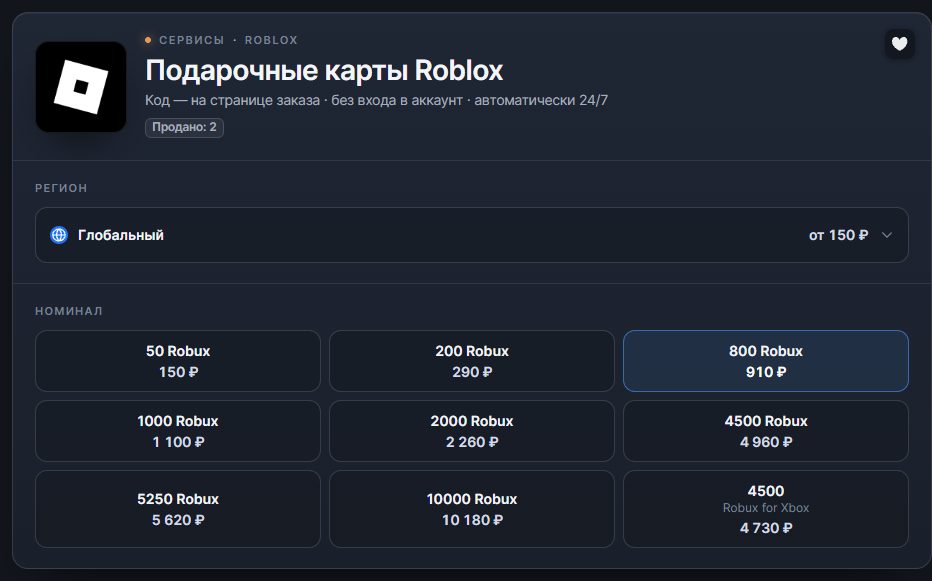
Our Roblox gift card page has codes of both kinds. Global codes for a fixed number of Robux fit an account in any country. For Russian accounts there are separate Robux codes, and for other countries there are gift cards in their currency. The same number of Robux costs a different price in different regions, so compare the price before you pay.
- The code is issued automatically. After payment the code appears on the order page, and the order details arrive by email. Delivery is automatic and runs around the clock. It usually takes a couple of minutes, though delays happen now and then.
- No password needed. We never ask for your Roblox login or password: you redeem the code yourself. Until it is entered, you can forward it as a gift.
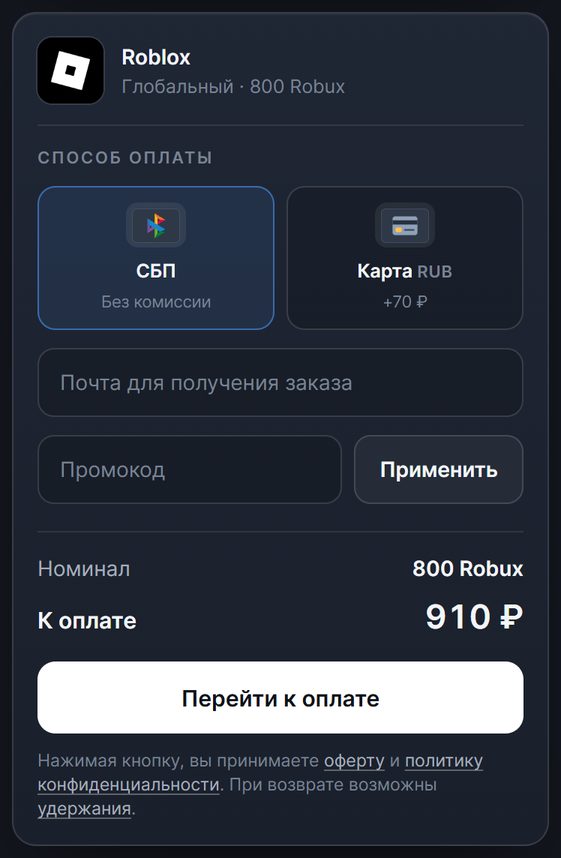
- The total is visible before payment. For example, at the time of writing a global code for 800 Robux costs 910 ₽ through SBP with no fee, and paying by card comes to 70 ₽ more. The smallest code costs 150 ₽.
- If the code did not work. First check the region of the code against the account. If that does not help, write in the order chat. Until the code is issued, the money can be refunded. A claim about an issued code that does not work is also reviewed, but if it did not fit the account's region, a refund may be refused. The terms are in the refund policy.