There are five ways to buy Telegram Premium in Russia: the official @PremiumBot, an in-app purchase through the App Store, a foreign bank card, a gift from another person, and a service that activates the subscription by @username and takes payment in rubles. The bot does not accept Russian cards, so without a foreign card the last option is the simplest. You give the service your username, pay through SBP or by card, and Premium usually shows up on your account within a few minutes, with no password and no SMS code.
The choice comes down to payment, not to the subscription itself. Russian bank cards have not worked in the App Store or Google Play since 2022, and on 1 April 2026 mobile carriers, at the request of Russia's Ministry of Digital Development, stopped topping up Apple ID balances from a phone account. The day before, Telegram sent users in Russia a warning that buying Premium in their region might soon become technically impossible. The messenger itself has run under Roskomnadzor restrictions in Russia since February 2026, but the subscription is still there on accounts. Paying for it is the only hard part.
The official @PremiumBot
The bot is Telegram's own payment method, with no app stores in between. You can take a monthly or yearly plan in it, and sometimes it offers two years at once. The subscription renews by itself until you send the bot the /stop command. Premium costs less through the bot than in the App Store or Google Play, because Apple and Google take no commission on this payment.
There are two limits. The first is the app. The bot accepts payment in the Android version of Telegram downloaded from Telegram's website and in the desktop apps. If Telegram came from an app store, you can't pay in the bot. The subscription covers the whole account, so if you pay on a computer, Premium appears on your phone too.
The second is paying from Russia. The bot currently does not accept Russian cards or SBP: the payment is declined before confirmation. Trying again and again is pointless, and a run of declines can make your bank suspicious. In the bot you can pay for Premium only with a card from a foreign bank.
The price in the bot depends on your country. The first payment is priced by the country code of your phone number, and later ones by the country of the bank that issued your card.
Best for: anyone whose payment in the bot goes through. If you own an iPhone, Telegram on a computer is enough to pay in the bot.
The App Store on iPhone and Google Play on Android
On iPhone you turn Premium on in Telegram's settings, in the Telegram Premium section, and the money is taken from your Apple ID balance. A bank card from Russia won't help here, and since April 2026 you can't top up an Apple ID from a phone balance either: all four major carriers switched that payment off. One route is left, an App Store gift card from the same country as your Apple ID. Codes for Russian and foreign Apple IDs are in the Apple gift cards section.
The downsides: Premium costs more in the App Store than in the bot, because Apple's commission is built into the price, and one Apple ID can pay for Premium on only one Telegram account. The upside is auto-renewal, which keeps working as long as the balance covers it. You can cancel in iPhone Settings by tapping your name and opening Subscriptions.
On Android the built-in purchase goes through Google Play, and Google Play has not processed payments in Russia since March 2022. Android owners are left with the bot in the version of Telegram from the official website, plus the options below.
Best for: iPhone owners who want auto-renewal and are happy to keep money on their Apple ID balance.
A foreign card
Both the bot and the app stores accept a card from a foreign bank. With one, Premium works like any ordinary subscription and renews itself, and in the bot the price from the second payment on is calculated in the currency of the country where the card was issued.
The downsides: you have to get the card somewhere first, and the final amount moves with the exchange rate and your bank's conversion fee. The bot gives the local price only if the card comes from a local bank and has a local billing address. In app stores, the card's country also has to match the country of the Apple ID or Google account.
Best for: people who already have such a card. Reviewers usually advise against getting one just for a single subscription, since the hassle outweighs the savings.
A gift from another person, and paying with Stars
You can receive Premium as a gift. The giver opens your profile, taps ⋮ (⋯ on iPhone) and "Send a Gift", picks a term and pays. The options are three, six or twelve months, and one month is not available. The subscription appears on the recipient's account on its own, with nothing to activate. Telegram prices gifts at one global rate, so they can be sent between any two countries.
Since March 2025 a gifted Premium can be paid for entirely with Telegram Stars. A popular scheme is built on that: people buy Stars for rubles and gift Premium with them. There is one catch: Telegram doesn't let you gift Premium to yourself, so the recipient has to be a different account. That's why people do it for each other or ask relatives. You can also buy Stars for such a gift by @username, without paying inside Telegram, for example on the Telegram Stars page.
Channels also give Premium away: a channel owner can run a giveaway of subscriptions among their followers. A gift has no auto-renewal, so when the term ends you have to pay for the subscription again.
Best for: anyone who has someone to ask, and anyone who gives Premium to others.
Fragment: official, but not for buyers in Russia
Fragment is a marketplace where Telegram usernames, Stars, ads and Premium are sold for cryptocurrency. Premium there comes for three, six or twelve months, for you or for someone else by username. Fragment does not accept bank cards, only cryptocurrency.
Since September 1, 2026, a Russian law has banned paying for goods and services in cryptocurrency, apart from a few narrow exceptions. For a buyer in Russia this route is therefore closed.
A service that activates Premium by @username
Such a service sets up the subscription on your account by username, and you pay it in rubles on its website. You don't need a password, an SMS code or a login to your account. The device doesn't matter either: Premium works the same on iPhone and Android.
The upsides: payment by SBP or with a Russian bank card, a total you can see in advance, and a subscription that usually arrives within a few minutes.
The downsides: there is no auto-renewal, so when the term ends you have to place the order again. A new subscription usually can't be added on top of an active one, so the current one has to run out first. The service charges a markup for its work. And a typo in the username sends Premium to someone else, with no way to take it back.
Best for: people whose payment in the bot fails and who have no foreign card.
Where to find your @username
The service needs the username of your personal account: not your phone number, and not the name people see in a chat. You set it and see it in Telegram's settings, in the Username field. If the field is empty, you can create a username: 5 to 32 characters, Latin letters, digits and underscores, not case-sensitive. After the purchase you can remove the username by saving an empty field, and the subscription stays, because it is tied to the account.
Which option suits whom
If you have a card from a foreign bank, the bot is the simplest place to buy Telegram Premium: it is the official subscription with no middleman's markup. If you don't, the choice depends on what you already have: an iPhone with an Apple ID balance, or just a username.
| Option | What you need | Auto-renewal | Main downside |
|---|---|---|---|
| @PremiumBot | Telegram from the website or for desktop, and a payment method the bot accepts | Yes | Russian cards and SBP are not accepted |
| App Store | An iPhone and an Apple ID balance topped up with a gift card | Yes | Costs more than the bot because of Apple's commission |
| Foreign card | A card from a foreign bank | Yes | You have to get the card somewhere |
| Gift, including one paid with Stars | Another person who gifts it | No | You can't gift Premium to yourself with Stars |
| Fragment | Cryptocurrency only | No | Closed to buyers in Russia by law |
| Service by @username | A username, payment by SBP or card | No | Markup, can't be added on top of an active subscription |
How long to buy Premium for, and what happens afterward
Only the bot, the App Store and a foreign card let you pay month by month, as a subscription. Gifts and username services usually offer terms of three, six and twelve months, with no single month among them. The longer the term, the cheaper each month, so a year pays off if you already know you need the subscription. Three months is enough for a trial.
When the term ends, nothing is deleted, but the extras switch off. The first 10 folders keep working, the first 5 chats stay pinned, only the first 70 characters of your profile bio show, GIFs beyond 200 are hidden, and you can't join new channels beyond the free limit. Files download at the normal speed again, and the Premium badge disappears. Your full bio comes back when you subscribe again.
You can't move Premium to another account. If you change your phone number, though, the subscription stays where it is.
What to look at when choosing a username service
There are many services that activate Premium by username. Before you pay, check five things.
- The total in rubles. Compare the amount due for the term you need with your chosen payment method, not the price in the ad.
- A check before payment. Some services find out before you pay whether the account exists and whether Premium is already active on it. Others leave it to the buyer to make sure.
- Who fills the order. See whether the subscription is activated automatically and around the clock, and during which hours support answers if something goes wrong.
- What happens on a mistake. Find out the refund terms for the case where Premium can't be activated before you pay. A subscription that has already reached an account, even the wrong one, can't be cancelled.
- The password. A username is all an order needs. Close any site that asks for a password or a login code.
How these points look on our site
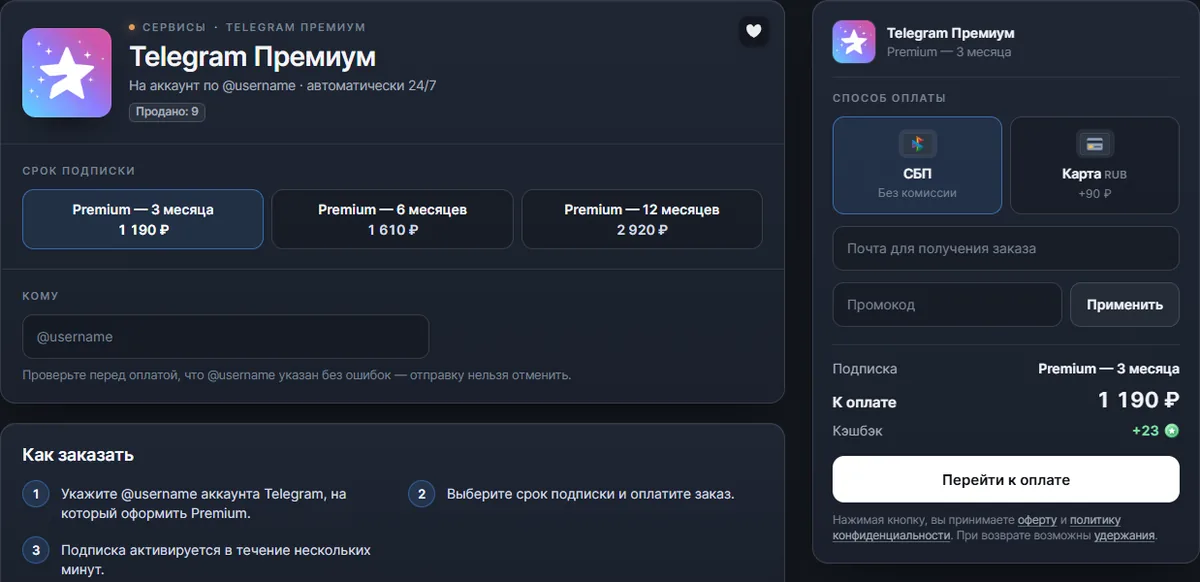
On our Telegram Premium page, at the time of writing, the same points work out like this.
- The total is visible before payment. A 3-month subscription costs 1,190 ₽, 6 months cost 1,610 ₽, and 12 months cost 2,920 ₽ when you pay by SBP. Paying by card comes out higher, by 90 ₽ for three months.
- A check before payment. When you enter the @username, the page looks the account up and usually shows its name, so it's easy to notice if the subscription is about to go to the wrong person. If the account isn't found (a channel or bot name won't work) or Premium is already active on it, the page says so, and you can't pay for the order.
- Delivery. Premium is activated automatically and around the clock, usually within a couple of minutes. You don't need a password, a code or a Telegram login, and you don't need to register on the site either: an email address for the order details is enough. If something goes wrong, an order chat opens after payment, and operators reply 10:00–20:00 MSK.
- A gift for a friend. The @username of any personal account without active Premium will do. There is no auto-renewal: when the term ends, you need a new order.
- Refunds. Until Premium is activated, the money can be returned: in full if the cause is on our side, and minus costs if it is on yours. An activated subscription can't be cancelled. The terms are in the refund policy.