


Home · Steam games · Aces of Thunder
Steam·gift
Aces of Thunder
How to receive the gift
- 1Pay for the order and enter a link to your Steam profile on the delivery page (steamcommunity.com/id/… or steamcommunity.com/profiles/…).
- 2The bot will send the gift to this account.
- 3Accept the gift in Steam (a notification arrives in the client and by e-mail) — the game will appear in your library.
The gift region must match your Steam account region — otherwise the gift cannot be accepted.
Details and languages
- Developer
- Gaijin Entertainment
- Publisher
- Gaijin Network Ltd
- Release date
- 3 Feb 2026
- Genres
- Action, Simulation
- Russian language
- Yes, interface and subtitles
- Steam App ID
- 2754090
Voice-over
Interface and subtitles
- Russian
- English
- Spanish
- French
- German
- Portuguese
- Italian
- Polish
- Japanese
- Korean
- Simplified Chinese
- Hungarian
- Portuguese (Brazil)
No information about supported languages.
Languages are listed according to Steam data. Check them before buying: no refund is possible once the game has been sent.
Before you buy Aces of Thunder
- Game modes
- Single-player, PvP online.
- Gamepad
- Partial support.
- Scores
- 1,150 reviews on Steam.
About the game
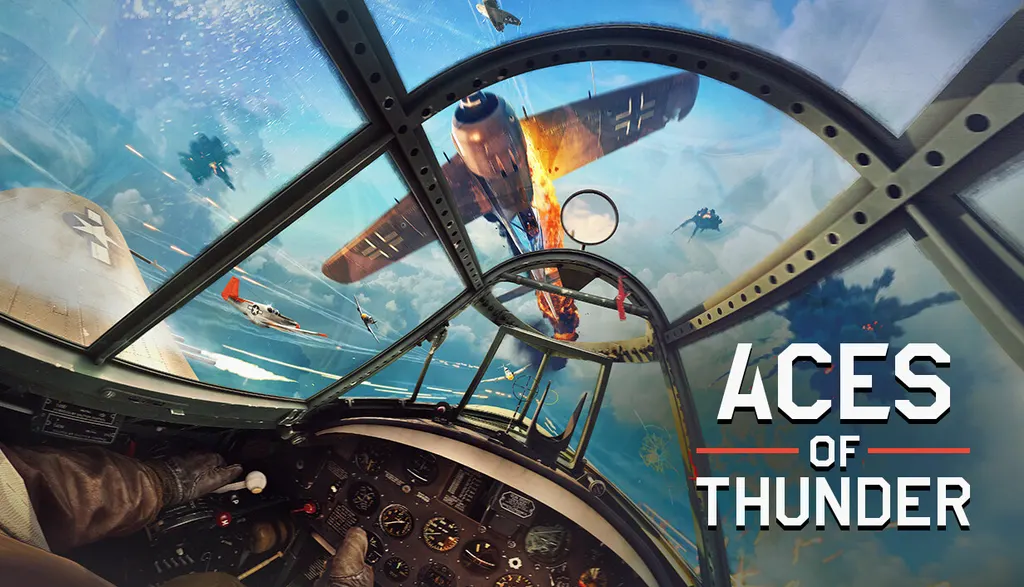
Aces of Thunder is a flight simulation game from Gaijin Entertainment built primarily for modern VR headsets, with a flat-screen mode also available on PC. Its flight and damage models are derived from War Thunder, and combat takes place exclusively from the cockpit view. The game includes over 20 aircraft of World War II, among them the P-51 Mustang, Bf.109, Il-2, Spitfire and A6M3 Zero, as well as Great War machines such as the Fokker Dr.I and SPAD S.XIII. Battles unfold across 15 maps covering the Western and Eastern Fronts, the Pacific and World War I frontlines. Single-player missions and online multiplayer are supported, with control via VR controllers, HOTAS or gamepad, and a hangar for inspecting aircraft between missions. The release is scheduled for 2026.
Description from Steam
Experience the thrill of aerial combat with Aces of Thunder, the ultimate flight simulation game with high fidelity graphics that looks perfect both with and without VR HMDs.
The game's physically accurate flight and damage models derived from the popular War Thunder military action game ensure a high level of realism. The battles take place exclusively from the cockpit view to provide ultimate immersion and fully supports HOTAS controls. Aces of Thunder features a set of the most legendary WW1 & WW2 aircraft available to hop in and fly right upon purchase.
Perfect selection of WW2 aircraft
Fly 20+ carefully recreated iconic aircraft of World War II, such as the American P-51 Mustang and P-63 Kingcobra, the German Bf 109 and Fw 190, the Soviet Il-2 and Yak-9T, the British Spitfire and the Japanese A6M3 Zero.
A rare chance to fly Great War machines
Iconic fighters like the Fokker Dr.I, famously flown by the Red Baron himself, or the SPAD S.XIII, the favorite aircraft of René Fonck, Allies’ most decorated ace, will have authentically detailed cockpits and historically accurate weaponry.
All key theaters of war
Aces of Thunder battles will see you fighting across the world and getting a better idea of where the fate of war was decided. Visit 15 beautiful maps representing three key theaters of World War II: Western, Eastern and Pacific Fronts, as well as signature World War I frontlines.
Intense dogfighting
Fight online against the best virtual pilots from all over the world in multiplayer mode, or master your aircraft in exciting single player missions.
Full immersion
Jump right into one of the highly detailed interactive cockpits, literally controlling the aircraft with your own hands! Aces of Thunder will also allow you to walk around the hangar between missions to get a closer look at your favorite aircraft.
Made specifically for VR
Thanks to native use of OpenXR, a wide range of VR devices is supported. Put on your HMD, take your VR controllers and grab virtual HOTAS (or use your hardware sim rig or gamepad) and join the fight!
System requirements
WindowsRequires a 64-bit processor and operating system
Questions and answers
Does Aces of Thunder have Russian language support?
Interface and subtitles: Russian, English, Spanish, French, German, Portuguese, Italian, Polish, Japanese, Korean, Simplified Chinese, Hungarian, Portuguese (Brazil).
What is a Steam gift and how is it different from a key?
A gift is a present our bot sends straight to your Steam account via your profile link: no code to enter, the game appears in your library once you accept the gift. A key is an activation code you enter yourself in the Steam client.
Which gift region should I choose?
The one your Steam account is registered in: Steam will not accept a gift from another region. The region is shown in your Steam account settings under "Store country". "CIS countries" means Belarus, Armenia, Georgia and other CIS countries.
How will I receive the gift?
After payment you enter a link to your Steam profile and the bot sends the gift straight to the account — you only need to accept it in Steam. It usually takes 2–5 minutes, around the clock.
What if the account already has this game?
Steam will not let you accept a gift of a game already in your library — check the library before buying. If it happens, write in the order chat: we will refund you.
Completed orders only
Customer reviews
There are no reviews of Aces of Thunder yet. The store has 35 reviews of completed orders, 21 of them about Steam products.
Read reviewsSteam · PC
Similar games




Countries where the key activates
Key region: —