


Home · Steam games · Onimusha 2: Samurai's Destiny
Steam·activation key
Onimusha 2: Samurai's Destiny
How to redeem the key
- 1Open Steam and sign in to your account.
- 2In the top menu choose “Games” → “Activate a Product on Steam…”.
- 3Enter the code you received and confirm the activation.
- 4Once activated, the game appears in your library — download it and play.
Before buying, make sure the country of your account is supported by the key region.
Details and languages
- Developer
- CAPCOM Co., Ltd.
- Publisher
- CAPCOM Co., Ltd.
- Release date
- 22 May 2025
- Genres
- Action
- Russian language
- Yes, interface and subtitles
- Steam App ID
- 3046600
Voice-over
- English
- Japanese
Interface and subtitles
- Russian
- English
- Spanish
- French
- German
- Italian
- Polish
- Japanese
- Korean
- Simplified Chinese
- Arabic
- Spanish (Latin America)
- Traditional Chinese
- Portuguese (Brazil)
No information about supported languages.
Languages are listed as reported by Steam. Please check them before buying: a key cannot be refunded once activated.
Before you buy Onimusha 2: Samurai's Destiny
- Which key
- The “CIS” region key: 870 ₽, can be activated in Russia.
- Game modes
- Single-player only.
- Gamepad
- Full support.
- Scores
- 645 reviews on Steam.
- Age rating
- 16+
About the game
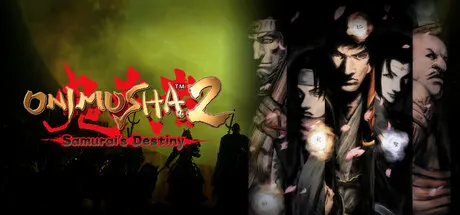
This re-release of Onimusha 2: Samurai's Destiny follows Jubei Yagyu through feudal Japan, where allies accompany him on his way. The game comes with HD graphics and reworked controls that make sword counterattacks easier to pull off during fights. It adds a Gallery mode with over 100 sketches by Keita Amemiya and a selection of all 43 tracks from the original soundtrack. Auto-save and quick weapon switching make play smoother, three mini games are unlocked from the start, and a Hell mode difficulty is available as well. The script has been adapted for additional languages, and the game is single-player only.
Description from Steam
Reclaim your destiny.
Onimusha 2: Samurai's Destiny returns with HD graphics and improved controls on the original game's intense swordplay and dramatic revenge story. Play as Jubei Yagyu and make your way through feudal Japan with your allies. This game has additional language support adapted from the original script.
Additional features include:
- New Gallery mode where you can view over 100 sketches by the game's character designer, Keita Amemiya.
- New digital soundtrack selection with all 43 tracks from the original soundtrack of Onimusha 2: Samurai's Destiny.
- Hell mode difficulty (game over after taking one strike).
- The Man in Black, Team Oni, and Puzzle Phantom Realm mini games will be available to play at the very beginning.
- Auto-save feature and easy weapon switch for improved playability.
You can also get a special outfit for Jubei if you have Onimusha: Warlords on Steam. To switch Jubei's outfit select Special Features → Jubei's Outfit and select between Normal and Special from the title-screen menu. This will only alter the appearance. Your status will be the same as the armour you equip in-game.
System requirements
WindowsRequires a 64-bit processor and operating system
Questions and answers
Does Onimusha 2: Samurai's Destiny have Russian language support?
Voice-over: English, Japanese. Interface and subtitles: Russian, English, Spanish, French, German, Italian, Polish, Japanese, Korean, Simplified Chinese, Arabic, Spanish (Latin America), Traditional Chinese, Portuguese (Brazil).
Which regions does the key activate in?
Pick the region that matches your Steam account region — otherwise the code may not activate. Activation countries by region:
CIS — Russia, Ukr. UA, Kazakhstan, Belarus, Armenia and 6 more countries.
Once activated, the game stays on your account for good.
How soon does the code arrive after payment?
Keys are issued automatically, around the clock: the code appears on the order page within 2–3 minutes.
What to do if the key does not activate?
First check your Steam account region: the key activates in the countries of its own region, and a mismatch is the most common reason activation fails. If the region is right, open “Orders” in the site header, pick the order and write in the chat — you can attach a screenshot of the error, and an operator will help you.
Completed orders only
Customer reviews
There are no reviews of Onimusha 2: Samurai's Destiny yet. The store has 35 reviews of completed orders, 21 of them about Steam products.
Read reviewsSteam · PC
Similar games








Countries where the key activates
Key region: —