


Home · Steam games · The Medium
Steam·activation key
The Medium
How to redeem the key
- 1Open Steam and sign in to your account.
- 2In the top menu choose “Games” → “Activate a Product on Steam…”.
- 3Enter the code you received and confirm the activation.
- 4Once activated, the game appears in your library — download it and play.
Before buying, make sure the country of your account is supported by the key region.
Details and languages
- Developer
- Bloober Team
- Publisher
- Bloober Team SA, NA PUBLISHING INC.
- Release date
- 28 Jan 2021
- Genres
- Adventure
- Russian language
- Yes, interface and subtitles
- Steam App ID
- 1293160
Voice-over
- English
Interface and subtitles
- Russian
- English
- Spanish
- French
- German
- Italian
- Polish
- Japanese
- Simplified Chinese
- Portuguese (Brazil)
No information about supported languages.
Languages are listed as reported by Steam. Please check them before buying: a key cannot be refunded once activated.
Before you buy The Medium
- Game modes
- Single-player only.
- Gamepad
- Full support.
- Scores
- 7,441 reviews on Steam.
- Age rating
- 18+
- System
- Windows and macOS.
About the game
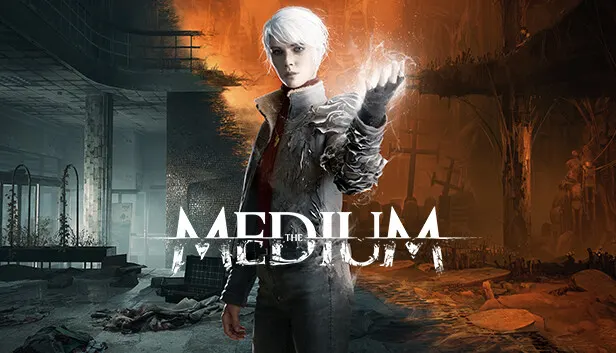
The Medium is an adventure game developed by Bloober Team and released in 2021, built exclusively for single-player. The protagonist, Marianne, is a medium haunted by visions she cannot explain, and these visions lead her to an abandoned resort where she must uncover the origins of her powers and the mystery that has followed her throughout her life. The core mechanic rests on existing in two worlds at once: the physical realm, of which only remnants remain, and the spirit world, made up of hidden truths, lingering emotions and horrors born from tragedy. By shifting between realities or exploring both simultaneously, she solves puzzles, uses supernatural abilities and protects herself from threats only a medium can perceive. In the spirit world she encounters tormented souls, navigates twisted landscapes and confronts a being that feeds on fear. Piecing together the story across abandoned halls and distant memories gradually reveals the secret of the resort and of Marianne's own past.
Description from Steam
You are Marianne, a medium haunted by visions you cannot explain. Drawn to an abandoned communist-era resort, you set out to uncover the origins of your powers and solve the mystery that has followed you your entire life.
Your gift allows you to interact with two worlds simultaneously. The physical realm shows you the remnants of what once was, while the spirit world reveals what lies beneath the surface: hidden truths, lingering emotions, and horrors born from tragedy. As you walk between these realities, you will use your abilities to investigate, solve puzzles, and protect yourself from threats that only someone like you can perceive.
In this haunting tale brought to you by the masters of horror at Bloober Team, every step forward brings you closer to the heart of a story shaped by trauma, sorrow and the echoes of the past.
Game Features:
- Wield Your Dual Reality – Experience a unique dual-perspective mechanic that lets you explore two worlds at once. Shift between realms or navigate both simultaneously to uncover secrets invisible to others.
- Harness Medium Powers – Use your supernatural abilities to manipulate the environment, shield yourself from hostile forces, and unleash spirit blasts to break through obstacles or escape deadly entities.
- Descend Into the Spirit World – Enter a haunting dimension inspired by nightmarish art and distorted memories. Encounter tormented souls, navigate twisted landscapes, and confront a relentless being that feeds on fear.
- Uncover a Dark Mystery – Piece together a story that spans both worlds. Explore abandoned halls, forgotten chambers, and memories left behind to understand the origins of the resort – and your own past.
System requirements
WindowsRequires a 64-bit processor and operating system
Questions and answers
Does The Medium have Russian language support?
Voice-over: English. Interface and subtitles: Russian, English, Spanish, French, German, Italian, Polish, Japanese, Simplified Chinese, Portuguese (Brazil).
Which regions does the key activate in?
The key activates with no regional restrictions — in any country, on a Steam account from any region. Once activated, the game stays on your account for good.
How soon does the code arrive after payment?
Keys are issued automatically, around the clock: the code appears on the order page within 2–3 minutes.
What to do if the key does not activate?
First check your Steam account region: the key activates in the countries of its own region, and a mismatch is the most common reason activation fails. If the region is right, open “Orders” in the site header, pick the order and write in the chat — you can attach a screenshot of the error, and an operator will help you.
Completed orders only
Customer reviews
There are no reviews of The Medium yet. The store has 35 reviews of completed orders, 21 of them about Steam products.
Read reviewsSteam · PC
Similar games



Countries where the key activates
Key region: —