


Home · Steam games · Train Valley 2
Steam·activation key
Train Valley 2
How to redeem the key
- 1Open Steam and sign in to your account.
- 2In the top menu choose “Games” → “Activate a Product on Steam…”.
- 3Enter the code you received and confirm the activation.
- 4Once activated, the game appears in your library — download it and play.
Before buying, make sure the country of your account is supported by the key region.
Details and languages
- Developer
- Alexey Davydov, Sergey Dvoynikov, Timofey Shargorodskiy, Flazm
- Publisher
- Flazm, META Publishing
- Release date
- 15 Apr 2019
- Genres
- Adventure, Casual, Indie, Simulation, Strategy
- Russian language
- Yes, interface and subtitles
- Steam App ID
- 602320
Voice-over
Interface and subtitles
- Russian
- English
- Spanish
- French
- German
- Italian
- Polish
- Turkish
- Japanese
- Korean
- Simplified Chinese
- Portuguese (Brazil)
- Czech
- Swedish
No information about supported languages.
Languages are listed as reported by Steam. Please check them before buying: a key cannot be refunded once activated.
Before you buy Train Valley 2
- Game modes
- Single-player only.
- Gamepad
- Full support, including DualSense and DualShock.
- Scores
- 2,341 reviews on Steam.
- System
- Windows, macOS and Linux.
About the game
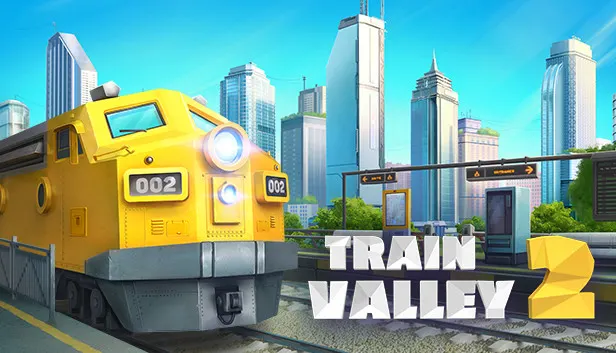
Train Valley 2 is a railroad economic puzzle game where the player runs a railway company from the Industrial Revolution to the present day. The goal is to meet the needs of the valley's cities and industries by building rail networks, upgrading locomotives, and keeping everything on schedule without delays or accidents. The game blends puzzle and management simulation elements, and its visuals use a low-poly aesthetic. Company Mode offers 50 levels, while the level editor allows playing levels created by other players or making original ones via Steam Workshop. The train roster includes 18 locomotive models and more than 45 types of train cars, and the Passenger Flow DLC introduces tougher challenges inspired by Train Valley 1 & 2.
Description from Steam
Train Valley 2 is a train tycoon puzzle game. Take your railroad company from the days of the Industrial Revolution and into the future, meeting the needs of the valley's cities and industries. Build railroad networks, manage traffic, upgrade your locomotives, and keep everything on schedule without delays or accidents.
- A Unique blend of Micromanagement, Tycoon and Puzzle games, putting you in control of your own company - that needs to help its local community thrive.
- Level Editor - Check out 2500+ levels already generated by players or try to create your own using Steam Workshop and get a high score there yourself.
- A new look - With unique visuals, based on a minimalistic low-poly aesthetic, Train Valley 2 is a joy to look at and immerse yourself in.
- Company Mode is a new mode in Train Valley 2, spanning 50 levels!
- A huge selection of Trains - 18 models of locomotives to unlock and more than 45 types of the train car - it’s up to you to keep things as efficient and cost-effective as possible, while the world around you gets more demanding!
So if you’ve ever wanted to solve complex logistics and transportation problems, fancied yourself as a bit of a train mogul, or you just love solving puzzles - there is a lot for players both new and old. Even if you’ve never played the original, there’s a lot to do in Train Valley 2!
Don’t forget to check out the Passenger Flow DLC - which brings bigger and even more complex challenges to the Valley, taking inspiration from both Train Valley 1 & 2, to give you some of the most difficult puzzles in the series to-date.
System requirements
WindowsQuestions and answers
Does Train Valley 2 have Russian language support?
Interface and subtitles: Russian, English, Spanish, French, German, Italian, Polish, Turkish, Japanese, Korean, Simplified Chinese, Portuguese (Brazil), Czech, Swedish.
Which regions does the key activate in?
The key activates with no regional restrictions — in any country, on a Steam account from any region. Once activated, the game stays on your account for good.
How soon does the code arrive after payment?
Keys are issued automatically, around the clock: the code appears on the order page within 2–3 minutes.
What to do if the key does not activate?
First check your Steam account region: the key activates in the countries of its own region, and a mismatch is the most common reason activation fails. If the region is right, open “Orders” in the site header, pick the order and write in the chat — you can attach a screenshot of the error, and an operator will help you.
Completed orders only
Customer reviews
There are no reviews of Train Valley 2 yet. The store has 35 reviews of completed orders, 21 of them about Steam products.
Read reviewsSteam · PC
Similar games








Countries where the key activates
Key region: —