EA Play is Electronic Arts' subscription for PS5 and PS4. While it is active, you can play any game in The Play List catalog with no time limit, try some new EA releases before launch, and buy EA digital content for 10% less. PS Store sells it for one month or one year, but PS Store does not work in Russia, so on a PS5 you can only get EA Play through an account from another country. You can either pay for it yourself from a wallet topped up with gift cards, or use a service that logs into your account and sets up the subscription for you.
The hard part is payment: not every account can buy a subscription with wallet money. On a Turkish account, for example, only residents of Turkey can do it. So the way you buy depends on the account's region, and it is better to choose before you start.
What EA Play includes on PS5
On PlayStation, the subscription gives you four things.
- The Play List catalog. You download these games from PS Store and play them with no time limit for as long as the subscription is active. If you let it lapse and subscribe again later, your saves are still there and you can continue where you stopped.
- Trials of new releases. For some new EA games, subscribers get 10 hours of play before the official launch. FC 26, for example, was open to subscribers from September 19, 2025. If you buy the game afterward, your progress carries over. The trial clock keeps running even when the game is only minimized, so close it when you are done.
- A 10% discount on EA digital content in PS Store, including games, pre-orders, expansions and point packs. Anything you buy with the discount stays yours after the subscription ends.
- Subscriber rewards. New cosmetic items, Ultimate Team packs and in-game currency appear every month. In November 2026 they include, for example, a Season 5 pack for Battlefield 6 and a weapon charm for Apex Legends.
There are also things the subscription does not do. It does not include online play: you need at least the basic Essential tier of PS Plus for multiplayer in FC, NHL or Battlefield. It also has no day-one releases: PlayStation only gets the standard EA Play, while the Pro version, with new games from day one and premium editions, runs only on PC. And the subscription does not move between platforms: if you buy it on a PS5, it works only on PlayStation.
The subscription needs an EA account linked to your PSN account. If you do not have one, you will be offered to create it when you subscribe. Some catalog games run offline, but you will need to sign in to your EA account from time to time to confirm the subscription. Trials always need a connection.
Which games are in EA Play
The core of the catalog is EA's sports series. In the PlayStation lineup on EA's site, the first games listed are FC 26, Madden NFL 26, College Football 26, F1 25, NHL 25 and FC 25, and journalists also name UFC 5 among the notable PlayStation titles. If sports are not your thing, the catalog also has story-driven games such as Star Wars Jedi: Survivor and Dragon Age: The Veilguard, and It Takes Two for playing with a partner.
A new installment of a sports series does not go straight into the catalog. At launch, subscribers usually get a trial of it, and the game reaches The Play List later. Older installments leave in the meantime: in 2026, Madden NFL 24, F1 23 and FC 24 were removed from the subscription, the last one on July 16. EA keeps a public list of removed games with dates and platforms.
The catalog depends on your country and changes from time to time. If you want the subscription for one particular game, check it against the EA Play game list for PlayStation before you pay. Check the language too, on the game's page in PS Store: not every game or regional version has Russian, and it is most often missing from games that first came out on PS4.
One month or one year
PS Store sells EA Play for 1 and for 12 months. The year is much cheaper: at the time of writing, the annual subscription cost 40–55% less across regions than twelve separate months.
A month is enough to finish one or two story games, or to find out if the catalog suits you. A year makes sense if you play FC or NHL all the time: rewards arrive every month, and the discount on point packs and expansions lasts the whole term.
A PS Store subscription renews by itself until you cancel it. On a PS5 you can turn off renewal in the settings: Users and Accounts → Account → Payment and Subscriptions → Subscriptions. After you cancel, the subscription keeps working until the end of the paid period. Keep in mind that PS Store takes money from the wallet first, so a renewal can eat up a sum you set aside for something else.
Which account region to choose
EA Play is sold in all six PS Store regions that people in Russia choose most often: Turkey, Ukr. UA, India, the UAE, Poland and the US. Each store has its own prices, and the difference is noticeable once converted into rubles, so compare them before you create an account.
The main limit is payment. With an Indian, Polish, American or Emirati account, you can pay for the subscription from a wallet topped up with codes. On a Turkish account, only residents of Turkey can do that, so buyers from Russia usually get the Turkish subscription through an intermediary who logs into the account and pays for it. Subscriptions for Ukr. UA accounts are also set up through intermediaries.
If you do not have an account in the right country, you will have to create a new one: you cannot change the country of an existing PlayStation account.
Setting up EA Play yourself with gift cards
This route suits you if you have an Indian, Polish, American or Emirati account and do not want to give your password to anyone.
- Buy PS Store codes for your account's region, for at least the price of the subscription.
- Redeem the codes: on a PS5, open PlayStation Store, press the triangle button and choose "... (More)" → "Redeem Codes". The money goes into your wallet.
- Find EA Play through search on the games home screen, choose a month or a year, and pay for the subscription from the wallet.
- Link your EA account if the console asks, and download the games you want from PS Store.
- Turn off auto-renewal under "Subscriptions" if you do not need it.
The advantages are clear: the password stays with you, and you can subscribe at any time, even at night. Whatever is left in the wallet is not lost: it goes toward the next month or toward EA game expansions, which subscribers also buy at a discount.
The drawbacks are the same as for any payment with codes, plus one of their own.
- Denominations do not match the price. Codes come in fixed amounts: in steps of 1,000 rupees for India, 50 zloty for Poland and 40 dirhams for the UAE. A month of the subscription in the Indian store cost less than the smallest code at the time of writing, and more than half of the amount stayed in the wallet.
- A mistake cannot be undone. A code is single-use and works only in the store of its own country, and wallet money cannot be moved to another account.
- A payment method on the account. Sony states that when you buy a subscription with wallet money, you may need to add a payment method to the account. If you are not asked, the wallet alone is enough.
Setup with account login through an intermediary
The second route is services that set up the subscription directly on your account. You pay in rubles and hand over your email, password and a two-step verification backup code, and a manager logs into the account, pays for the subscription and tells you when it is done. One seller says outright that they link a card to the account and pay with it. This is also how Turkish subscriptions are set up, since a buyer in Russia cannot pay for them from a wallet.
We looked through about thirty such listings on one marketplace, and the scheme is almost the same everywhere: the buyer writes the login details to the seller in a chat, and a person carries out the order.
- Timing. At the time of writing, sellers promise anything from 5–15 minutes to a little over an hour, and often the clock starts only when a manager takes the order.
- Working hours. Some sellers keep a schedule, for example 8:00 to 1:00 a.m. or 12:30 p.m. to midnight Moscow time. An order paid for outside those hours waits for the next working day.
- Prices. For a month of a Turkish-account subscription, sellers ask very different amounts, and the gap reaches about a factor of two.
- Refunds. Some keep part of the amount if you change your mind before the order is carried out: one listing says 20%.
Remember that the email, password and backup codes open the whole account, and a real person reads them in the chat. A backup code works only once, so the code the seller used to sign in is already spent. When the subscription is set up, change your password.
You will also come across "shared" accounts: the seller lets you sign in to their own account that already has a subscription and make your console its primary one. The subscription stays theirs, sellers forbid you to sign in again or change settings, and under PlayStation's rules a PS Store purchase is a personal license of the account holder and cannot be passed on.
Which way to choose
| What matters | Yourself with codes | Intermediary with login |
|---|---|---|
| Account password | stays with you | you hand it to the seller |
| Account region | India, Poland, US, UAE | including Turkey and Ukr. UA |
| When it is set up | any time | during the seller's working hours |
| How long you wait | as long as redeeming the codes takes | from 5–15 minutes to the next day |
| Main drawback | leftover wallet balance, auto-renewal | a markup and handing over access |
If your account is Indian, Polish, American or Emirati and you would rather not give out the password, it is simpler to set up the subscription yourself. If the account is Turkish, or you do not want to deal with denominations, setup with login is the remaining option. Then pick a service by three signs: whether the price for your region and term is visible before you pay, where you enter your account details, and what happens to your money if the subscription cannot be set up.
How it works on our site
On our EA Play page, the subscription is set up with account login. You choose the region and the term on the page, and the price is visible before you pay. A month on a Turkish account cost 620 ₽ at the time of writing and a year cost 3,730 ₽; on an American account it was 760 ₽ and 4,830 ₽.
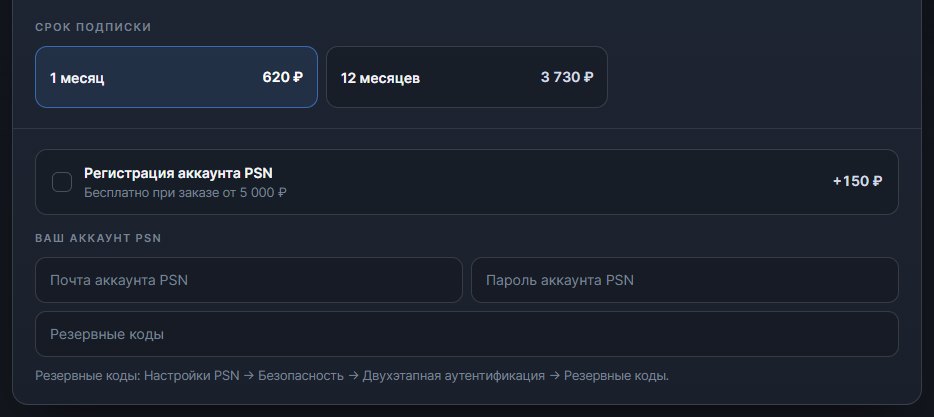
You type your email, password and backup codes straight into the order form. From there they go directly into the order chat with the operator, so you do not need to send them separately. After you pay, just write in that chat that the payment went through.
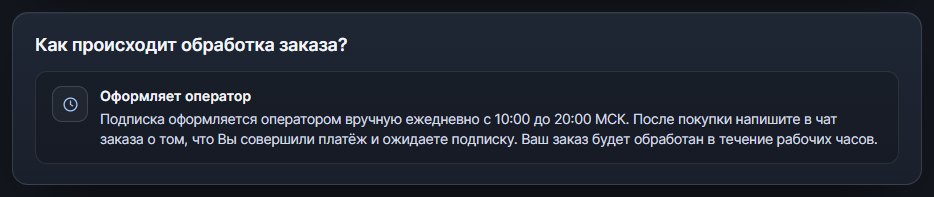
Subscriptions here are set up by an operator, not by automation: at the time of writing, every day from 10 a.m. to 8 p.m. Moscow time. An order paid for after 8 p.m. or at night is picked up by the operator at 10 a.m.
If you do not have an account in the right country, tick "PSN account registration": a new account in the region you paid for is created together with the order. Back then, this cost 150 ₽, or nothing on orders from 5,000 ₽. The email, the password and everything bought on that account belong to you.
If you would rather set up the subscription yourself, codes for Indian, Polish, American and Emirati accounts are on the PSN top-up page. They arrive automatically, around the clock, in 1–3 minutes on average at the time of writing, and you can adjust the amount on the page to the nearest denomination.
Until the subscription is set up, you can get your money back: in full if the order was not fulfilled through our fault, and minus actual costs if the cause is on the buyer's side, such as wrong login details. The details are in the refund policy.