In Russia you can buy PS Plus only for a PlayStation account from another country, most often Turkey, India, the US or Poland: a Russian account has not been able to subscribe since 2022. There are three ways to do it. You can top up the account wallet with PS Store gift cards and pay for the subscription yourself, redeem a code for the subscription itself, or hand the order to a service that logs in to your account. There are also three tiers. Essential opens online play, Extra adds a catalog of hundreds of games, and the top tier, called Deluxe or Premium depending on the country, adds classics and game trials on top.
The hard part is not the subscription but the account. PS Store has been suspended in Russia since March 2022: you can still spend what is left in a wallet, but you cannot renew a subscription. Sony does not let you change the country of an existing account, so PS Plus goes on a separate foreign account. You can still play with the subscription from your main profile, as explained below.
How Essential, Extra and Deluxe differ
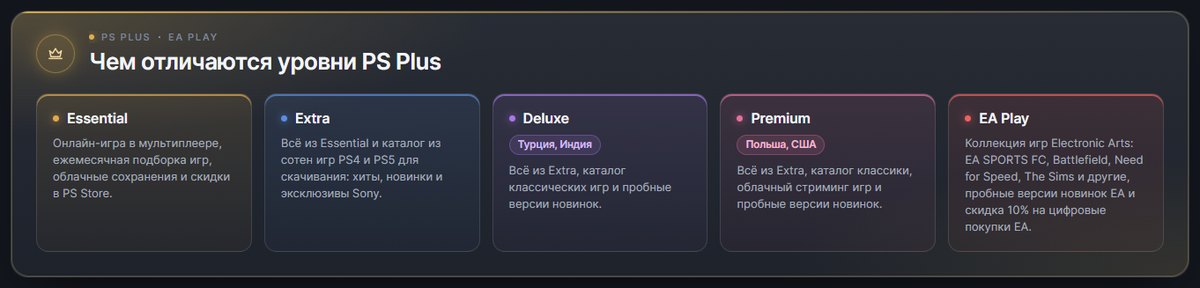
The PS Plus tiers are nested: each one includes everything the previous one gives you.
- Essential. Online multiplayer in most paid games, a few games every month, cloud storage for saves, Share Play and discounts for members. Free online games such as Fortnite and Apex Legends usually do not need a subscription.
- Extra. On top of that you get a catalog of hundreds of PS4 and PS5 games, along with the Ubisoft+ Classics selection. You download catalog games to the console and play them for as long as the subscription is active.
- Deluxe. Beyond Extra, there is a classics catalog with PS1, PS2 and PSP games, plus time-limited trials of new releases.
- Premium. The same top tier in countries where Sony runs cloud streaming. Besides everything in Deluxe, you can stream games from the cloud, including PS3 games and some PS5 games, and the subscription includes a catalog of Sony Pictures films.
Games from the subscription do not become yours for good. You have to add the monthly games to your library while they are in the lineup, and they run, like catalog games, only while PS Plus is active. Games leave the catalogs over time, and Sony announces the departure date in advance. Add-ons and in-game currency you bought separately for such a game also stop working when the subscription ends, until you renew it or buy the game itself.
Which tier and term to choose
Start from what you plan to play.
- Online play in games you already own. Essential is enough.
- Lots of new games without buying each one. Take Extra, but first find two or three games in your region's catalog that are worth the subscription: the lineup changes every month and differs from country to country.
- Classics and trials. That means Deluxe or Premium. Premium's cloud streaming needs a good connection: Sony lists 5 Mbps as the minimum and 15 Mbps for 1080p.
PS4 owners should note one more thing: since 2026, new PS4 games reach the subscription only occasionally, so check what in the catalog will run on your console before you pay.
The subscription is sold for 1, 3 and 12 months. Per month, a year is noticeably cheaper: in the Turkish PS Store in autumn 2026, annual plans cost about a third less than twelve single months. One month is enough to play through a couple of catalog games or to find out if the subscription is for you, and you can raise the tier later by paying the difference.
 PS Plus Essential, 1 monthOnline play, monthly games, cloud saves · 1, 3 or 12 monthsBuyfrom 1 240 ₽
 PS4PS5PS Plus Extra, 1 monthEverything in Essential plus a catalog of PS4 and PS5 games · 1, 3 or 12 monthsBuyfrom 1 920 ₽
 PS Plus Deluxe, 1 monthExtra, classics and game trials · Turkey and India accountsBuyfrom 1 940 ₽
 PS Plus Premium, 1 monthEverything in Deluxe plus cloud streaming · US and Poland accountsBuyfrom 2 410 ₽
Which account region you need for PS Plus
For buying from Russia, people most often set up accounts in Turkey, Ukr. UA, India, the UAE, Poland and the US. For a subscription, the countries differ in three ways.
- Price. PS Plus costs something different in every country. By journalists' calculations, an annual plan of any tier in India and Turkey comes out cheaper than in the US, where a comparable tier costs 1.5 to 1.8 times as much.
- Top tier. In Turkey and India it is called Deluxe and has no cloud games. In the US and Poland it is Premium with streaming.
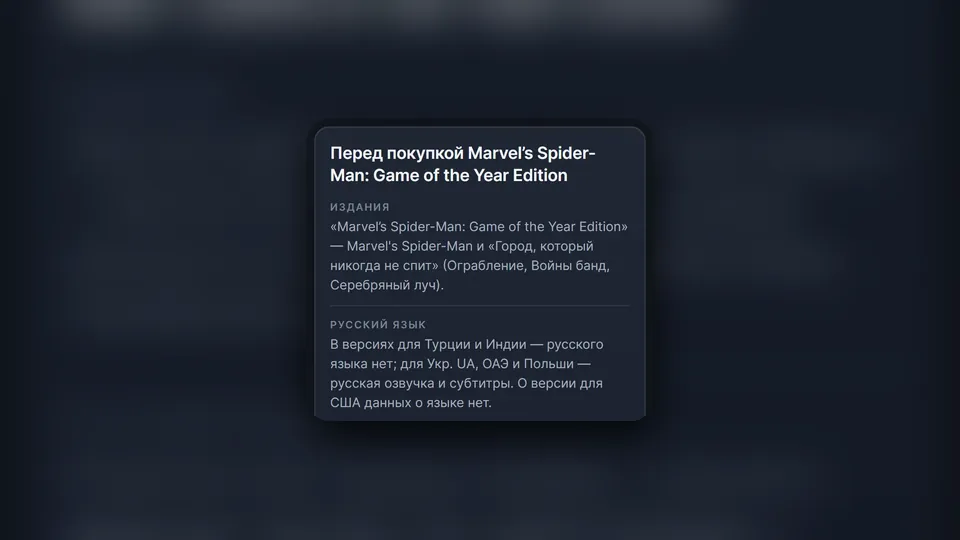
- Language. Russian voice-over and subtitles depend on each game's regional version. Russian is most often missing from games that first came out on PS4, so check the games you want from the catalog in the PS Store of the country you choose.
If you already have a foreign account, buy the subscription for its country: you cannot change the country after registration, and money and purchases do not move between PlayStation accounts.
Method one: top up the wallet and pay for the subscription yourself
This is the route for people who want to keep everything in their own hands. You buy PS Store gift cards for the country your account is registered in, redeem the codes under "Redeem Codes", and sign up for PS Plus in PS Store, paying from the wallet.
The advantages are clear: the password stays with you alone, you pick the tier and term from everything your country's PS Store sells, and whatever is left in the wallet goes toward the next renewal or a game.
The drawbacks are manual work and a few details that trip people up.
- Denominations. Cards come in fixed amounts, so you usually buy a bit more than the subscription costs.
- Region. A code works only for an account of its own country and can be redeemed once. Money that lands on the wrong account cannot be moved back.
- Turkish wallet. Only residents of Turkey can pay for PS Plus from a Turkish account's wallet balance. Wallets from India, Poland, the US and the UAE work for a subscription.
- Auto-renewal. PS Plus renews itself at the current price until you cancel. If the wallet is short on the renewal date, PlayStation tries to charge the difference to the main payment method linked to the account.
Best for: people who do not want to give anyone access to the account and do not mind fiddling with denominations.
Method two: a code for the subscription itself
Besides top-up cards, there are codes for PS Plus itself. The code shows the tier and term, you enter it in the same "Redeem Codes" screen, and you need no money in the wallet. What the code does depends on the subscription you have right now:
- no subscription: exactly what the code says switches on;
- the same tier is already active: the term is added to the current one;
- a code for a higher tier: your plan moves up a tier, and the days you have left are recalculated at the new tier's price;
- a code for a lower tier while a higher one is active: it turns into days of the higher tier, so a one-month Essential code gives about three weeks of Extra.
There are three catches. Like a top-up card, the code has to be issued for your account's country. Under PlayStation's rules, an account needs a valid payment method to redeem a subscription code, and without a foreign card that can be an obstacle. And after the term paid by the code, the subscription may continue as a paid one, so check the end date and auto-renewal right after you activate it.
Method three: setup with a login to your account
If you would rather skip codes, you can hand the subscription to an intermediary. You pay in rubles, give your login details, and a staff member of the service signs in to your account and switches on the tier and term you picked.
We went through a dozen and a half such listings on one marketplace, and they work in nearly the same way. After you pay, you write to the seller in the chat with the purchase code from the marketplace, your email and your account password, and most sellers also ask for one or several backup codes for two-step verification, so you have to turn it on beforehand. Then a manager connects the subscription by hand.
Timing depends on people. Some sellers promise 5 to 15 minutes after they receive your details, others say an hour, and some say 12 hours. Many work to their own schedule: 10:00 to 20:00, 11:00 to 23:00, or 7:00 to 1:00 Moscow time, and some sellers say outright that a night order will be done the next day.
The main price of the convenience is access to your account. A real person reads your email, password and backup codes, and backup codes let someone sign in even without your phone. Once the subscription is connected, change the password and check which backup codes you have left in the "Security" section of your account management.
Best for: people who do not want to deal with denominations and are ready to give access to the account for a while.
How to play with the subscription from your main account
Your whole library and your saves usually stay on the old Russian account, while PS Plus now sits on the foreign one. You do not have to switch between them: part of what the subscription gives works for every user of the console.
- On the PS5, sign in to the foreign account that holds PS Plus.
- Open "Settings" → "Users and Accounts" → "Other" → "Console Sharing and Offline Play", then choose "Enable". On the PS4 the same setting is called "Activate as Your Primary PS4".
- From the foreign account, download the monthly games or catalog games, return to your main profile and launch them there. Trophies are earned on the main account.
This shares online play, downloaded monthly games, catalog games if they are in your tier, and games bought with the member discount. You can use PS Plus discounts and claim monthly games only from the account that holds the subscription, and cloud storage for saves also stays with it. Sharing works on one PS5 and one PS4 at a time, and you cannot share the subscription with a friend on their console.
Renewal, changing tiers and cancelling
- Cancelling. On the PS5, open "Settings" → "Users and Accounts" → "Account" → "Payment and Subscriptions" → "Subscriptions", pick PS Plus and press "Cancel Subscription". The benefits stay until the end of the paid term, and money already paid is not refunded.
- Buying ahead. A new term bought while a subscription is active starts when the current one ends. That helps if the subscription gets cheaper in a sale.
- Upgrading. Buy the higher tier and you pay the prorated difference until the end of the paid period.
- Downgrading. You pick it in subscription management, and the lower tier starts after the next payment date.
- Prices. Sony gives at least 60 days' notice of a price rise by email, and you can cancel before that date.
Which method to choose
| What matters | Top-up cards | Subscription code | Setup with login |
|---|---|---|---|
| Account password | stays with you | stays with you | goes to the person doing the work |
| Who sets it up | you | you | a manager, by hand |
| When | any time | any time | during the seller's working hours |
| Choice of tier and term | anything in your country's PS Store | only what the code says | what the seller offers |
| What to watch | denominations and auto-renewal | code region and the account's payment method | account access and the wait |
If you do not want to give your password to anyone, top-up cards are your route. If you want the subscription with no fuss and can give account access for a while, setup with a login is easier.
How it works in our store
Our store offers both options: codes, with which you pay for the subscription yourself, and PS Plus set up on your account. By the same criteria as in the table, they look like this.
Wallet codes. On the PS Store wallet top-up page there are codes for accounts in Turkey, India, the UAE, Poland and the US. The system issues them with no manager and at any hour, in 1 to 3 minutes on average at the time of writing, and the amount is assembled from the cards in stock. Nobody needs your password: you redeem the codes and pay for PS Plus yourself. Wallets from India, Poland, the US and the UAE work for a subscription: as noted above, only residents of Turkey can pay for PS Plus from a Turkish wallet balance.
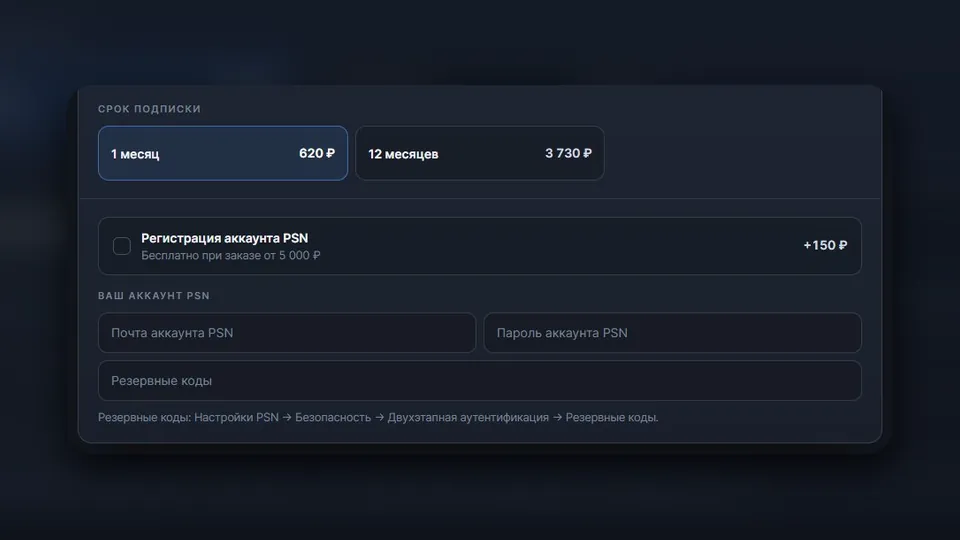
Subscription on your account. The PS Plus subscriptions section has Essential and Extra for Turkey, India, Poland and the US, Deluxe for Turkey and India, and Premium for Poland and the US, each for one month, three months or a year. You pick the tier, region and term on the subscription page, for example PS Plus Deluxe, and the price is shown right there. You enter your email, password and at least one backup code in the "Your PSN account" form before paying, so there is nothing to forward to the chat later.
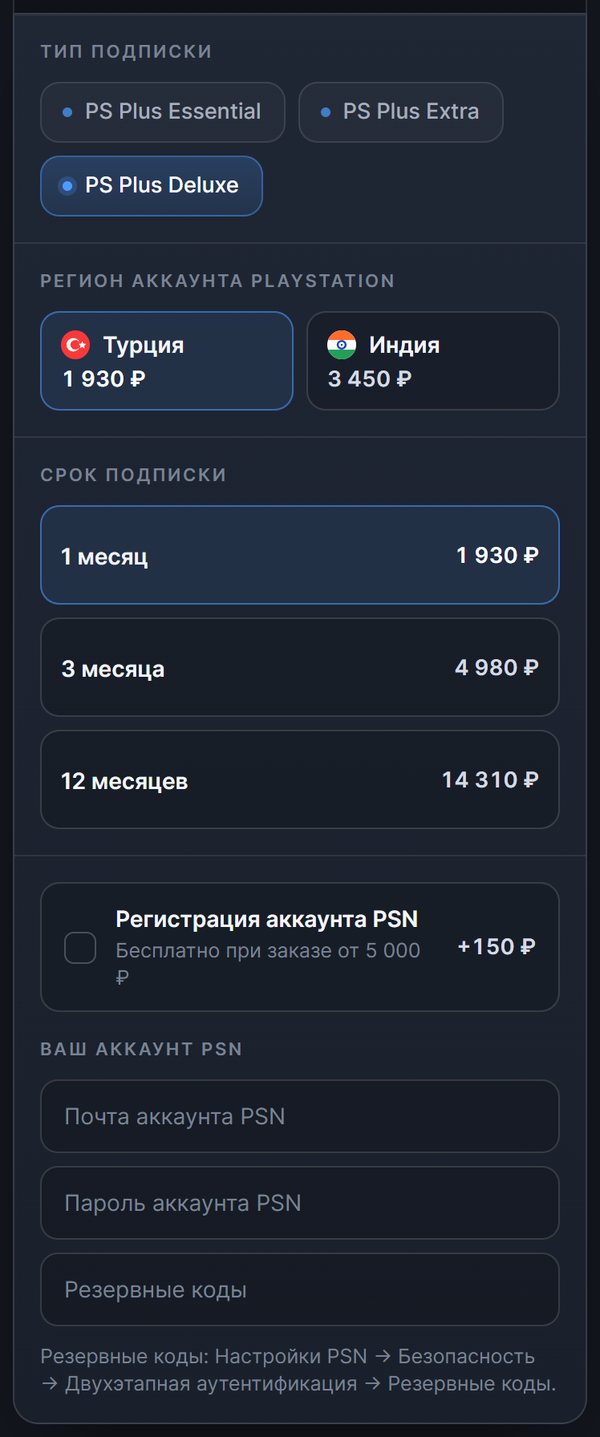
At the time of writing, an operator connects the subscription by hand daily from 10:00 to 20:00 Moscow time. An order paid at night is therefore done during working hours, and after paying it is worth telling the order chat that you are waiting for the subscription. If something goes wrong, the same chat opens from the "Orders" section.
Back then, Essential for one month on a Turkish account cost 1,240 ₽, and for a year 7,470 ₽. Deluxe for one month for Turkey cost 1,930 ₽, and Premium for one month for the US cost 2,410 ₽. These are prices for payment through SBP; paying by card costs a little more.
If you do not have an account for the right country, tick "PSN account registration" when you order. It costs 150 ₽ at the time of writing, and is free on orders from 5,000 ₽, in which case you do not need to enter login details. A new account is registered for you, and the email, password and purchases on it belong to you.