You can top up a Turkish PS5 account from Russia in three ways: with PS Store codes in lira that you redeem yourself, through a service that signs in to your account, or with a Turkish bank card if you have one. A Russian card does not work in the Turkish store, so codes are the easiest route. You pay for them in rubles, and the lira land in your wallet as soon as you enter the 12 digits.
It used to be simpler: you attached an ordinary Russian card to the Turkish account and paid with it. Since about 2023 the Turkish PS Store has accepted only local payment methods, and at that point there were no gift cards in lira on sale. Now there are, and topping up from Russia mostly relies on them. The Turkish wallet has its own rules, though, and it is better to learn them before you buy your first code.
How the Turkish wallet works
A Turkish account is kept in lira, and you can fund it only with codes and cards from the Turkish region. Codes from other countries will not work on it, and Sony does not let you change an account's country after registration. If you are unsure about your region, open your account management, go to "Your information", then "Residential address": the country is the last line.
There are a few more rules that people usually remember too late.
- The balance on PS5 is shown right in the store: open PlayStation Store, press the triangle button and choose "... (More)". The amount in lira sits to the right of your profile icon.
- The wallet is spent first. When you buy something, PS Store takes the money from your balance first, and you can pay the missing part with another payment method that the Turkish store accepts. Without a Turkish card, the wallet has to hold the entire price.
- Money does not come back out. Sony states plainly that it does not refund what has been added to a wallet, and you cannot move lira to another account.
- A child account has no wallet. You cannot top it up directly: the adult who manages the family group redeems the code on their own account and sets a monthly spending limit for the child.
- The balance has a ceiling. The limit for a Turkish wallet is 18,000 lira. A code that would push the balance past the limit will not go through until you spend some of the lira. There is no point in keeping a large sum on the wallet in advance.
Gift cards in lira: topping up the wallet yourself
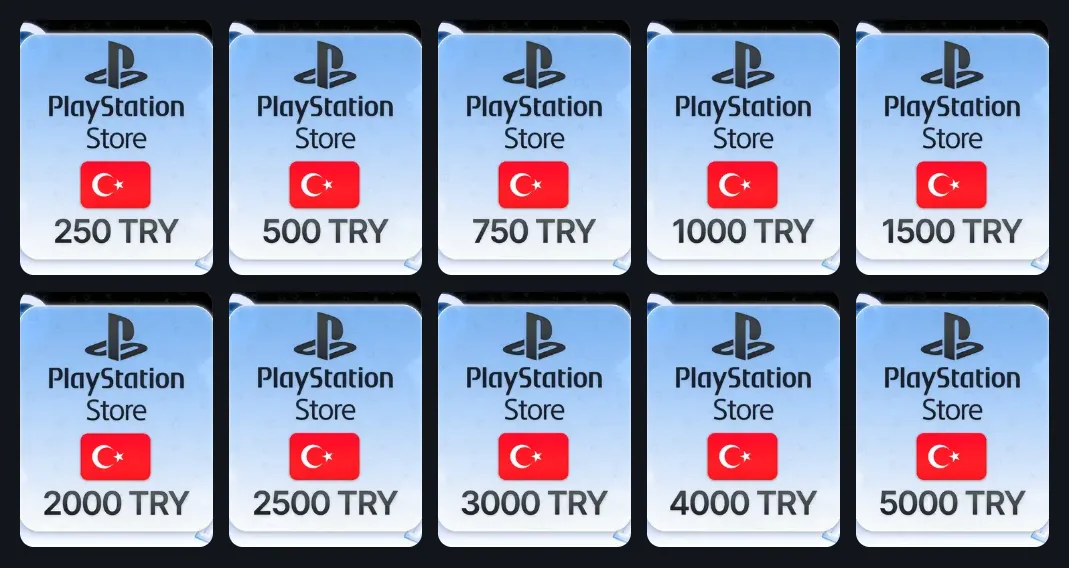
Turkish PS Store gift cards are currently sold in denominations from 250 to 5,000 lira: 250, 500, 750, 1,000, 1,500, 2,000, 2,500, 3,000, 4,000 and 5,000. That means any amount you build from codes is a multiple of 250 lira. Some shops sell every card as a separate product, others hand over a set of codes for the whole amount at once.
Redeeming a code on PS5 takes about a minute:
- Sign in to the Turkish account on the console.
- Open PlayStation Store and press the triangle button.
- Choose "... (More)", then "Redeem Codes".
- Enter all 12 digits and confirm with "Redeem". The lira appear on your balance right away.
You can also enter a code at the moment you pay for a game: the payment methods on PS5 include "Redeem Codes and Gift Cards". In a browser, redemption is tucked away in the profile menu at the top of PlayStation Store. If the site or app does not react to the "Continue" button, sellers advise entering the same code on the console.
Codes have solid advantages. You never hand your password to anyone, you can redeem a code whenever you like, and 12 digits are easy to send to a friend as a gift. The drawbacks come down to money and mistakes:
- A markup on the exchange rate. A lira in a code costs more than at the Central Bank rate, and the markup differs several times over between sellers. The final price also depends on how you pay.
- Leftovers. A game's price rarely divides by 250 exactly, so a few lira will sit on the balance until you buy something else.
- An issued code cannot be returned. Many sellers warn that a code, once issued, is not exchanged or refunded, especially if it was bought for the wrong region. Some will look at a complaint about a dead code only if you send a screen recording from payment to activation, so read the terms before you buy.
How many lira to buy
Find the game in the Turkish PlayStation store and look at its price in lira. Subtract what is already on the wallet and round the difference up to the next 250. Say a game costs 2,799 lira and the balance is 120: you are short 2,679, so you need codes for 2,750, for instance 2,500 and 250. After the purchase, 71 lira stay on the wallet.
Prices in the Turkish store change, and discounts end on a set day. If you top up exactly to a discounted price and put the purchase off, the lira may fall short once the sale is over. It is wiser to buy codes when you are ready to buy the game straight away.
Topping up through a service that signs in
Here the service does the work for you: it signs in to your account and credits the lira itself. After payment, you send the seller your order number, your PSN email and password, and one or two backup codes for two-step verification, usually in the order chat. Then you wait until a manager gets to the order.
Terms vary between services. Some also require the top-up amount to be a multiple of 250 lira, as with gift cards. Others accept any amount that is a multiple of 10 lira but set a limit, for example no more than 5,000 lira a day. If you need to top up the Turkish PS Store by an uneven amount and have no Turkish bank card, this is the only option.
The rest depends on people. Orders are usually taken from 9–11 a.m. until 10 p.m.–midnight Moscow time, and anything paid for at night is handled the next day. Sellers promise 5–15 minutes from the start of processing, but some state in their rules up to four hours, or even a day. If you cancel an order, some sellers keep 20–25% of the amount, including when the PS Store discount ended while your order waited in the queue.
Before you hand over access, weigh two things. With the email, password and backup codes, someone can do anything with the account, and the manager sees them in the chat. And each backup code works only once: when your supply runs low, you get a fresh set after you switch two-step verification off and on again. Once the lira arrive, change the password.
A Turkish bank card
The Turkish PS Store accepts Visa, Mastercard and Apple Pay. You can save up to three cards in the account, and they are handy both for paying for games directly and for adding money to the wallet. But the card has to suit the account's country: the store rejects Russian cards, and foreign virtual cards, according to reviewers, often fail, sometimes as early as when you try to attach them.
Who it suits: people who live in Turkey or have opened an account there. For everyone else it is more of an experiment than a way to fund the wallet every month.
What you can pay for from a Turkish wallet
Lira on the balance cover anything sold in the Turkish PS Store: games, add-ons, season passes, in-game currency, pre-orders and discounted items.
Subscriptions are trickier. PlayStation's help page for Turkey warns that to buy a subscription you may need a payment method on the account even when the wallet holds enough money. Sony also requires a valid payment method to redeem a code for a subscription. Some sellers write outright that PS Plus or EA Play cannot be paid for from a topped-up wallet. So it is better not to save lira for a subscription: set it up separately and spend the wallet on games.
One more mix-up: a 10-digit code is not a top-up but a discount. You enter it in the cart when you buy, and it does not apply to subscriptions or pre-orders.
Which method to choose
| Method | What you need | Amount | Weak spot |
|---|---|---|---|
| Codes in lira | A code for the Turkey region, payment in rubles | A multiple of 250 lira | Markup on the rate and leftovers; an issued code is not taken back |
| Service with sign-in | PSN email, password and backup codes | A multiple of 250 or 10 lira, depending on the service | Someone else has access to your account, and the seller's schedule applies |
| Turkish bank card | A card issued in Turkey | Exactly the price of the purchase | Russian cards and many virtual cards do not work |
Most people find codes the easiest way to top up a Turkish PS5 account: they need no access to the account, and you decide when to fund the wallet. Choose sign-in when you do not want to fiddle with denominations or need an uneven amount.
Whichever method you pick, compare sellers on a few points:
- The region in the description. It should say "Turkey" or TRY, not just PlayStation.
- The rate per lira. Divide the price in rubles by the denomination and compare the result across sellers. "No fees" means nothing until you know the rate.
- Automatic delivery or a manager. Codes with automatic delivery arrive at night too, while a manager answers only during working hours.
- What happens if something goes wrong. Find out before you pay if an unfulfilled order is refunded, how much is withheld, and if a complaint needs a screen recording.
How it works with us
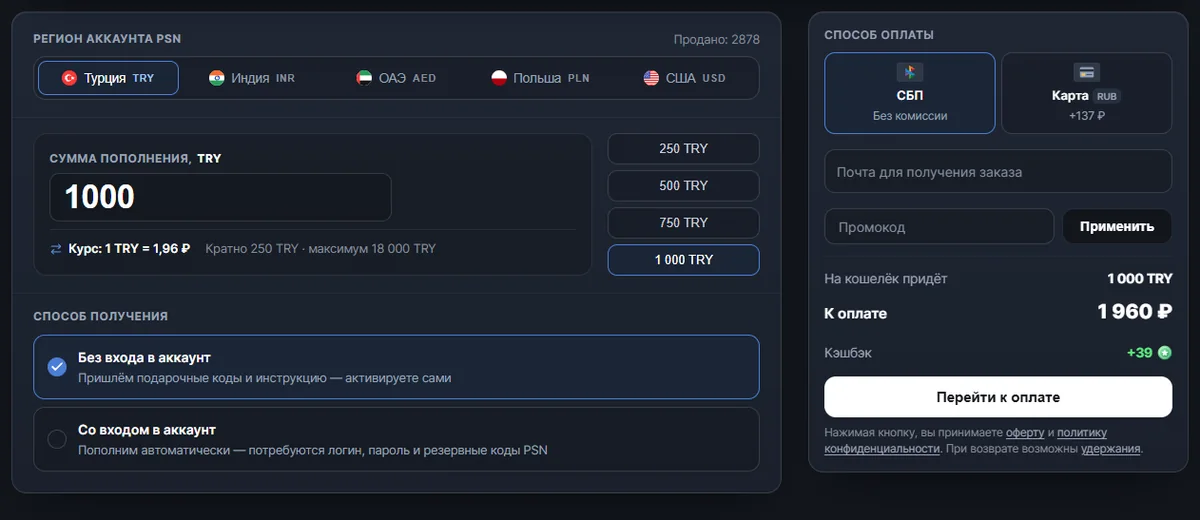
On our PSN top-up page, a Turkish wallet is topped up in the same two ways, with codes and with sign-in, only without a manager.
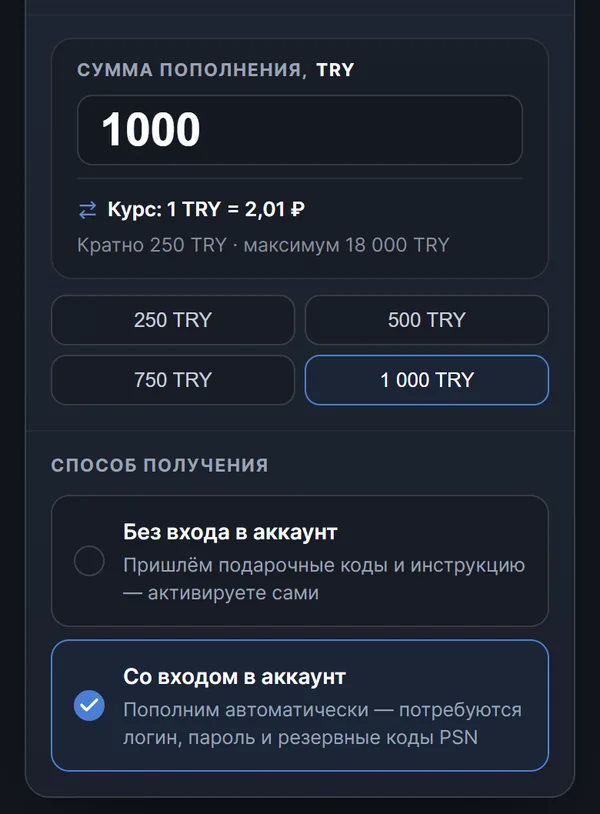
You build the amount in steps of 250 TRY, and one order can credit no more than 18,000 TRY. The rate and the total are visible before you pay. At the time of writing, 1,000 TRY without sign-in via SBP (the Russian Faster Payments System) cost 1,960 ₽, which is 1.96 ₽ per lira. With sign-in, the same amount cost 2,010 ₽, and paying by card added 137 ₽ to the no-sign-in price. If the cards currently in stock cannot make up the amount you entered, the form suggests the nearest amount it can assemble.
- Without signing in. Right after payment, the system picks one code or several and puts them on your order page together with activation instructions. As of the same date, this usually takes 1–3 minutes, at night too. If you need a single card of a specific denomination, you can take it from the PS Store gift cards section.
- With sign-in. You enter your PSN login, password and backup codes on the delivery page after payment. Then the system signs in to the account itself and redeems the codes onto your wallet, usually in 5–10 minutes and at any hour, with no chat and no schedule. As soon as the top-up is done, the password and backup codes are deleted automatically from the server, and only the login is kept.
You do not have to top up the wallet for a particular game. On the game's page in the PlayStation catalog, you can buy it straight away for a Turkish account: with codes that the system picks for the price with the smallest overpayment, or with sign-in, usually in 10–15 minutes at the time of writing. PS Plus and EA Play for a Turkish account are sold in the subscriptions section, and an operator sets them up from 10 a.m. to 8 p.m. Moscow time.
If an order has not been completed, meaning the codes were not shown and the lira did not arrive, the money is returned in full when the cause is on our side, and minus confirmed costs when the region or account details were entered wrongly. You can complain about a code that did not work even after it was issued, through the order chat. All the terms are gathered in the refund policy.