From Russia, you can only top up PS Store on an account from another country: Sony suspended the Russian store back in March 2022. There are three ways that work. You can redeem PS Store gift cards for your account's country yourself, hand the top-up to a service that signs in to your account and adds the money, or link a bank card from the same country. Most people find codes the easiest: you pay in rubles by SBP or card, and the money lands in your wallet the moment you enter the code.
The difficulty comes from Sony's own rules. A Russian account can't be topped up at all; all you can do is spend what was in the wallet before the store closed. Cards from Russian banks aren't accepted by foreign PS Stores. And an account from any other country has limits of its own: you pick the country once, at sign-up, a code works only in its own country, and wallet money can be neither withdrawn nor moved to another account.
Which account region you need
The wallet is topped up in the currency of the account's country, so first check which country your account uses. You'll find it in account management under "Your information" → "Residential address", at the very bottom. In the PlayStation App, the same address opens from your account details.
For buying from Russia, people most often create accounts in Turkey, Ukr. UA, India, the UAE, Poland and the US. The same game costs different amounts in these stores, and Russian language isn't available everywhere: it's most often missing in games that first came out on PS4. If you don't have an account in the country you need yet, you'll have to create a new one, and neither games nor money will move over from the old one.
Two regions come with caveats. Gift cards for Ukr. UA are rare and cost noticeably more than their face value, so that wallet is usually topped up with account login. And from a Turkish wallet balance, only someone who lives in Turkey can pay for PS Plus and EA Play, and code sellers warn about this outright. If the money is meant for a subscription, take that into account before you top up.
Gift cards: top up your PSN wallet yourself
This is the simplest route. You buy a PS Store code for the right country and amount, then enter it on your own account. Codes for rubles are sold by digital-goods marketplaces, standalone shops and even some mobile carriers, and many sellers deliver them automatically at any hour.
You can redeem a code on a console, in a browser or in the app:
- Sign in to the account of the country the code was issued for.
- Open "Redeem Codes". On PS5 it's in the "... (More)" menu of PlayStation Store, on PS4 it's at the bottom of the store's side panel, in a browser it's in the profile menu, and in the PlayStation App it's in the store menu.
- Enter all 12 digits of the code and confirm.
- Check your wallet balance: the money arrives right after redemption.
On PS5 you can also enter a code at checkout, through the codes and gift cards option in the list of payment methods. A top-up code won't work on a child account: the family manager redeems it on their own account.
The advantages are simple. Your password and backup codes stay with you, you enter the code yourself whenever it suits you, and 12 digits are easy to forward if you want to give someone money for PS Store. There are drawbacks too.
- Markup. A code costs more than its face value at the exchange rate. Reviewers put the markup at 10–15 %, and the final figure depends on the seller and the payment method.
- Denominations. Codes come in round amounts: for Turkey, multiples of 250 lira; for India, thousands of rupees. You can't assemble the exact price of a game, and the remainder stays in the wallet until your next purchase.
- Own country only. An account won't accept a code from another country. And a code redeemed on the wrong account stays there: every code is single-use, and funds can't be moved between accounts.
- No exchanges. Sellers usually don't swap a delivered code or refund it, so check the country and denomination before you pay.
- Wallet ceiling. A balance can't grow forever. If a code would push it past the limit, it won't activate until part of the money is spent. The limit differs from country to country, and even for Turkey sellers quote different figures.
Who it suits: people who don't want to give anyone access to their account and are happy to work out the denominations themselves. Codes for different countries are collected, for example, in the PS Store gift cards section.
Top-up with account login
The second route is a service that tops up the wallet for you. You pay in rubles and hand over your login, password and a couple of backup codes for two-step verification, and a staff member signs in to the account and adds the money. They redeem codes themselves, or pay with a card from that country if they have one. For Ukr. UA accounts this is the main option.
The method has one advantage, but a weighty one: the seller does everything, and you don't have to redeem any codes. The drawbacks are more numerous, and nearly all of them come from a person doing the work.
- Working hours. Most of these sellers take orders from roughly 9–11 a.m. to 10–11 p.m. Moscow time, and an order paid at night waits until morning.
- Timing. They promise anything from 5–15 minutes to an hour from the moment a manager takes the order, and some openly mention delays of up to three hours.
- Chat. After paying, you need to send the seller your purchase code and account details in chat and stay reachable: sometimes a verification code sent to your email is needed to sign in as well.
- Account access. A login, password and backup codes open the whole account, and in the chat a real person reads them.
If you choose this route, take precautions: turn on two-step verification in advance, and change the password once the money arrives. Backup codes are single-use, and the ones the seller has used are no good to you any more. You get a new set if you turn two-step verification off and on again.
A bank card from the account's country
According to Sony's help pages, PS Store accepts Visa, Mastercard and JCB, as well as PayPal, and you can link up to three cards to an account. A linked card can be used both to buy games and to top up the wallet. But the card's country must match the account's country: a Turkish account needs a Turkish card, a US account needs a US card. A card issued in another country may simply be rejected by PS Store.
For someone living in Russia, this is the narrowest path. PayPal left the country back in 2022, and foreign virtual cards have stopped being an easy fix. The most popular Turkish virtual card service lost its banking license in 2025, and its replacements, reviewers write, involve a complicated sign-up, a fee for opening an account and top-ups through cryptocurrency. Linking a virtual card to an account doesn't always work either: PS Store often declines such cards.
Who it suits: people who already hold a card from a bank in the country where the account is registered.
Which method suits whom
In short, most people will find it easier to top up PS Store from Russia with codes. Login top-up covers wallets that have almost no codes available, and a card from the account's country helps those who already have one.
| Method | What you need | Who it suits | Main drawback |
|---|---|---|---|
| Gift cards | A code for the account's country, payment in rubles | People who don't want to give access to their account | Markup and fixed denominations; a code from another country won't work |
| Top-up with login | Login, password and backup codes | Owners of Ukr. UA accounts and anyone who doesn't want to deal with codes | Account access, the seller's working hours |
| Card from the account's country | A card from a bank in the same country | People who live abroad or opened an account there | Russian cards don't work, virtual ones are often declined |
If you need the money for one particular game, you don't have to work out a top-up amount: buy the game directly, either with codes matched to its price or with account login. The easiest way to find the game is the PlayStation games catalog: the game's page shows what it costs in each region and whether that region has Russian voice-over.
What to look at when choosing a top-up service
There are plenty of sellers of codes and top-ups, and it's better to compare them by a few criteria than by their advertising.
- Code country. The listing should say outright which country the code is for. The currency alone isn't enough: a code for a US account won't work on an account from another country that also pays in dollars.
- The real rate. Divide the amount you pay by the face value and you get how many rubles one unit of currency costs. That's the number sellers are compared by. Separately, check how much more paying by card costs than paying by SBP.
- Who delivers. Automatic delivery works around the clock, while manual delivery works only during the seller's hours.
- Can your amount be assembled. Some sellers send a set of several codes for the amount you need, others sell cards strictly one at a time. The first is more convenient if your amount is uneven.
- What happens if something goes wrong. A delivered code is usually treated as a completed order. So what the service promises before delivery matters: whether it will refund the money if the order isn't fulfilled, in full or minus costs, and how soon.
- Your password. A code needs no account details at all. If a code seller asks for your login and password, that's a reason to look for another one.
How these points look at our store
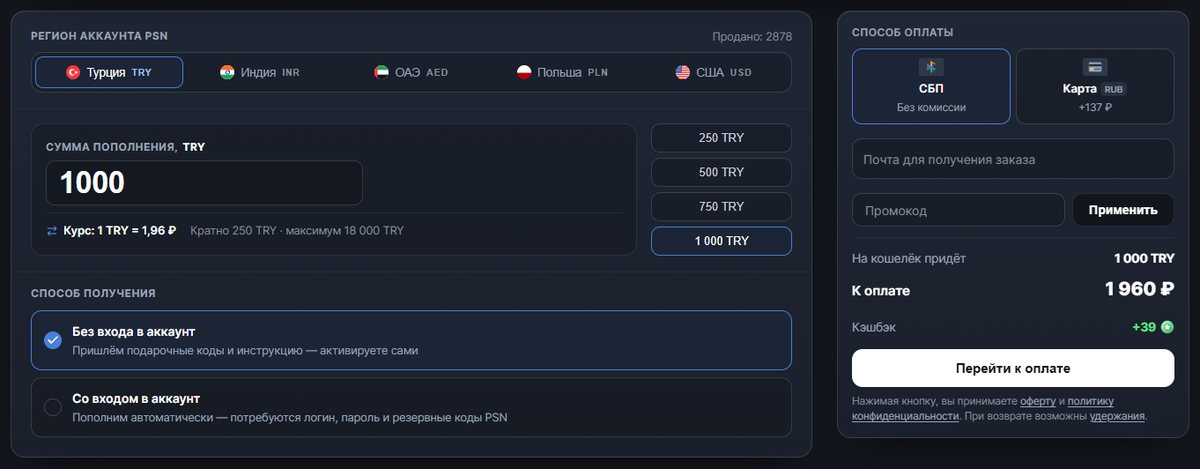
On our PSN top-up page, both methods are gathered in one form. You choose the account's region, the amount in its currency and the delivery method, and before paying you can see how much will reach the wallet and how much you'll pay.
- Regions and amounts. You can top up wallets of accounts from Turkey, India, the UAE, Poland and the US. The amount is built from the gift cards currently in stock and is a multiple of the region's denomination: for Turkey that's 250 TRY, up to 18,000 TRY per top-up. If there aren't enough cards for the amount you enter, the page offers the nearest available one.
- The rate is visible at once. At the time of writing, the lira cost 1.96 ₽ at top-up: 1,000 TRY by SBP without login came to 1,960 ₽, and with login to 2,010 ₽. SBP adds nothing on top, while paying by card costs 137 ₽ more.
- Without login. The system picks a code for the whole amount, or a set of codes, and sends them with instructions to your order page, on average within 1–3 minutes and at any hour. You redeem them yourself, and nobody needs your password.
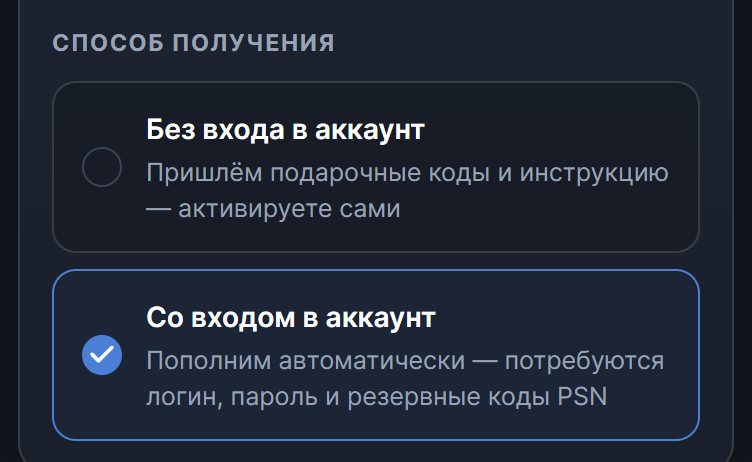
With login, you don't redeem any codes. After paying, you enter the account's login, password and backup codes, and the system signs in and adds the money itself. The order is completed automatically and around the clock, with no manager and no working hours, and as of the same date it takes 5–10 minutes on average. After a successful top-up, the password and backup codes are automatically erased from the server, and only the login remains. Check the password and backup codes before paying: with wrong details, the order won't go through.
Without login suits people who don't want to give anyone a password, and with login suits those who just want the money to arrive in the wallet, with no codes and no waiting for a manager. Owners of Ukr. UA accounts will find it simpler to buy the game they want directly: on a game's page for that region, purchase with account login is available.
Until the codes are delivered and the money is credited, an order can be refunded: in full if the cause is on our side, and minus costs if you made a mistake with the region or the account details. The details are in the refund policy.