You can't top up Steam from Russia with no fee at all. Steam doesn't accept Russian bank cards, and every middleman on the way takes a cut, whether as a percentage, a flat charge, a markup on the exchange rate or a surcharge for the payment method. The cheapest route is usually a top-up by login, paid through the Faster Payments System (SBP) with a service that shows the final price up front. Wallet codes and payment from a phone balance tend to cost more, selling items on the Community Market isn't free either, and if you need the money for one game, you can skip the top-up and buy its key instead.
"0%" appears on plenty of top-up sites, but it almost always means the money is taken somewhere else. So don't compare the percentages on the storefront. Compare two amounts: what you pay and what actually lands on your balance.
Why you can't top up Steam with no fee
Without a middleman, money reaches a Steam wallet only through a payment method Steam itself accepts. It has declined Russian bank cards since March 2022, Mir cards don't work either, and there has been no direct payment from Russia since then.
That leaves intermediaries: top-up services that work by login, gaming sections inside bank apps, mobile carriers, code sellers. An intermediary usually pays a bank to accept your payment, sends the money to Steam from abroad, often in dollars, and wants to earn something on the way. All of those costs end up in the price of the top-up.
Even a service that zeroes out its own share with a promo code still leaves the bank's processing fee in place. Journalists who have compared top-up methods agree on one point: you can't avoid overpaying entirely, only reduce it.
Where the fee hides
The overpayment is made up of several parts, and a service can show you one while earning on another.
- The service's percentage. This is the most visible part: it's printed next to the amount, so it's the easiest to compare. Sometimes the percentage drops as the amount grows, which makes a large top-up cheaper per ruble than a small one.
- A flat fee. The same sum is taken from every payment, however much you top up. A 50 ₽ fee eats 20% of a 250 ₽ top-up and only 1% of 5,000 ₽, so small payments through such a service are expensive.
- The exchange rate. A service or bank says "0%" but sends dollars to Steam, and Steam converts them to rubles at its own rate. You end up with less on your balance than you paid. Reviewers put these losses at 4–12%, depending on the method and the day.
- The payment method. Paying by card is usually pricier than SBP, and some services add a separate surcharge for cards. For payment from a phone balance the terms differ between carriers and change often, but on top of the exchange-rate loss you generally pay the carrier's fee: reviewers estimate about 10%, and more on small amounts.
- A subscription. Some services promise a 1:1 top-up only if you pay for a monthly subscription. The fee doesn't disappear. It moves into the subscription charge, and the subscription only pays off if you top up often and in large amounts.
- The fine print of temporary offers. A promo code can zero out the service's share, but such offers are rare. Journalists have described a case where a "0%" deal came bundled with a paid weekly subscription and no obvious way to cancel it, so read what you're agreeing to before you pay.
How to calculate what you're overpaying
Take two amounts: what will be charged to your card or account, and what will arrive on your Steam balance. Divide the difference by the amount on the balance and multiply by 100. That is your real overpayment in percent. If you pay 1,080 ₽ to get 1,000 ₽ on the balance, you overpay 8%, whatever the service calls it.
To keep the comparison fair, hold the conditions constant:
- calculate on the amount you actually plan to top up, since a flat fee weighs differently at different sizes;
- pick the same payment method at every service;
- compare at the same time, because the rate at services and at Steam shifts even within a day;
- if a service promises an approximate amount, or one in dollars, check it afterwards against what really appeared in the wallet.
If your wallet is in tenge, hryvnia or dollars, also check the rate at which the service converts rubles into your wallet currency. A service can earn on the rate just as it does on a percentage.
Where it's cheaper: comparing the methods
Journalists currently treat roughly 4–10% as a normal overpayment for a top-up by login. Against that background, the other methods look like this, going by reviewers' estimates and Steam's own rules.
| Method | Where you lose | How much you lose | Who it suits |
|---|---|---|---|
| Login top-up service with an open rate | The service's percentage, a card surcharge | About 4–10% | Almost anyone with a ruble wallet |
| Bank app with no fee of its own | Converting dollars to rubles at Steam's rate | About 7–10% | Customers of that bank, if the amount credited is shown in advance |
| Payment from a phone balance | The carrier's fee and the rate | About 10%, more on small amounts | Subscribers of that carrier, more often for large amounts |
| Wallet code | A markup over face value | 5 to 30% | Gifts and foreign accounts |
| Selling items | The Community Market fee | From 5%, about 13% for CS2 and Dota 2 items | People who already have something to sell |
A login service with an open rate and SBP payment is usually the cheapest. A wallet code costs noticeably more, but the exchange rate doesn't touch it: the full face value is credited, and you redeem the code yourself. A Russian account needs a code in rubles, while owners of foreign accounts can use Steam Wallet codes for their own country.
The Community Market needs no real money, but it has a fee too. On top of the seller's price, Steam charges the buyer 5%, and for Counter-Strike 2, Dota 2 and Team Fortress 2 items the publisher adds another 10%, so the seller gets about 13% less than the buyer pays. You can't withdraw what you earn from Steam. There's also advice to buy items cheaper on third-party sites and resell them on Steam. In theory that gets you close to break-even, but you wait several days before an item can be listed, you have to understand prices, and you risk running into a dishonest seller.
How to overpay less
- Pay by SBP. Almost everywhere it's the cheapest method, and a card surcharge can be noticeable.
- Don't split a payment where there's a flat fee. Two top-ups of 500 ₽ with a 50 ₽ fee cost 50 ₽ more than one top-up of 1,000 ₽. With a single percentage rate and no flat fee, splitting costs you almost nothing. Just remember the per-order ceiling at the service and Steam's daily limit, which is shared across all services.
- Top up before a sale, not in its first hours. At peak load services slow down, and the rate can jump.
- For a single game, buy a key. A key is activated right in Steam, so you don't pay for a top-up at all. Compare the key's price with the game's Steam price plus the top-up overpayment, and check that the key's region fits your account. You can see key prices in the Steam key catalog, and the region is given in the product description.
- Don't trust amounts below face value. Offers like "1,000 ₽ on your balance for 600 ₽" are linked by reviewers to fraud and stolen cards. And no service needs your Steam password or Steam Guard code for a top-up.
What a top-up costs with us
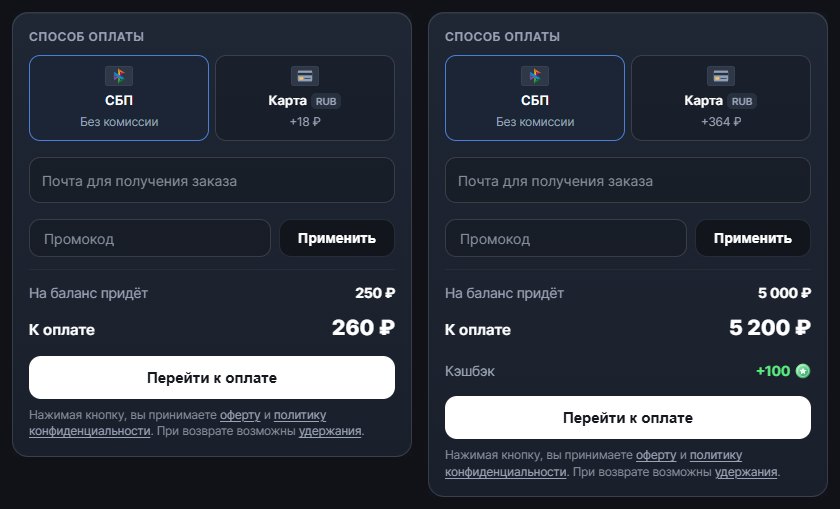
Run our Steam top-up page through the same checks and this is what you get at the time of writing.
- One rate, no flat fee. The store's fee is 4 %, and it's already included in the "Total" line. For 250 ₽ on the balance you pay 260 ₽ by SBP, and for 5,000 ₽ you pay 5,200 ₽. In percentage terms, a small top-up costs the same as a large one.
- SBP with no surcharge. With SBP the overpayment equals the store's rate and nothing else is added. A card costs more: for the same 5,000 ₽ on the balance you pay 364 ₽ extra, and that surcharge is visible on the payment tile before you pay.
- No conversion to dollars. Rubles go to a ruble wallet, so Steam converts nothing, and the amount you enter arrives on the balance ruble for ruble.
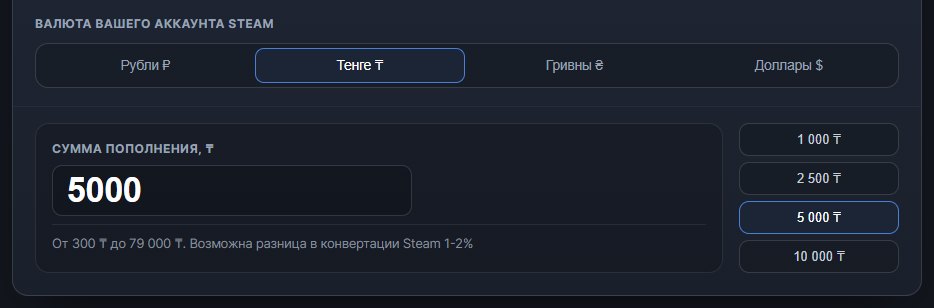
- Wallets in tenge, hryvnia and dollars. You can enter the amount directly in your wallet currency. The page converts it to rubles at Steam's own rate, and when the money is credited, Steam converts the rubles into your wallet currency. That is why the balance can come out 1–2% above or below the amount promised.
- Promo code and cashback. You enter a Steam top-up promo code in the "Promo code" field, and the new amount shows at once in the "Total" line. If you signed in to the site through Telegram, you get cashback points once the order is completed: 100 for a 5,000 ₽ top-up.
- Limits. One order runs from 50 ₽ to 15,000 ₽, and up to 50,000 ₽ per day.
- The cost of a mistake. The page usually checks the login before you pay. Until the money is credited, you can get it back: in full if the failure is on our side, and minus our costs if the login was entered wrong. The details are in the refund policy.