


Home · Steam games · CODE VEIN
Steam·activation key
CODE VEIN
How to redeem the key
- 1Open Steam and sign in to your account.
- 2In the top menu choose “Games” → “Activate a Product on Steam…”.
- 3Enter the code you received and confirm the activation.
- 4Once activated, the game appears in your library — download it and play.
Before buying, make sure the country of your account is supported by the key region.
Details and languages
- Developer
- Bandai Namco Studios
- Publisher
- Bandai Namco Entertainment
- Release date
- 26 Sep 2019
- Genres
- Action, RPG
- Russian language
- Yes, interface and subtitles
- Steam App ID
- 678960
Voice-over
- English
- Japanese
Interface and subtitles
- Russian
- English
- Spanish
- French
- German
- Italian
- Japanese
- Korean
- Spanish (Latin America)
- Traditional Chinese
- Portuguese (Brazil)
No information about supported languages.
Languages are listed as reported by Steam. Please check them before buying: a key cannot be refunded once activated.
Before you buy CODE VEIN
- Which key
- The “Global” region key: 540 ₽, can be activated in Russia.
- Game modes
- Single-player, co-op online.
- Gamepad
- Partial support, including DualShock.
- Scores
- 46,279 reviews on Steam.
- Age rating
- 16+
About the game
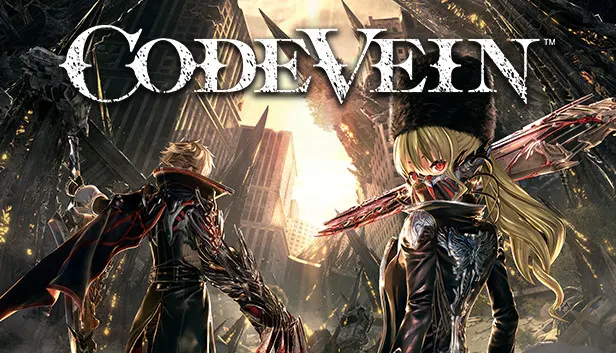
CODE VEIN is set in a ruined world that the protagonist explores together with a partner. In single play an AI companion fights alongside the character, while online co-op lets a friend join to coordinate approaches and defend against surprise attacks. Progress brings new gear and character levels, making the protagonist stronger against the Lost. The arsenal includes various weapons such as bayonets, axes and spears, and Blood Code enhancements grant access to Gifts that increase strength, weaken enemies or unlock new weapon abilities and attacks. Blood Veils serve as blood-draining tools, each with its own visual and attack style that opens up different combat strategies. The character class can be changed at any time, skills can be mixed and matched, and different NPCs can be chosen as partners, all while the hero seeks to unlock the past and escape the living nightmare.
Description from Steam
Team up with an AI partner or a friend in co-op multiplayer and venture out into a world of destruction in this story driven connected dungeon experience. Use your combined strength to coordinate your approach and defend each other from surprise attacks or tackle overpowered enemies.
GREATER CHALLENGES BRING GREATER REWARDS
Acquire new gear, level up your character, and become more powerful to rise up against the Lost. From new players to seasoned action game veterans, the challenges in CODE VEIN will keep you coming back for more.
CUSTOMIZE YOUR REVENANT
Choose from various weapons such as bayonets, axes, spears, and more. Enhance your character’s abilities with powerful Blood Code enhancements, each with access to various “Gifts” that can increase your strength, weaken enemies, and can allow you to utilize new weapon abilities or access overpowered attacks. Finish off your opponents with your Blood Veil, powerful blood draining tools, each with their own unique visual and attack style that opens up a myriad of new combat strategies.
In the face of certain death, we rise.
Team up and embark on a journey to the ends of hell to unlock your past and escape your living nightmare in CODE VEIN. Death may feel permanent but your loadout doesn't have to. Change your character class at any time, unlock the ability to mix and match skills, or choose different NPCs to partner with, all of which could make the difference between life and death.
System requirements
WindowsRequires a 64-bit processor and operating system
Questions and answers
Does CODE VEIN have Russian language support?
Voice-over: English, Japanese. Interface and subtitles: Russian, English, Spanish, French, German, Italian, Japanese, Korean, Spanish (Latin America), Traditional Chinese, Portuguese (Brazil).
Which regions does the key activate in?
The key activates with no regional restrictions — in any country, on a Steam account from any region. Once activated, the game stays on your account for good.
How soon does the code arrive after payment?
Keys are issued automatically, around the clock: the code appears on the order page within 2–3 minutes.
What to do if the key does not activate?
First check your Steam account region: the key activates in the countries of its own region, and a mismatch is the most common reason activation fails. If the region is right, open “Orders” in the site header, pick the order and write in the chat — you can attach a screenshot of the error, and an operator will help you.
Completed orders only
Customer reviews
There are no reviews of CODE VEIN yet. The store has 35 reviews of completed orders, 21 of them about Steam products.
Read reviewsSteam · PC
Similar games












Countries where the key activates
Key region: —