


Home · Steam games · Euro Truck Simulator 2
Steam·activation key
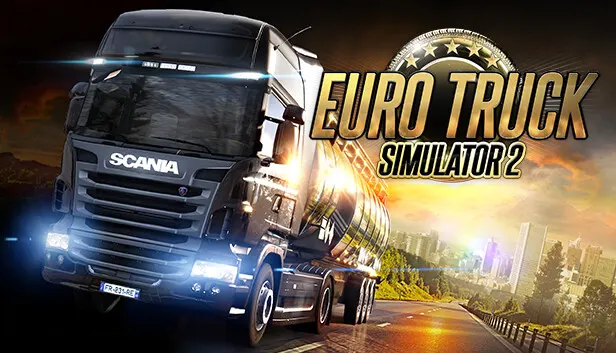
Euro Truck Simulator 2
How to redeem the key
- 1Open Steam and sign in to your account.
- 2In the top menu choose “Games” → “Activate a Product on Steam…”.
- 3Enter the code you received and confirm the activation.
- 4Once activated, the game appears in your library — download it and play.
Before buying, make sure the country of your account is supported by the key region.
Details and languages
- Developer
- SCS Software
- Publisher
- SCS Software
- Release date
- 12 Oct 2012
- Genres
- Indie, Simulation
- Russian language
- Yes, interface and subtitles
- Steam App ID
- 227300
Voice-over
Interface and subtitles
- Russian
- English
- Spanish
- French
- German
- Portuguese
- Italian
- Polish
- Turkish
- Japanese
- Korean
- Simplified Chinese
- Bulgarian
- Hungarian
- Greek
- Danish
- Catalan
- Traditional Chinese
- Lithuanian
- Dutch
- Norwegian
- Portuguese (Brazil)
- Romanian
- Serbian
- Slovak
- Slovenian
- Ukrainian
- Finnish
- Czech
- Swedish
No information about supported languages.
Languages are listed as reported by Steam. Please check them before buying: a key cannot be refunded once activated.
Before you buy Euro Truck Simulator 2
- Which key
- The “Global” region key: 980 ₽, can be activated in Russia.
- Game modes
- Single-player, co-op online.
- Scores
- 783,270 reviews on Steam.
- Age rating
- 3+
- System
- Windows, macOS and Linux.
About the game
Euro Truck Simulator 2 is a trucking simulation from SCS Software released in 2012, in which the player takes the role of a truck driver delivering cargo across Europe. Routes cover dozens of cities in the UK, Belgium, Germany, Italy, the Netherlands, Poland and other countries, with cargo transported to more than 60 European cities in total. Beyond driving, the player can run a business that keeps growing while deliveries are completed, building a fleet of trucks, acquiring garages, hiring drivers and managing the company for profit. Trucks can be tuned for performance or appearance, with optional lights, bars, horns, beacons, smoke exhausts and other parts. The game supports single-player play and online co-op in the Convoy multiplayer mode. An optional World of Trucks online community adds a Photo Mode, screenshot discussion, Editor's Pick selections and custom avatars and license plates; registration there is not required to play.
Description from Steam
Travel across Europe as king of the road, a trucker who delivers important cargo across impressive distances! With dozens of cities to explore from the UK, Belgium, Germany, Italy, the Netherlands, Poland, and many more, your endurance, skill and speed will all be pushed to their limits. If you’ve got what it takes to be part of an elite trucking force, get behind the wheel and prove it!
Key Features:
- Transport a vast variety of cargo across more than 60 European cities.
- Run your own business which continues to grow even as you complete your freight deliveries.
- Build your own fleet of trucks, buy garages, hire drivers, manage your company for maximum profits.
- A varied amount of truck tuning that range from performance to cosmetic changes.
- Customize your vehicles with optional lights, bars, horns, beacons, smoke exhausts, and more.
- Thousands of miles of real road networks with hundreds of famous landmarks and structures.
- Play, deliver and chat online together with your friends in the Convoy multiplayer mode!
World of Trucks:
Take advantage of additional features of Euro Truck Simulator 2 by joining our online community on World of Trucks, our center for virtual truckers all around the world interested in Euro Truck Simulator 2 and future SCS Software's truck simulators.
- Use in-game Photo Mode to capture the best moments and share them with thousands of people who love trucks.
- Favorite the images you like the most and return to them anytime in the future.
- Discuss the screenshots with everyone using World of Trucks.
- See the best images hand-picked by the game creators in Editor's Pick updated almost every day. Try to get your own screenshot on this list!
- Upload and use your custom avatar and license plate in the game.
World of Trucks is an optional service, registration on World of Trucks isn't required to play the game.
System requirements
WindowsQuestions and answers
Does Euro Truck Simulator 2 have Russian language support?
Interface and subtitles: Russian, English, Spanish, French, German, Portuguese, Italian, Polish, Turkish, Japanese, Korean, Simplified Chinese, Bulgarian, Hungarian, Greek, Danish, Catalan, Traditional Chinese, Lithuanian, Dutch, Norwegian, Portuguese (Brazil), Romanian, Serbian, Slovak, Slovenian, Ukrainian, Finnish, Czech, Swedish.
Which regions does the key activate in?
The key activates with no regional restrictions — in any country, on a Steam account from any region. Once activated, the game stays on your account for good.
How soon does the code arrive after payment?
Keys are issued automatically, around the clock: the code appears on the order page within 2–3 minutes.
What to do if the key does not activate?
First check your Steam account region: the key activates in the countries of its own region, and a mismatch is the most common reason activation fails. If the region is right, open “Orders” in the site header, pick the order and write in the chat — you can attach a screenshot of the error, and an operator will help you.
Completed orders only
Customer reviews
There are no reviews of Euro Truck Simulator 2 yet. The store has 35 reviews of completed orders, 21 of them about Steam products.
Read reviewsSteam · PC
Similar games



Countries where the key activates
Key region: —