


Home · Steam games · Mashinky
Steam·activation key
Mashinky
How to redeem the key
- 1Open Steam and sign in to your account.
- 2In the top menu choose “Games” → “Activate a Product on Steam…”.
- 3Enter the code you received and confirm the activation.
- 4Once activated, the game appears in your library — download it and play.
Before buying, make sure the country of your account is supported by the key region.
Details and languages
- Developer
- Jan Zelený
- Publisher
- Jan Zelený
- Release date
- 6 Oct 2018
- Genres
- Indie, Simulation, Strategy, Early Access
- Russian language
- Yes, interface and subtitles
- Steam App ID
- 598960
Voice-over
Interface and subtitles
- Russian
- English
- Spanish
- French
- German
- Polish
- Hungarian
- Greek
- Ukrainian
- Czech
No information about supported languages.
Languages are listed as reported by Steam. Please check them before buying: a key cannot be refunded once activated.
Before you buy Mashinky
- Which key
- The “Global” region key: 2 040 ₽, can be activated in Russia.
- Game modes
- Single-player, co-op online, PvP online.
- Scores
- 2,449 reviews on Steam.
About the game
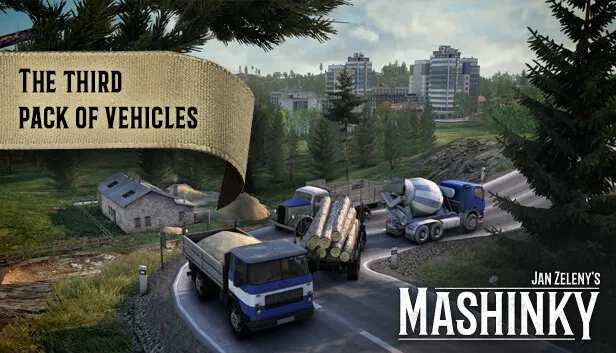
Set on a procedurally generated map, Mashinky puts the player at the head of a small transport company that grows into a transport empire. The economic side calls for transporting passengers and various cargoes at a profit, and success depends on developing every industry involved. Construction happens in an isometric mode on a grid-based map, where a line between two stations is as valid as a complex network with junctions and signals. Over time, industry buildings, stations, and depots can be upgraded, while the fleet expands with new engines and special wagons that bring bonuses such as greater capacity or new cargo types. Separate viewing modes let the player ride in a train cab or watch the built network operate, and the game offers single-player, online co-op, and online PvP. The Early Access version contains 5 of 7 eras, with more eras, industries, and vehicles planned for the future.
Description from Steam
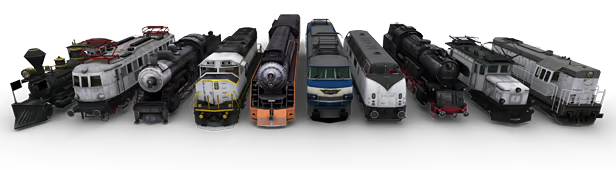
Mashinky is a brand new transport strategy game from Czech developer Jan Zeleny. Zooming through gorgeous landscapes, utilising a traditional isometric construction mode and mastering a unique board game-like gameplay, you'll find yourself immersed in the task of building your own transport empire on a procedurally generated map.
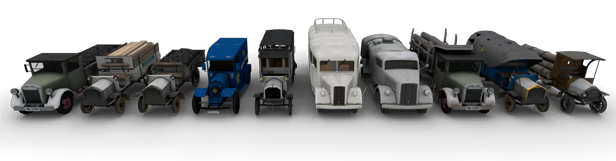
The game is a unique blend of realistic graphics combined with an isometric construction mode and boardgame-like rules.

Players start the game in control of a transport company. They must lay tracks on difficult terrain, research and buy new vehicles, manage routes and compete against economic rules to make as much profit as possible by transporting passengers and various cargos. This makes for a challenging simulation game requiring the player to consider all elements of business to be successful.
Players can switch to an isometric construction mode inspired by the very best strategy classics. This is a grid based map where every change of traffic layout is a rewarding puzzle. You can build simple tracks connecting just two stations, or design sophisticated networks using junctions and signals to maximize efficiency and performance.
As the game progresses, you’ll need to extend and customize your transport empire. You can upgrade industry buildings, stations and depots in various ways, and improve your trains using new engines and special wagons. Each upgrade offers a unique bonus; greater capacity, new processing rules and even new cargo types. Players can develop their own strategy to suit best the network they're building.
With the innovative viewing modes, you can ride one of your trains or watch the operation of the network you have built. You can exit construction mode at any time to dive back into the beautiful landscapes and detailing of the 3D world. You can see your track network from a different perspective, or even jump into one of your train and enjoy the ride.
For the Early Access release, we've prepared already first 5 eras out of 7. As EA progresses, we will introduce more eras so in the future, you’ll progress from the Age of Steam through the modern world and into the future. You’ll encounter new industries and vehicles in each era. Villages will grow to become cities, new infrastructure and upgrades will become available. It is up to you how you use these new features to build your transport empire. From humble beginnings, you’ll build a vast transport network using everything from steam power while moving cargo like coal and wood to - will be introduced to the game in the future - maglev supertrains delivering futuristic electronics.
System requirements
WindowsQuestions and answers
Does Mashinky have Russian language support?
Interface and subtitles: Russian, English, Spanish, French, German, Polish, Hungarian, Greek, Ukrainian, Czech.
Which regions does the key activate in?
The key activates with no regional restrictions — in any country, on a Steam account from any region. Once activated, the game stays on your account for good.
How soon does the code arrive after payment?
Keys are issued automatically, around the clock: the code appears on the order page within 2–3 minutes.
What to do if the key does not activate?
First check your Steam account region: the key activates in the countries of its own region, and a mismatch is the most common reason activation fails. If the region is right, open “Orders” in the site header, pick the order and write in the chat — you can attach a screenshot of the error, and an operator will help you.
Completed orders only
Customer reviews
There are no reviews of Mashinky yet. The store has 35 reviews of completed orders, 21 of them about Steam products.
Read reviewsSteam · PC
Similar games







Countries where the key activates
Key region: —