


Home · Steam games · Just Cause 3
Steam·activation key
Just Cause 3
How to redeem the key
- 1Open Steam and sign in to your account.
- 2In the top menu choose “Games” → “Activate a Product on Steam…”.
- 3Enter the code you received and confirm the activation.
- 4Once activated, the game appears in your library — download it and play.
Before buying, make sure the country of your account is supported by the key region.
Details and languages
- Developer
- Avalanche Studios
- Publisher
- Square Enix
- Release date
- 30 Nov 2015
- Genres
- Action, Adventure
- Russian language
- Yes, with voice-over
- Steam App ID
- 225540
Voice-over
- Russian
- English
- Spanish
- French
- German
- Italian
- Japanese
- Arabic
- Portuguese (Brazil)
Interface and subtitles
- Russian
- English
- Spanish
- French
- German
- Italian
- Polish
- Japanese
- Arabic
- Portuguese (Brazil)
No information about supported languages.
Languages are listed as reported by Steam. Please check them before buying: a key cannot be refunded once activated.
Before you buy Just Cause 3
- Game modes
- Single-player only.
- Gamepad
- Full support.
- Scores
- 104,076 reviews on Steam.
- Age rating
- 18+
About the game
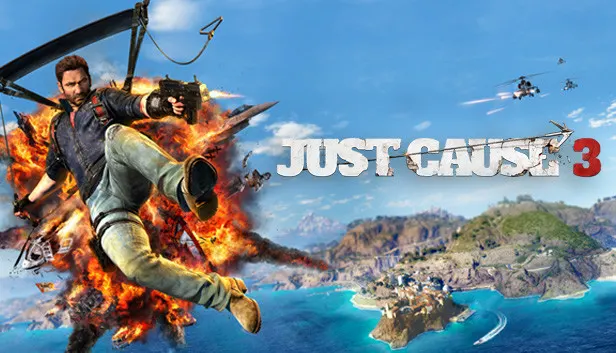
Just Cause 3 takes place in Medici, a Mediterranean republic ruled by General Di Ravello. Rico Rodriguez sets out to undermine the dictator's control, and the open world of over 400 square miles offers a parachute, a wingsuit and a grapple for that purpose. These tools let the player skydive, glide over mountains, hijack vehicles, move quickly and tether objects together to create chaos. Destruction is central: players trigger chains of explosions at military bases, harbours, prisons, police stations and communications facilities, using a wide range of explosive weaponry and a variety of vehicles. The game also features dozens of challenge missions, collectibles and online community features. The XL edition adds a pass for three expansions, plus fiery wingsuit and parachute skins. Only single-player mode is available.
Description from Steam
The Mediterranean republic of Medici is suffering under the brutal control of General Di Ravello, a dictator with an insatiable appetite for power. Enter Rico Rodriguez, a man on a mission to destroy the General’s hold on power by any means necessary. With over 400 square miles of complete freedom from sky to seabed and a huge arsenal of weaponry, gadgets and vehicles, prepare to unleash chaos in the most creative and explosive ways you can imagine.
FEATURES:
- Explore a Mediterranean island paradise with complete vertical freedom – skydive, BASE jump and free dive in an open world with virtually zero limits
- Glide through the air and swoop across mountains with your Wingsuit giving a new way to rain death from above
- Use your Grapple and Parachute to scale buildings, hijack vehicles, move quickly or tether objects together for creative new ways to cause Chaos.
- Cause massive chains of destruction in military bases, harbours, prisons, police stations and communications facilities to bring down a dictator
- Arm yourself with a wide range of explosive weaponry from shotguns and missile launchers to tank-busters and air-strikes
- Choose from a huge variety of different vehicles to drive including speedboats, jets, helicopters, turbo-fuelled sports cars and super bikes
- Get adventurous with dozens of challenge missions and collectibles to discover
- Online community features
System requirements
WindowsQuestions and answers
Does Just Cause 3 have Russian language support?
Voice-over: Russian, English, Spanish, French, German, Italian, Japanese, Arabic, Portuguese (Brazil). Interface and subtitles: Russian, English, Spanish, French, German, Italian, Polish, Japanese, Arabic, Portuguese (Brazil).
Which regions does the key activate in?
The key activates with no regional restrictions — in any country, on a Steam account from any region. Once activated, the game stays on your account for good.
How soon does the code arrive after payment?
Keys are issued automatically, around the clock: the code appears on the order page within 2–3 minutes.
What to do if the key does not activate?
First check your Steam account region: the key activates in the countries of its own region, and a mismatch is the most common reason activation fails. If the region is right, open “Orders” in the site header, pick the order and write in the chat — you can attach a screenshot of the error, and an operator will help you.
Completed orders only
Customer reviews
There are no reviews of Just Cause 3 yet. The store has 35 reviews of completed orders, 21 of them about Steam products.
Read reviewsSteam · PC
Similar games









Countries where the key activates
Key region: —