


Home · Steam games · Marvel's Spider-Man Remastered
Steam·activation key
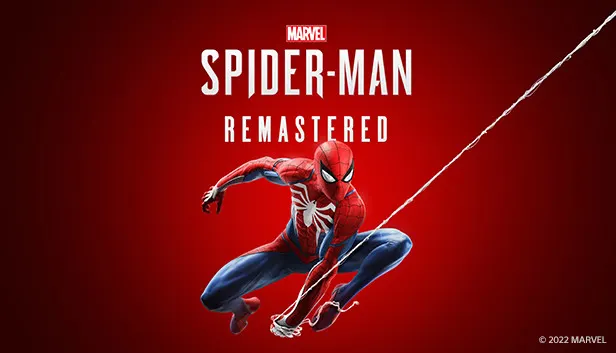
Marvel's Spider-Man Remastered
How to redeem the key
- 1Open Steam and sign in to your account.
- 2In the top menu choose “Games” → “Activate a Product on Steam…”.
- 3Enter the code you received and confirm the activation.
- 4Once activated, the game appears in your library — download it and play.
Before buying, make sure the country of your account is supported by the key region.
Details and languages
- Developer
- Insomniac Games, Nixxes Software
- Publisher
- PlayStation Publishing LLC
- Release date
- 12 Aug 2022
- Genres
- Action, Adventure, Casual
- Russian language
- Yes, with voice-over
- Steam App ID
- 1817070
Voice-over
- Russian
- English
- Spanish
- French
- German
- Portuguese
- Italian
- Polish
- Japanese
- Spanish (Latin America)
- Portuguese (Brazil)
Interface and subtitles
- Russian
- English
- Spanish
- French
- German
- Portuguese
- Italian
- Polish
- Japanese
- Korean
- Hungarian
- Greek
- Danish
- Spanish (Latin America)
- Traditional Chinese
- Dutch
- Norwegian
- Portuguese (Brazil)
- Finnish
- Czech
- Swedish
No information about supported languages.
Languages are listed as reported by Steam. Please check them before buying: a key cannot be refunded once activated.
Before you buy Marvel's Spider-Man Remastered
- Which key
- The “Rest of the world” region key: 1 940 ₽, cannot be activated in Russia.
- Game modes
- Single-player only.
- Gamepad
- Full support, including DualSense and DualShock.
- Scores
- 101,305 reviews on Steam.
- Age rating
- 16+
About the game
Players control an experienced Peter Parker in this PC remaster, which Insomniac Games made with Marvel and Nixxes Software optimized for the platform. Set in Marvel’s New York, the story follows the hero as he fights big crime and legendary villains while trying to balance his personal life and career. Peter has spent more than eight years behind the mask, and the single-player gameplay conveys that experience through improvisational combat, acrobatic moves, web-swinging traversal and environmental interactions. Free movement through lively Manhattan neighborhoods and the use of surroundings in fights form the core of the game. After the main story, the included The City That Never Sleeps expansion offers three story chapters with additional missions and challenges. The remastered version reworks PC graphics with various quality options, unlocked framerates, NVIDIA DLSS, NVIDIA DLAA and AMD FSR 2.0 support, plus ray-traced reflections, improved shadows and ultra-wide monitor support. Controls include full keyboard and mouse support with customization, and a wired PlayStation DualSense controller provides haptic feedback and adaptive trigger effects.
Description from Steam
Developed by Insomniac Games in collaboration with Marvel, and optimized for PC by Nixxes Software, Marvel's Spider-Man Remastered on PC introduces an experienced Peter Parker who’s fighting big crime and iconic villains in Marvel’s New York. At the same time, he’s struggling to balance his chaotic personal life and career while the fate of Marvel’s New York rests upon his shoulders.
Key Features
Be GreaterWhen iconic Marvel villains threaten Marvel’s New York, Peter Parker and Spider-Man’s worlds collide. To save the city and those he loves, he must rise up and be greater.
Feel like Spider-Man
After eight years behind the mask, Peter Parker is a crime-fighting master. Feel the full power of a more experienced Spider-Man with improvisational combat, dynamic acrobatics, fluid urban traversal and environmental interactions.
Worlds collide
The worlds of Peter Parker and Spider-Man collide in an original action-packed story. In this new Spider-Man universe, iconic characters from Peter and Spider-Man’s lives have been reimagined, placing familiar characters in unique roles.
Marvel’s New York is your playground
The Big Apple comes to life in Marvel’s Spider-Man. Swing through vibrant neighborhoods and catch breathtaking views of iconic Marvel and Manhattan landmarks. Use the environment to defeat villains with epic takedowns in true blockbuster action.
Enjoy The City That Never Sleeps complete content
Following the events of the main story of Marvel’s Spider-Man Remastered, experience the continuation of Peter Parker’s journey in Marvel’s Spider-Man: The City That Never Sleeps, three story chapters with additional missions and challenges to discover.
PC Features
PC Optimized GraphicsEnjoy a variety of graphics quality options to tailor to a wide range of devices, unlocked framerates, and support for other technologies including performance boosting NVIDIA DLSS and image quality enhancing NVIDIA DLAA. Upscaling technology AMD FSR 2.0 is also supported.
Ray-traced reflections and improved shadows*
See the city come to life with improved shadows and stunning ray-traced reflection options with a variety of quality modes to choose from.
Ultra-wide Monitor support**
Take in the cinematic sights of Marvel’s New York with support for a range of screen setups, including 16:9, 16:10, 21:9, 32:9, and 48:9 resolutions with triple monitor setups using NVIDIA Surround or AMD Eyefinity.
Controls and Customization
Feel what it’s like to play as Spider-Man through immersive haptic feedback and dynamic trigger effects using a PlayStation DualSense™ controller on a wired USB connection. Enjoy full mouse and keyboard support with various customizable control options.
*Compatible PC required
**Compatible PC and display device required.
System requirements
WindowsRequires a 64-bit processor and operating system
Questions and answers
Does Marvel's Spider-Man Remastered have Russian language support?
Voice-over: Russian, English, Spanish, French, German, Portuguese, Italian, Polish, Japanese, Spanish (Latin America), Portuguese (Brazil). Interface and subtitles: Russian, English, Spanish, French, German, Portuguese, Italian, Polish, Japanese, Korean, Hungarian, Greek, Danish, Spanish (Latin America), Traditional Chinese, Dutch, Norwegian, Portuguese (Brazil), Finnish, Czech, Swedish.
Which regions does the key activate in?
Pick the region that matches your Steam account region — otherwise the code may not activate. Activation countries by region:
CIS — Ukr. UA, Kazakhstan, Armenia, Azerbaijan, Kyrgyzstan and 4 more countries;
Rest of the world — Åland Islands, American Samoa, Andorra, Anguilla, Antarctica and 98 more countries.
Once activated, the game stays on your account for good.
How soon does the code arrive after payment?
Keys are issued automatically, around the clock: the code appears on the order page within 2–3 minutes.
What to do if the key does not activate?
First check your Steam account region: the key activates in the countries of its own region, and a mismatch is the most common reason activation fails. If the region is right, open “Orders” in the site header, pick the order and write in the chat — you can attach a screenshot of the error, and an operator will help you.
Completed orders only
Customer reviews
There are no reviews of Marvel's Spider-Man Remastered yet. The store has 35 reviews of completed orders, 21 of them about Steam products.
Read reviewsSteam · PC
Similar games









Countries where the key activates
Key region: —