


Home · Steam games · PAC-MAN WORLD Re-PAC
Steam·activation key
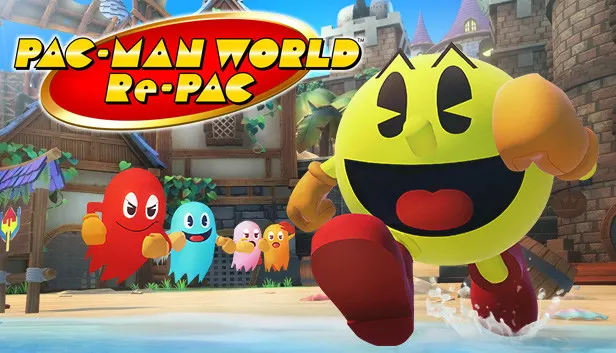
PAC-MAN WORLD Re-PAC
How to redeem the key
- 1Open Steam and sign in to your account.
- 2In the top menu choose “Games” → “Activate a Product on Steam…”.
- 3Enter the code you received and confirm the activation.
- 4Once activated, the game appears in your library — download it and play.
Before buying, make sure the country of your account is supported by the key region.
Details and languages
- Developer
- NOW PRODUCTION
- Publisher
- Bandai Namco Entertainment
- Release date
- 25 Aug 2022
- Genres
- Action, Adventure, Casual
- Russian language
- Yes, interface and subtitles
- Steam App ID
- 1859470
Voice-over
Interface and subtitles
- Russian
- English
- Spanish
- French
- German
- Italian
- Japanese
- Korean
- Simplified Chinese
- Traditional Chinese
No information about supported languages.
Languages are listed as reported by Steam. Please check them before buying: a key cannot be refunded once activated.
Before you buy PAC-MAN WORLD Re-PAC
- Which key
- The “Global” region key: 540 ₽, can be activated in Russia.
- Game modes
- Single-player only.
- Gamepad
- Full support.
- Scores
- 1,634 reviews on Steam.
- Age rating
- 7+
About the game
The rescue of PAC-MAN's kidnapped family and friends, taken by the Ghosts on his birthday, drives the story of PAC-MAN WORLD Re-PAC and leads the hero to Ghost Island. Progress there means dodging Ghosts and solving environmental puzzles, while rev-rolls, butt-bounces, PAC-DOT attacks and hover-jumps carry the fight through to TOC-MAN. Beyond the story campaign in QUEST MODE, the game includes a collection of 3D mazes in MAZE MODE and the original PAC-MAN in CLASSIC MODE. As an updated version, it brings reworked UI, mechanics and visuals.
Description from Steam
PAC-MAN arrives home on his birthday to find the Ghosts have kidnapped PAC-MAN’s family and ruined his party! Off to the rescue, PAC-MAN sets out to Ghost Island!
• With improved UI, fine-tuned mechanics and updated visuals, PAC-MAN WORLD Re-PAC is a modernized classic!
• Dodge Ghosts, solve environmental puzzles, rescue the PAC-FAM, and more in this platforming adventure!
• Butt-bounce, rev-roll, PAC-DOT attack, and hover-jump to the final face-off against TOC-MAN!
• Play a collection of 3D mazes in MAZE MODE! Clear QUEST MODE to unlock the original PAC-MAN game in ORIGINAL MODE!
System requirements
WindowsRequires a 64-bit processor and operating system
Questions and answers
Does PAC-MAN WORLD Re-PAC have Russian language support?
Interface and subtitles: Russian, English, Spanish, French, German, Italian, Japanese, Korean, Simplified Chinese, Traditional Chinese.
Which regions does the key activate in?
The key activates with no regional restrictions — in any country, on a Steam account from any region. Once activated, the game stays on your account for good.
How soon does the code arrive after payment?
Keys are issued automatically, around the clock: the code appears on the order page within 2–3 minutes.
What to do if the key does not activate?
First check your Steam account region: the key activates in the countries of its own region, and a mismatch is the most common reason activation fails. If the region is right, open “Orders” in the site header, pick the order and write in the chat — you can attach a screenshot of the error, and an operator will help you.
Completed orders only
Customer reviews
There are no reviews of PAC-MAN WORLD Re-PAC yet. The store has 35 reviews of completed orders, 21 of them about Steam products.
Read reviewsSteam · PC
Similar games



Countries where the key activates
Key region: —