


Home · Steam games · Monster Hunter Wilds
Steam·activation key
Monster Hunter Wilds
How to redeem the key
- 1Open Steam and sign in to your account.
- 2In the top menu choose “Games” → “Activate a Product on Steam…”.
- 3Enter the code you received and confirm the activation.
- 4Once activated, the game appears in your library — download it and play.
Before buying, make sure the country of your account is supported by the key region.
Details and languages
- Developer
- CAPCOM Co., Ltd.
- Publisher
- CAPCOM Co., Ltd.
- Release date
- 27 Feb 2025
- Genres
- Action, Adventure, RPG
- Russian language
- Yes, with voice-over
- Steam App ID
- 2246340
Voice-over
- Russian
- English
- Spanish
- French
- German
- Italian
- Japanese
- Simplified Chinese
- Spanish (Latin America)
- Portuguese (Brazil)
Interface and subtitles
- Russian
- English
- Spanish
- French
- German
- Italian
- Polish
- Japanese
- Korean
- Simplified Chinese
- Arabic
- Spanish (Latin America)
- Traditional Chinese
- Portuguese (Brazil)
- Thai
No information about supported languages.
Languages are listed as reported by Steam. Please check them before buying: a key cannot be refunded once activated.
Before you buy Monster Hunter Wilds
- Game modes
- Single-player, co-op online, cross-platform play.
- Gamepad
- Full support.
- Scores
- 200,151 reviews on Steam.
- Age rating
- 16+
About the game
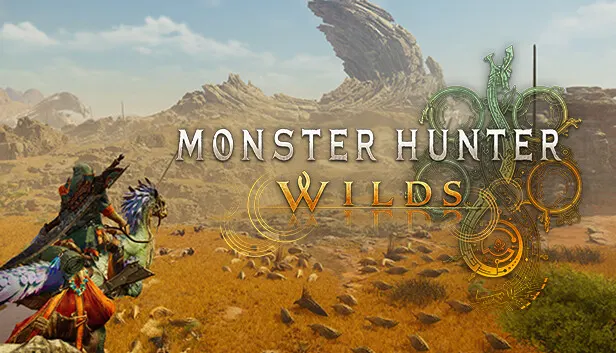
Monster Hunter Wilds takes place in the Forbidden Lands, an unexplored region the Guild enters on a reconnaissance expedition after a boy rescued at its border describes a mysterious monster that attacked his village. Players carry out the hunter's duty by tracking and defeating powerful monsters and crafting new weapons and armor from materials gathered during hunts. Weather in these lands changes often and abruptly, reshaping the environment: ravenous monsters hunt in packs during the harsh Fallow and perilous Inclemency periods, while wildlife is rich and abundant during Plenty. The monsters living there have adapted to these shifts and rely on their own traits to survive and reproduce. Hunters must account for monster behavior and know the terrain well rather than depending only on their gear. Single-player, online co-op and cross-platform play are available, and along the way players meet hunting partners and fellow expedition members.
Description from Steam
The unbridled force of nature runs wild and relentless, with environments transforming drastically from one moment to the next.
This is a story of monsters and humans and their struggles to live in harmony in a world of duality.
Fulfill your duty as a Hunter by tracking and defeating powerful monsters and forging strong new weapons and armor from the materials you harvest from your hunt as you uncover the connection between the people of the Forbidden Lands and the locales they inhabit.
The ultimate hunting experience awaits you in Monster Hunter Wilds.
Story
A few years past, a young boy named Nata was rescued at the border of the Forbidden Lands, an unexplored region the guild has yet to survey.
After hearing the boy’s tale of his lone escape from a mysterious monster that attacked his village, the Guild organized an expedition into the Forbidden Lands to investigate.
A Living World
Environments within the Forbidden Lands can drastically change as the weather shifts constantly and suddenly. During the harsh Fallow and perilous Inclemency periods, ravenous monsters will venture out to hunt in packs, yet during the Plenty periods, wildlife is rich and abundant.
Monsters
The monsters who inhabit these environments have been forced to adapt to the dynamic changes that occur, using their unique characteristics to survive and thrive.
Hunting
As the world around them changes, so must the hunters and their tactics. Not only will hunters have a multitude of weapons and armor to choose from, but the art of the hunt itself has evolved as hunters learn to anticipate monsters’ behavior and familiarize themselves with their environment.
Characters
From hunting partners to fellow expedition members, you’ll encounter plenty of those who will support you on your journey.
System requirements
WindowsRequires a 64-bit processor and operating system
Questions and answers
Does Monster Hunter Wilds have Russian language support?
Voice-over: Russian, English, Spanish, French, German, Italian, Japanese, Simplified Chinese, Spanish (Latin America), Portuguese (Brazil). Interface and subtitles: Russian, English, Spanish, French, German, Italian, Polish, Japanese, Korean, Simplified Chinese, Arabic, Spanish (Latin America), Traditional Chinese, Portuguese (Brazil), Thai.
Which regions does the key activate in?
Pick the region that matches your Steam account region — otherwise the code may not activate. Activation countries by region:
CIS — Russia, Ukr. UA, Kazakhstan, Belarus, Armenia and 6 more countries.
Once activated, the game stays on your account for good.
How soon does the code arrive after payment?
Keys are issued automatically, around the clock: the code appears on the order page within 2–3 minutes.
What to do if the key does not activate?
First check your Steam account region: the key activates in the countries of its own region, and a mismatch is the most common reason activation fails. If the region is right, open “Orders” in the site header, pick the order and write in the chat — you can attach a screenshot of the error, and an operator will help you.
Completed orders only
Customer reviews
There are no reviews of Monster Hunter Wilds yet. The store has 35 reviews of completed orders, 21 of them about Steam products.
Read reviewsSteam · PC
Similar games


Countries where the key activates
Key region: —