


Home · Steam games · BATTLETECH
Steam·activation key
BATTLETECH
How to redeem the key
- 1Open Steam and sign in to your account.
- 2In the top menu choose “Games” → “Activate a Product on Steam…”.
- 3Enter the code you received and confirm the activation.
- 4Once activated, the game appears in your library — download it and play.
Before buying, make sure the country of your account is supported by the key region.
Details and languages
- Developer
- Harebrained Schemes
- Publisher
- Paradox Interactive
- Release date
- 24 Apr 2018
- Genres
- Action, Adventure, Strategy
- Russian language
- Yes, interface and subtitles
- Steam App ID
- 637090
Voice-over
- English
Interface and subtitles
- Russian
- English
- French
- German
No information about supported languages.
Languages are listed as reported by Steam. Please check them before buying: a key cannot be refunded once activated.
Before you buy BATTLETECH
- Which key
- The “BATTLETECH” key, region “CIS”: 570 ₽, can be activated in Russia.
- Game modes
- Single-player, PvP online, cross-platform play.
- Scores
- 22,994 reviews on Steam.
- Age rating
- 12+
- System
- Windows, macOS and Linux.
About the game
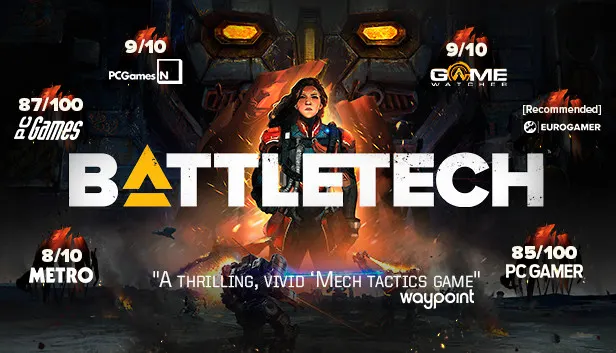
BATTLETECH is set in the year 3025, when the galaxy is caught in a cycle of perpetual war between noble houses that field massive combat vehicles called BattleMechs. The player commands a mercenary outfit of 'Mechs and the MechWarriors who pilot them, trying to stay afloat while being drawn into a brutal interstellar civil war and managing reputation with noble houses and local factions. Combat is turn-based: over 30 BattleMechs can be deployed in a wide variety of combinations, and terrain, positioning, weapon selection and special abilities decide the outcome. Between battles the player upgrades the starfaring base of operations, negotiates contracts with feudal lords, and repairs and maintains the 'Mechs, using the MechLab to replace damaged weapon systems with salvage from fallen foes. The story follows a violently deposed ruler waging war to reclaim her throne with the support of the player's mercenary company. Alongside the single-player campaign there is online PvP and cross-platform play, plus a skirmish mode against the AI.
Description from Steam
From original BATTLETECH/MechWarrior creator Jordan Weisman and the developers of the award-winning Shadowrun Returns series comes the next-generation of turn-based tactical 'Mech combat.
The year is 3025 and the galaxy is trapped in a cycle of perpetual war, fought by noble houses with enormous, mechanized combat vehicles called BattleMechs. Take command of your own mercenary outfit of 'Mechs and the MechWarriors that pilot them, struggling to stay afloat as you find yourself drawn into a brutal interstellar civil war. Upgrade your starfaring base of operations, negotiate mercenary contracts with feudal lords, repair and maintain your stable of aging BattleMechs, and execute devastating combat tactics to defeat your enemies on the battlefield.
COMMAND A SQUAD OF 'MECHS IN TURN-BASED COMBAT
Deploy over 30 BattleMechs in a wide variety of combinations. Use terrain, positioning, weapon selection and special abilities to outmaneuver and outplay your opponents.
MANAGE YOUR MERCENARY COMPANY
Recruit, customize, and develop unique MechWarriors. Improve and customize your dropship. As a Mercenary, travel a wide stretch of space, taking missions and managing your reputation with a variety of noble houses and local factions.
TAKE PART IN A DESPERATE CIVIL WAR
Immerse yourself in the story of a violently deposed ruler, waging a brutal war to take back her throne with the support of your ragtag mercenary company.
CUSTOMIZE YOUR 'MECHS
Use your MechLab to maintain and upgrade your units, replacing damaged weapon systems with battlefield salvage taken from fallen foes.
PVP MULTIPLAYER & SKIRMISH MODE
Customize a Lance of 'Mechs and MechWarriors to go head-to-head with your friends, compete against opponents online, or jump into single-player skirmish mode to test your strategies against the AI.
System requirements
WindowsRequires a 64-bit processor and operating system
Questions and answers
Does BATTLETECH have Russian language support?
Voice-over: English. Interface and subtitles: Russian, English, French, German.
Which regions does the key activate in?
Pick the region that matches your Steam account region — otherwise the code may not activate. Activation countries by region:
CIS — Russia, Ukr. UA, Kazakhstan, Belarus, Armenia and 6 more countries.
Once activated, the game stays on your account for good.
How soon does the code arrive after payment?
Keys are issued automatically, around the clock: the code appears on the order page within 2–3 minutes.
What to do if the key does not activate?
First check your Steam account region: the key activates in the countries of its own region, and a mismatch is the most common reason activation fails. If the region is right, open “Orders” in the site header, pick the order and write in the chat — you can attach a screenshot of the error, and an operator will help you.
Completed orders only
Customer reviews
There are no reviews of BATTLETECH yet. The store has 35 reviews of completed orders, 21 of them about Steam products.
Read reviewsSteam · PC
Similar games








Countries where the key activates
Key region: —