
Home · Steam games · Moonlighter: Complete Edition
Moonlighter: Complete Edition
How to redeem the key
- Open Steam and sign in to your account.
- In the top menu choose “Games” → “Activate a Product on Steam…”.
- Enter the code you received and confirm the activation.
- Once activated, the game appears in your library — download it and play.
Before buying, make sure the country of your account is supported by the key region.
How to receive the gift
- Pay for the order and enter a link to your Steam profile on the delivery page (steamcommunity.com/id/… or steamcommunity.com/profiles/…).
- The bot will send the gift to this account.
- Accept the gift in Steam (a notification arrives in the client and by e-mail) — the game will appear in your library.
The gift region must match your Steam account region — otherwise the gift cannot be accepted.
- Developer
- Digital Sun
- Publisher
- 11 bit studios
- Release date
- 29 May, 2018
- Genres
- Action, Adventure, Indie
- Russian language
- Yes, interface and subtitles
- Steam App ID
- 606150
Game languages
- Russian
- English
- Spanish
- French
- German
- Italian
- Polish
- Turkish
- Japanese
- Korean
- Китайский (упр.)
- Китайский (трад.)
- Portuguese (Brazil)
Languages are listed as reported by Steam. Please check them before buying: a key cannot be refunded once activated.
Languages are listed according to Steam data. Check them before buying: no refund is possible once the game has been sent.
About the game
Since launch, Moonlighter has received a wealth of updates—from quality-of-life improvements and balance tweaks to major roadmap additions. The current version expands the original experience with new mini-bosses, gear, over 100 new room layouts, Companions, deeper lore, and a New Game+ mode packed with fresh challenges.
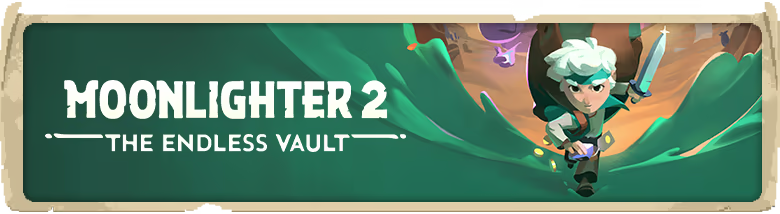
During a long-passed archaeological excavation, a set of Gates were discovered. People quickly realized that these ancient passages lead to different realms and dimensions – providing brave and reckless adventurers with treasures beyond measure. Rynoka, a small commercial village, was founded near the excavation site providing refuge and a place for adventurers to sell their hard-earned riches.
Moonlighter is an Action RPG with rogue-lite elements following the everyday routines of Will, an adventurous shopkeeper that dreams of becoming a hero.
SHOPKEEPING
While conducting your business in Rynoka village, you can put items on sale, set their price carefully, manage gold reserves, recruit assistants and upgrade the shop. Be careful though – some shady individuals may want to steal your precious wares!
FIGHT WITH STYLE
Defeat various enemies and bosses, and revel in challenging and deep combat mechanics. Masterful control of your weapons, critical timing, careful positioning, and an understanding of your enemies and environment are crucial to your survival. How you battle your enemies is up to you.
MEET VILLAGERS
Get to know your neighbors as you restore the prosperity of this small commercial hamlet. Help establish new businesses and watch them grow in the idyllic community of Rynoka.
CRAFT AND ENCHANT
Understanding the crafting and enchanting system is essential for your progression. Interact with the villagers to craft new armor and weapons, and enchant existing equipment. This creates a great deal of flexibility and spices up the way equipment is used.
GET THE LOOT
Access strange worlds through otherworldly gates and collect valuable items from exotic civilizations: resources, weapons, armors and peculiar artifacts. Hoarding everything won't be possible - use the unique inventory system wisely to take the most profitable loot with you.
BEFRIEND COMPANIONS
Gates lead to different worlds. Each run is unique and forces you to make smart and calculated decisions. You never know what you will encounter next – that’s why you must be prepared for everything.
System requirements
WindowsCommon questions
Does Moonlighter: Complete Edition have Russian language support?
Interface and subtitles: Russian, English, Spanish, French, German, Italian, Polish, Turkish, Japanese, Korean, Китайский (упр.), Китайский (трад.), Portuguese (Brazil).
Which regions does the key activate in?
The key activates with no regional restrictions — in any country, on a Steam account from any region. Once activated, the game stays on your account for good.
How soon does the code arrive after payment?
Keys are issued automatically, around the clock: the code appears on the order page within 2–3 minutes.
What to do if the key does not activate?
First check your Steam account region: the key activates in the countries of its own region, and a mismatch is the most common reason activation fails. If the region is right, open “Orders” in the site header, pick the order and write in the chat — you can attach a screenshot of the error, and an operator replies.
What is a Steam gift and how is it different from a key?
A gift is a present our bot sends straight to your Steam account via your profile link: no code to enter, the game appears in your library once you accept the gift. A key is an activation code you enter yourself in the Steam client. You choose the format on the purchase panel.
Which gift region should I choose?
The one your Steam account is registered in: Steam will not accept a gift from another region. The region is shown in your Steam account settings under "Store country". "CIS countries" means Belarus, Armenia, Georgia and other CIS countries.
How will I receive the gift?
After payment you enter a link to your Steam profile and the bot sends the gift straight to the account — you only need to accept it in Steam. It usually takes 2–5 minutes, around the clock.
What if the account already has this game?
Steam will not let you accept a gift of a game already in your library — check the library before buying. If it happens, write in the order chat: we will refund you.
Countries where the key activates
Key region: —
Similar items
 RU
RU
 −88%
RU
−88%
RU
 Sold: 6
RU
Sold: 6
RU
 RU
RU
 −79%
RU
−79%
RU
 RU
RU
 RURU
RURU
 RU
RU
 RU
RU
 RU
RU
 RU
RU
 RU
RU
 RU
RU
 RU
RU