
Home · Steam games · Hellblade: Senua's Sacrifice
Hellblade: Senua's Sacrifice
How to redeem the key
- Open Steam and sign in to your account.
- In the top menu choose “Games” → “Activate a Product on Steam…”.
- Enter the code you received and confirm the activation.
- Once activated, the game appears in your library — download it and play.
Before buying, make sure the country of your account is supported by the key region.
How to receive the gift
- Pay for the order and enter a link to your Steam profile on the delivery page (steamcommunity.com/id/… or steamcommunity.com/profiles/…).
- The bot will send the gift to this account.
- Accept the gift in Steam (a notification arrives in the client and by e-mail) — the game will appear in your library.
The gift region must match your Steam account region — otherwise the gift cannot be accepted.
- Developer
- Ninja Theory
- Publisher
- Ninja Theory, Xbox Game Studios
- Release date
- 7 Aug, 2017
- Genres
- Action, Adventure, Indie
- Russian language
- Yes, interface and subtitles
- Steam App ID
- 414340
Game languages
- English
- Russian
- English
- Spanish
- French
- German
- Portuguese
- Italian
- Polish
- Turkish
- Japanese
- Korean
- Китайский (упр.)
- Arabic
- Danish
- Китайский (трад.)
- Dutch
- Norwegian
- Portuguese (Brazil)
- Finnish
- Шведский
Languages are listed as reported by Steam. Please check them before buying: a key cannot be refunded once activated.
Languages are listed according to Steam data. Check them before buying: no refund is possible once the game has been sent.
About the game

From the makers of Heavenly Sword, Enslaved: Odyssey to the West, and DmC: Devil May Cry, comes a warrior’s brutal journey into myth and madness.
2021 Update:
Return to Helheim and experience Senua’s world through new eyes with enriched visuals and new features. Upgraded materials, particles and LOD, DirectX Raytracing and optimised performance with NVIDIA DLSS and AMD FSR support. We have also used this opportunity to include some key accessibility improvements, including full controller remapping and colour blindness settings.
Set in the Viking age, a broken Celtic warrior embarks on a haunting vision quest into Viking Hell to fight for the soul of her dead lover.
Created in collaboration with neuroscientists and people who experience psychosis, Hellblade: Senua’s Sacrifice will pull you deep into Senua’s mind.

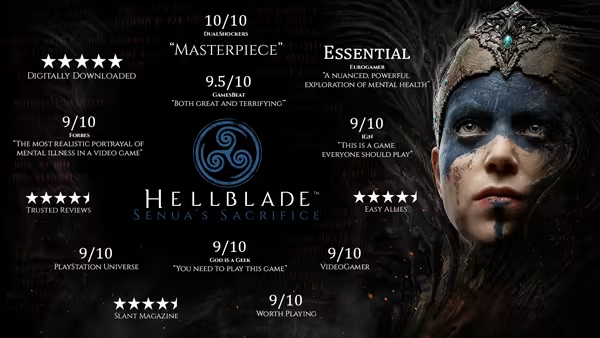
GAMEPLAY
- Accessibility options available on launch within the first-boot options menu.
- Adjustable combat difficulty between dynamically-adjusted 'Auto' mode, or manually-selected 'Easy', 'Medium', or 'Hard' modes.
- Game can be paused both during gameplay and cinematics.
AUDIO
- Custom volume controls can be adjusted for Master, Music, SFX, Voices, and Menu audio.
- Audio output can be adjusted between Stereo and Mono sound modes.
VISUAL
- Color blind modes, and correction intensities can be adjusted for the included Deuteranopia, Protanopia, and Tritanopia filters.
- Subtitles for spoken content can be set to On or Off.
- Subtitle text size can be adjusted between 'Standard' or 'Large'.
- Subtitle text color can be adjusted between White, Orange, Green, or Blue.
- Subtitle backgrounds can be adjusted between Transparent or 'Solid' black.
- Text contrast for menu backgrounds can be adjusted between 'Half-Transparent' or 'Solid' black.
INPUT
- Adjustable input sensitivity for controller joystick and mouse axes, and ability to invert camera axis.
- Input remapping for keyboard keys and controller buttons (camera control and menu navigation keys excluded).
- Full keyboard support allowing the game to be entirely played with a keyboard (arrow keys replace mouse/right stick movement).
- Controller vibration can be set to On or Off.
- Running modifier can be set to be activated on key/button Toggle or Hold.
Note that the listed accessibility options apply to the Hellblade: Senua's Sacrifice Enhanced on PC version of the game.
System requirements
WindowsCommon questions
Does Hellblade: Senua's Sacrifice have Russian language support?
Voice-over: English. Interface and subtitles: Russian, English, Spanish, French, German, Portuguese, Italian, Polish, Turkish, Japanese, Korean, Китайский (упр.), Arabic, Danish, Китайский (трад.), Dutch, Norwegian, Portuguese (Brazil), Finnish, Шведский.
Which regions does the key activate in?
The key activates with no regional restrictions — in any country, on a Steam account from any region. Once activated, the game stays on your account for good.
How soon does the code arrive after payment?
Keys are issued automatically, around the clock: the code appears on the order page within 2–3 minutes.
What to do if the key does not activate?
First check your Steam account region: the key activates in the countries of its own region, and a mismatch is the most common reason activation fails. If the region is right, open “Orders” in the site header, pick the order and write in the chat — you can attach a screenshot of the error, and an operator replies.
What is a Steam gift and how is it different from a key?
A gift is a present our bot sends straight to your Steam account via your profile link: no code to enter, the game appears in your library once you accept the gift. A key is an activation code you enter yourself in the Steam client. You choose the format on the purchase panel.
Which gift region should I choose?
The one your Steam account is registered in: Steam will not accept a gift from another region. The region is shown in your Steam account settings under "Store country". "CIS countries" means Belarus, Armenia, Georgia and other CIS countries.
How will I receive the gift?
After payment you enter a link to your Steam profile and the bot sends the gift straight to the account — you only need to accept it in Steam. It usually takes 2–5 minutes, around the clock.
What if the account already has this game?
Steam will not let you accept a gift of a game already in your library — check the library before buying. If it happens, write in the order chat: we will refund you.
Countries where the key activates
Key region: —
Similar items
 RU
RU
 Sold: 6
RU
Sold: 6
RU
 −89%
RU
−89%
RU
 −40%
−40%
 −88%
RU
−88%
RU
 −50%
−50%
 RURU
RURU
 RURU
RURU
 RU
RU
 RU
RU
 RU
RU
 RU
RU
 −90%
RU
−90%
RU
 RU
RU