


Home · Steam games · Little Nightmares III
Steam·gift
Little Nightmares III
How to receive the gift
- 1Pay for the order and enter a link to your Steam profile on the delivery page (steamcommunity.com/id/… or steamcommunity.com/profiles/…).
- 2The bot will send the gift to this account.
- 3Accept the gift in Steam (a notification arrives in the client and by e-mail) — the game will appear in your library.
The gift region must match your Steam account region — otherwise the gift cannot be accepted.
Details and languages
- Developer
- Supermassive Games
- Publisher
- Bandai Namco Entertainment
- Release date
- 9 Oct 2025
- Genres
- Adventure
- Russian language
- Yes, interface and subtitles
- Steam App ID
- 1392860
Voice-over
Interface and subtitles
- Russian
- English
- Spanish
- French
- German
- Italian
- Polish
- Japanese
- Korean
- Simplified Chinese
- Arabic
- Indonesian
- Spanish (Latin America)
- Traditional Chinese
- Portuguese (Brazil)
- Thai
No information about supported languages.
Languages are listed according to Steam data. Check them before buying: no refund is possible once the game has been sent.
Before you buy Little Nightmares III
- Game modes
- Single-player, co-op online.
- Gamepad
- Full support.
- Scores
- 10,152 reviews on Steam.
- Age rating
- 16+
About the game
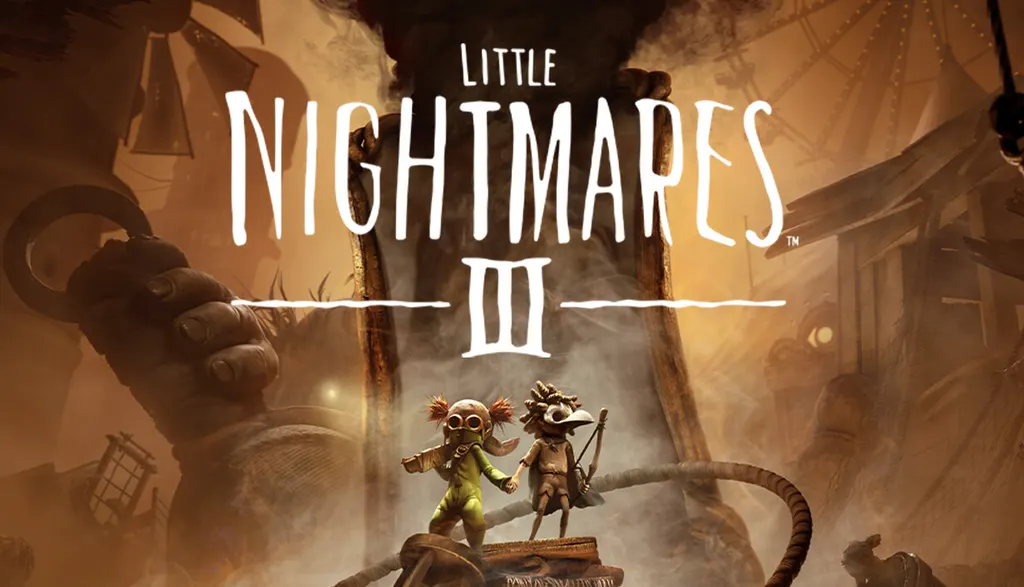
Little Nightmares III is a 2025 PC adventure game developed by Supermassive Games and published by Bandai Namco Entertainment. It follows two friends, Low and Alone, who roamed the desolate lands separately before meeting and now seek a way out of the Nowhere, a world not made for children. They move through hidden passages, overcome obstacles and watch each other's backs, with a companion controlled either by another player or by the computer. Each child has a signature item: Low's bow serves against high targets, ropes and flying enemies, while Alone's wrench helps finish off stunned foes, break barriers and operate massive machines. In places such as the sandy ruins of the Necropolis, a candy factory and a funfair, the pair must hide, run and fight, and as they follow the Spiral the locations grow more disturbing and traumatic memories surface. Single-player and online co-op modes are available.
Description from Steam
Two young friends, lost in a frightening world not made for children.
If they cannot find a way out of this Nowhere place, they’ll be condemned to a fate worse than death.

You play as Low and Alone, best friends ever since they found each other in this lonely nightmare. They each possess their own iconic item: a bow for Low and a wrench for Alone. Working together, they’ve become adept at sneaking through hidden passages, hoisting each other over massive obstacles, and watching each other’s backs. Whether you’re playing with a friend or an A.I. companion, you’ll depend on each other's iconic items to create opportunities and to progress. The environment is full of clues and possibilities for imaginative children to exploit. Low’s arrows can reach high targets, cut through ropes, or down flying enemies, and Alone’s wrench is just the thing for crushing stunned enemies, smashing through barriers, or manipulating the workings of massive machines.

No matter where you go, the Nowhere is home to horrific monsters. These Residents won't hesitate to go out of their way to capture any intrusive little Visitors that draw their attention. You might find yourself playing a terrifying game of hide and seek with Monster Baby in the sandy ruins of the Necropolis, struggling to avoid swarms of voracious Candy Weevils in an unsetlling Candy Factory, or dodging heavy feet while running along the rain-soaked promenade of a filthy funfair. You'll need to be ready to run, hide, or even defend yourself at a moment's notice to stay in one piece.

Don’t be too distracted by the desolate beauty of the Nowhere. There are dark mysteries waiting for you as Low and Alone follow their mirror path across the Spiral. As each new location will become more dangerous and disturbing than the last, traumatic flashes from the past will begin to emerge. Will Low and Alone finally escape from this unending nightmare?
Only you can help them, little ones...
System requirements
WindowsRequires a 64-bit processor and operating system
Questions and answers
Does Little Nightmares III have Russian language support?
Interface and subtitles: Russian, English, Spanish, French, German, Italian, Polish, Japanese, Korean, Simplified Chinese, Arabic, Indonesian, Spanish (Latin America), Traditional Chinese, Portuguese (Brazil), Thai.
What is a Steam gift and how is it different from a key?
A gift is a present our bot sends straight to your Steam account via your profile link: no code to enter, the game appears in your library once you accept the gift. A key is an activation code you enter yourself in the Steam client.
Which gift region should I choose?
The one your Steam account is registered in: Steam will not accept a gift from another region. The region is shown in your Steam account settings under "Store country". "CIS countries" means Belarus, Armenia, Georgia and other CIS countries.
How will I receive the gift?
After payment you enter a link to your Steam profile and the bot sends the gift straight to the account — you only need to accept it in Steam. It usually takes 2–5 minutes, around the clock.
What if the account already has this game?
Steam will not let you accept a gift of a game already in your library — check the library before buying. If it happens, write in the order chat: we will refund you.
Completed orders only
Customer reviews
There are no reviews of Little Nightmares III yet. The store has 35 reviews of completed orders, 21 of them about Steam products.
Read reviewsSteam · PC
Similar games









Countries where the key activates
Key region: —