


Home · Steam games · Torchlight II
Steam·gift
Torchlight II
How to receive the gift
- 1Pay for the order and enter a link to your Steam profile on the delivery page (steamcommunity.com/id/… or steamcommunity.com/profiles/…).
- 2The bot will send the gift to this account.
- 3Accept the gift in Steam (a notification arrives in the client and by e-mail) — the game will appear in your library.
The gift region must match your Steam account region — otherwise the gift cannot be accepted.
Details and languages
- Developer
- Runic Games
- Publisher
- XD
- Release date
- 20 Sep 2012
- Genres
- Action, Adventure, Indie, RPG
- Russian language
- Yes, with voice-over
- Steam App ID
- 200710
Voice-over
- Russian
- English
- German
- Polish
- Japanese
- Simplified Chinese
- Traditional Chinese
Interface and subtitles
- Russian
- English
- German
- Polish
- Japanese
- Simplified Chinese
- Traditional Chinese
No information about supported languages.
Languages are listed according to Steam data. Check them before buying: no refund is possible once the game has been sent.
Before you buy Torchlight II
- Game modes
- Single-player, co-op, cross-platform play.
- Scores
- 33,071 reviews on Steam.
- System
- Windows, macOS and Linux.
About the game
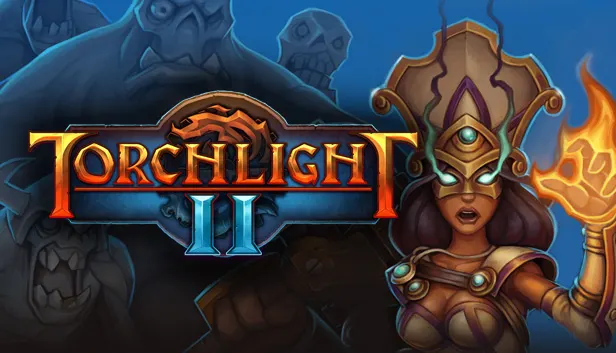
Torchlight II is an action RPG by Runic Games that continues the first game and expands its world. It takes place in the open world of Vilderan, where the hero explores vast areas and visits hub towns along the way, fighting through rain, snow, day and night. Players choose from four classes, and each character can be male or female with customized cosmetic features and looks. Levels are randomized, so layouts, paths, loot and monsters differ with every playthrough. The game offers co-op over LAN or the Internet with a matchmaking service, plus Steam Workshop support that automatically downloads and synchronizes mods, with over a thousand mods available and the GUTS editor for creating and sharing original work. After the primary campaign, New Game Plus lets players start again with the same character at a significantly greater challenge while keeping all skills, gold and gear. Pets and fishing return in improved form: the pet still runs to town to sell loot, and now has other useful abilities as well.
Description from Steam
The award-winning Action RPG is back, bigger and better than ever! Torchlight II is filled to the brim with randomized levels, enemies and loot. Capturing all the flavor and excitement of the original, Torchlight II expands the world and adds features players wanted most, including online and LAN multiplayer. Once again, the fate of the world is in your hands.
Key Features
CHARACTERS
With four classes to choose from, you’ll have a variety of play styles at your fingertips. Each class can be played as either male or female, with customized cosmetic features and looks to make your hero stand out.
MULTIPLAYER
Play co-op with your friends via LAN or over the Internet for free. Our matchmaking service lets you connect and play games with people around the world.
OPEN WORLD
Explore the vast overworld and multiple hub towns of Vilderan. Fight through rain, snow, day and night. Level randomization ensures new layouts, paths, loot, and monsters every time you play.
MOD SUPPORT
Torchlight II supports Steam Workshop, allowing for automatic mod subscription and synchronization. Choose from over a thousand mods and bend the game to your will. Or use GUTS, the Torchlight II editor, to create and share your work with the entire world!
NEW GAME PLUS
In New Game Plus, the game's not over until you say it is. Once you've beaten Torchlight II's primary campaign, you can start again with the same character for a significantly greater challenge. You'll keep all the skills, gold, and gear you worked so hard for!
PETS & FISHING
These popular features make their return in Torchlight II in improved form. More choices, better effects, and your pet will still make the run to town to sell your loot so you don’t have to.
System requirements
WindowsQuestions and answers
Does Torchlight II have Russian language support?
Voice-over: Russian, English, German, Polish, Japanese, Simplified Chinese, Traditional Chinese. Interface and subtitles: Russian, English, German, Polish, Japanese, Simplified Chinese, Traditional Chinese.
What is a Steam gift and how is it different from a key?
A gift is a present our bot sends straight to your Steam account via your profile link: no code to enter, the game appears in your library once you accept the gift. A key is an activation code you enter yourself in the Steam client.
Which gift region should I choose?
The one your Steam account is registered in: Steam will not accept a gift from another region. The region is shown in your Steam account settings under "Store country". "CIS countries" means Belarus, Armenia, Georgia and other CIS countries.
How will I receive the gift?
After payment you enter a link to your Steam profile and the bot sends the gift straight to the account — you only need to accept it in Steam. It usually takes 2–5 minutes, around the clock.
What if the account already has this game?
Steam will not let you accept a gift of a game already in your library — check the library before buying. If it happens, write in the order chat: we will refund you.
Completed orders only
Customer reviews
There are no reviews of Torchlight II yet. The store has 35 reviews of completed orders, 21 of them about Steam products.
Read reviewsSteam · PC
Similar games




Countries where the key activates
Key region: —