


Home · Steam games · Age of Empires IV
Steam·activation key
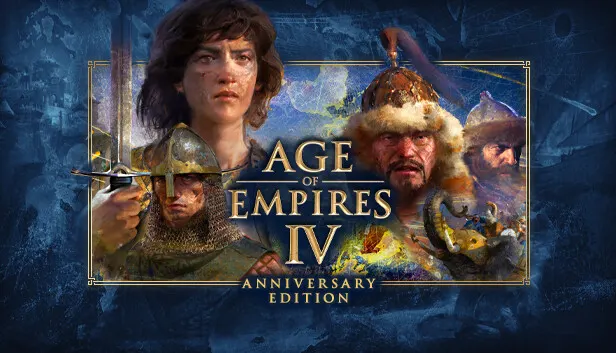
Age of Empires IV
How to redeem the key
- 1Open Steam and sign in to your account.
- 2In the top menu choose “Games” → “Activate a Product on Steam…”.
- 3Enter the code you received and confirm the activation.
- 4Once activated, the game appears in your library — download it and play.
Before buying, make sure the country of your account is supported by the key region.
Details and languages
- Developer
- World's Edge, Relic Entertainment, Forgotten Empires, Climax Studios
- Publisher
- Xbox Game Studios
- Release date
- 28 Oct 2021
- Genres
- Strategy
- Russian language
- Yes, interface and subtitles
- Steam App ID
- 1466860
Voice-over
- English
- Spanish
- French
- German
- Italian
- Korean
- Simplified Chinese
- Spanish (Latin America)
- Portuguese (Brazil)
Interface and subtitles
- Russian
- English
- Spanish
- French
- German
- Portuguese
- Italian
- Polish
- Turkish
- Japanese
- Korean
- Simplified Chinese
- Hungarian
- Vietnamese
- Greek
- Danish
- Spanish (Latin America)
- Traditional Chinese
- Malay
- Dutch
- Norwegian
- Portuguese (Brazil)
- Finnish
- Hindi
- Czech
- Swedish
No information about supported languages.
Languages are listed as reported by Steam. Please check them before buying: a key cannot be refunded once activated.
Before you buy Age of Empires IV
- Game modes
- Single-player, co-op online, PvP online, cross-platform play.
- Gamepad
- Full support, including DualSense.
- Scores
- 72,144 reviews on Steam.
- Age rating
- 12+
About the game
Age of Empires IV is a real-time strategy game set across the period from the Dark Ages to the Renaissance. Players build cities, manage resources and fight on land and at sea, choosing from 10 civilizations including the English, the Chinese and the Delhi Sultanate. The game offers 4 campaigns with 35 missions, along with a Campaign Story Mode and a tutorial system for newcomers. Online multiplayer supports up to 8 participants in PvP and PvE modes, including co-op play and spectating. The Anniversary Edition adds two civilizations, the Malians and the Ottomans, plus 8 new maps, new masteries, challenges, taunts and cheats. A beta version of the Mod Editor lets players create their own maps, mission scenarios and tuning packs.
Description from Steam
Celebrating its first year of delighting millions of global players, the award-winning and best-selling strategy franchise continues with Age of Empires IV: Anniversary Edition, putting you at the center of even more epic historical battles that shaped the world.
Featuring both familiar and innovative new ways to expand your empire in vast landscapes with stunning 4K visual fidelity, Age of Empires IV: Anniversary Edition brings an evolved real-time strategy game to the next level in this celebratory new version that includes a host of free new content such as brand-new civilizations, new maps, additional in-game updates and languages, and new masteries, challenges, taunts and cheats – all at an amazing value that packs in more history than ever before!
Two New Civilizations, 8 New Maps - Lead the mighty Malians of West Africa as one of the richest trading nations of all-time as you focus on strong economic prowess in mining and investing in gold.
Or assemble one of the longest lasting empires in history with the Ottoman civilization and its well-trained military force, which features the largest gunpowder siege weapons available – the Great Bombards – mighty cannons that can fell any opponents who stand in your way.
Customize Your Game with Mods (Beta) - Chart your own course with powerful creator tools in the latest beta release of Mod Editor. Sculpt your own skirmish and multiplayer maps, craft unique mission scenarios, forge data driven tuning packs and envision new modes of play for Age of Empires IV.
Return to History – The past is prologue as you are immersed in a rich historical setting of 10 diverse civilizations across the world from the English to the Chinese to the Delhi Sultanate in your quest for victory. Build cities, manage resources, and lead your troops to battle on land and at sea in 4 distinct campaigns with 35 missions that span across 500 years of history from the Dark Ages up to the Renaissance.
An Age for All Players – Age of Empires IV is an inviting experience for new players with a tutorial system that teaches the essence of real-time strategy and a Campaign Story Mode designed for first time players to help achieve easy setup and success, yet is challenging enough for veteran players with new game mechanics, evolved strategies, and combat techniques.
Challenge the World – Jump online to compete, cooperate or spectate with up to 7 of your friends in PVP and PVE multiplayer modes that include ranked seasons and much more!
Choose Your Path to Greatness with Historical Figures – Live the adventures of Joan of Arc in her quest to defeat the English, or command mighty Mongol troops as Genghis Khan in his conquest across Asia. The choice is yours – and every decision you make will determine the outcome of history.
System requirements
WindowsRequires a 64-bit processor and operating system
Questions and answers
Does Age of Empires IV have Russian language support?
Voice-over: English, Spanish, French, German, Italian, Korean, Simplified Chinese, Spanish (Latin America), Portuguese (Brazil). Interface and subtitles: Russian, English, Spanish, French, German, Portuguese, Italian, Polish, Turkish, Japanese, Korean, Simplified Chinese, Hungarian, Vietnamese, Greek, Danish, Spanish (Latin America), Traditional Chinese, Malay, Dutch, Norwegian, Portuguese (Brazil), Finnish, Hindi, Czech, Swedish.
Which regions does the key activate in?
The key activates with no regional restrictions — in any country, on a Steam account from any region. Once activated, the game stays on your account for good.
How soon does the code arrive after payment?
Keys are issued automatically, around the clock: the code appears on the order page within 2–3 minutes.
What to do if the key does not activate?
First check your Steam account region: the key activates in the countries of its own region, and a mismatch is the most common reason activation fails. If the region is right, open “Orders” in the site header, pick the order and write in the chat — you can attach a screenshot of the error, and an operator will help you.
Completed orders only
Customer reviews
There are no reviews of Age of Empires IV yet. The store has 35 reviews of completed orders, 21 of them about Steam products.
Read reviewsSteam · PC
Similar games







Countries where the key activates
Key region: —