


Home · Steam games · Hogwarts Legacy
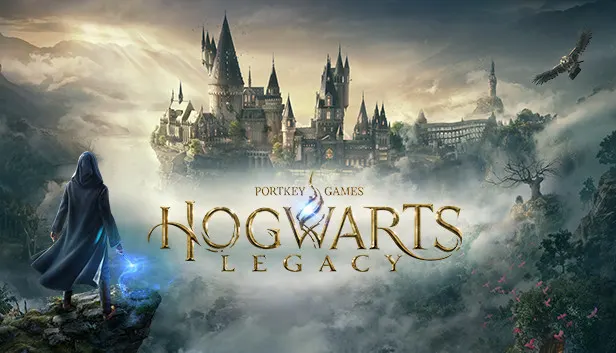
Steam·activation key
Hogwarts Legacy
How to redeem the key
- 1Open Steam and sign in to your account.
- 2In the top menu choose “Games” → “Activate a Product on Steam…”.
- 3Enter the code you received and confirm the activation.
- 4Once activated, the game appears in your library — download it and play.
Before buying, make sure the country of your account is supported by the key region.
Details and languages
- Developer
- Avalanche Software
- Publisher
- Warner Bros. Games
- Release date
- 10 Feb 2023
- Genres
- Action, Adventure, RPG
- Russian language
- Yes, interface and subtitles
- Steam App ID
- 990080
Voice-over
- English
- Spanish
- French
- German
- Italian
- Japanese
- Spanish (Latin America)
- Portuguese (Brazil)
Interface and subtitles
- Russian
- English
- Spanish
- French
- German
- Italian
- Polish
- Japanese
- Korean
- Simplified Chinese
- Arabic
- Spanish (Latin America)
- Traditional Chinese
- Portuguese (Brazil)
No information about supported languages.
Languages are listed as reported by Steam. Please check them before buying: a key cannot be refunded once activated.
Before you buy Hogwarts Legacy
- Which key
- The “Hogwarts Legacy” key, region “CIS”: 3 790 ₽, cannot be activated in Russia.
- Game modes
- Single-player only.
- Gamepad
- Full support, including DualSense and DualShock.
- In-game purchases
- Yes.
- Scores
- 274,054 reviews on Steam.
- Age rating
- 12+
About the game
Players take the role of a student in the 1800s who guards the key to an ancient secret capable of tearing the wizarding world apart. Its fate is settled through alliances with other characters and battles against Dark wizards. Beyond exploring locations, the game offers discovering magical beasts, customizing the character, crafting potions, casting spells and upgrading talents. A Haunted Hogsmeade Shop Quest is included, granting an additional dungeon, the Shopkeeper’s Cosmetic Set and an in-game Hogsmeade shop. Updates added Photo Mode and Talent Resets, and new cosmetic items became available to all players: The Glasses That Lived, the Azkaban Prisoner Uniform and Coat, the Onyx Hippogriff Mount, the Felix Felicis Potion Recipe and 2 Dark Wizard Brooms.
Description from Steam
Hogwarts Legacy is an open-world action RPG set in the world first introduced in the Harry Potter books. Embark on a journey through familiar and new locations as you explore and discover magical beasts, customize your character and craft potions, master spell casting, upgrade talents and become the wizard you want to be.
Experience Hogwarts in the 1800s. Your character is a student who holds the key to an ancient secret that threatens to tear the wizarding world apart. Make allies, battle Dark wizards, and ultimately decide the fate of the wizarding world. Your legacy is what you make of it. Live the Unwritten.
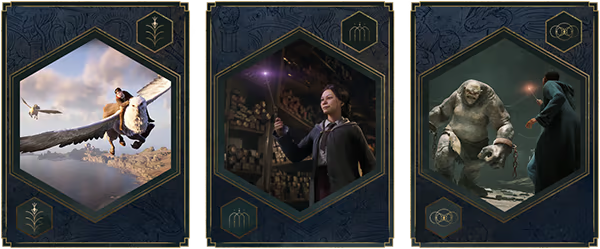

Includes Haunted Hogsmeade Shop Quest which grants access to an additional dungeon, Shopkeeper’s Cosmetic Set, and in-game Hogsmeade shop.
New Features Include:
-Photo Mode
-Talent Resets
New cosmetic items now available to all players: The Glasses That Lived, Azkaban Prisoner Uniform and Coat, Onyx Hippogriff Mount, Felix Felicis Potion Recipe, Dark Wizard Brooms (2)
System requirements
WindowsRequires a 64-bit processor and operating system
Questions and answers
Does Hogwarts Legacy have Russian language support?
Voice-over: English, Spanish, French, German, Italian, Japanese, Spanish (Latin America), Portuguese (Brazil). Interface and subtitles: Russian, English, Spanish, French, German, Italian, Polish, Japanese, Korean, Simplified Chinese, Arabic, Spanish (Latin America), Traditional Chinese, Portuguese (Brazil).
Which regions does the key activate in?
Pick the region that matches your Steam account region — otherwise the code may not activate. Activation countries by region:
CIS — Ukr. UA, Kazakhstan, Armenia, Azerbaijan, Kyrgyzstan and 4 more countries;
Latin America — Antigua and Barbuda, Argentina, Bahamas, Barbados, Belize and 28 more countries.
Once activated, the game stays on your account for good.
How soon does the code arrive after payment?
Keys are issued automatically, around the clock: the code appears on the order page within 2–3 minutes.
What to do if the key does not activate?
First check your Steam account region: the key activates in the countries of its own region, and a mismatch is the most common reason activation fails. If the region is right, open “Orders” in the site header, pick the order and write in the chat — you can attach a screenshot of the error, and an operator will help you.
Completed orders only
Customer reviews
There are no reviews of Hogwarts Legacy yet. The store has 35 reviews of completed orders, 21 of them about Steam products.
Read reviewsSteam · PC
Similar games








Countries where the key activates
Key region: —