


Home · Steam games · Squad
Steam·activation key
Squad
How to redeem the key
- 1Open Steam and sign in to your account.
- 2In the top menu choose “Games” → “Activate a Product on Steam…”.
- 3Enter the code you received and confirm the activation.
- 4Once activated, the game appears in your library — download it and play.
Before buying, make sure the country of your account is supported by the key region.
Details and languages
- Developer
- Offworld
- Publisher
- Offworld
- Release date
- 23 Sep 2020
- Genres
- Action, Indie, Massively Multiplayer, Strategy
- Russian language
- Yes, interface and subtitles
- Steam App ID
- 393380
Voice-over
- English
Interface and subtitles
- Russian
- English
- Spanish
- French
- German
- Japanese
- Simplified Chinese
- Portuguese (Brazil)
- Ukrainian
No information about supported languages.
Languages are listed as reported by Steam. Please check them before buying: a key cannot be refunded once activated.
Before you buy Squad
- Which key
- For an account from Russia, these “Squad” keys work: CIS (910 ₽) and Global (1 400 ₽).
- Game modes
- Co-op online, PvP online.
- Gamepad
- Partial support.
- Scores
- 180,174 reviews on Steam.
About the game
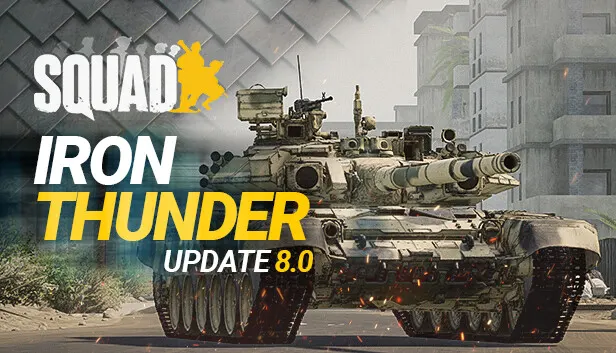
Squad is a multiplayer tactical first-person shooter where combat is built around realism and coordinated teamwork. Battles are fought 50 vs. 50 between conventional and unconventional factions on large maps inspired by real-world locations, with players operating in squads of up to nine soldiers. There are 13 factions in total, each with its own weapons and vehicles, so loadouts are chosen to match the preferred tactics. Picture-in-Picture scopes simulate looking through military optics, and a suppression system affects how firefights unfold. Beyond combat, players build fortifications and emplacements and supply their team with ammunition and materials, while a VoIP system with several channels and map markers helps coordinate actions. Update 10.1 introduced Fireteam, a five-player co-op PvE mode with four tactical missions.
Description from Steam
Squad is the embodiment of tactical military action. Compete in massive-scale 50 vs. 50 battles in the most realistic combined-arms first-person shooter. Squad emphasizes combat realism through teamwork, tactics, and authentic warfare. A wide selection of realistic faction-specific weapons and vehicles allow players to build their own loadouts that best suit their preferred tactics. And with Squad’s unique Picture-in-Picture scopes, it’s like you’re really aiming at the enemy through real military-issue scopes.
Featuring 13 factions, 24 massive maps, and a sweeping arsenal of weapons and vehicles, Squad creates a heart-thumping, visceral shooter experience that requires split-second decision-making in intense, realistic firefights.
New in Update 10.1: Fireteam
Fireteam is Squad's new PvE gamemode that has launched with Update 10.1. This up to 5-player co-op PvE mode condenses the game’s most memorable moments into shorter, intense tactical missions. Four missions are available to all Squad players. Those who wish to support the ongoing development of Fireteam can choose to purchase either the Supporter or Founder pack - linked from this page.
Massive 50 vs. 50 Battles
Squad creates authentic combat experiences while pitting conventional and unconventional factions against each other. As part of a 50 person team, join a nine-person squad to face off against opposing factions in intense combat across large real-world environments. Squad features 13 factions from all over the world, including the United States Marine Corps, Australian Defence Force, and Canadian Army among many others.
Ultra-Realistic Infantry Combat
Squad’s combat was designed to provide the most fun, immersive, and authentic infantry experience possible. With Squad’s core tenets of teamwork and tactics, you’ll have to work together to outmaneuver your enemies with realistic Picture-in-Picture scopes and Squad’s unique Suppression system. Work with your squad to overwhelm the enemy and snatch victory from the jaws of defeat!
Building & Logistics System
Adapt to the ever-changing needs of the battlefield. By building fortifications and emplacements or supplying your team with ammunition and materials, you can give your squad the edge. Whether it’s placing HMGs and AT guns or fortifying a position with sandbags, razor wire, and some much-needed ammo, the battlefield is yours to change, if you have the courage to do so.
Communication
Solid communication is a soldier's best friend when engaging the enemy. To help facilitate navigating the complexity of communication on the battlefield, Squad provides a world-class in-game VoIP system that allows players to talk to other soldiers locally, in-squad, between squad leaders, or even to the overall team commander. Map tools and in-world markers aid fire team leads and squad leaders to inform their soldiers of on-the-fly engagement tactics.
System requirements
WindowsRequires a 64-bit processor and operating system
Questions and answers
Does Squad have Russian language support?
Voice-over: English. Interface and subtitles: Russian, English, Spanish, French, German, Japanese, Simplified Chinese, Portuguese (Brazil), Ukrainian.
Which regions does the key activate in?
Pick the region that matches your Steam account region — otherwise the code may not activate. Activation countries by region:
CIS — Russia, Ukr. UA, Kazakhstan, Belarus, Armenia and 6 more countries;
Global — in any country in the world.
Once activated, the game stays on your account for good.
How soon does the code arrive after payment?
Keys are issued automatically, around the clock: the code appears on the order page within 2–3 minutes.
What to do if the key does not activate?
First check your Steam account region: the key activates in the countries of its own region, and a mismatch is the most common reason activation fails. If the region is right, open “Orders” in the site header, pick the order and write in the chat — you can attach a screenshot of the error, and an operator will help you.
Completed orders only
Customer reviews
There are no reviews of Squad yet. The store has 35 reviews of completed orders, 21 of them about Steam products.
Read reviewsSteam · PC
Similar games










Countries where the key activates
Key region: —