


Home · Steam games · Starfield
Steam·activation key
Starfield
How to redeem the key
- 1Open Steam and sign in to your account.
- 2In the top menu choose “Games” → “Activate a Product on Steam…”.
- 3Enter the code you received and confirm the activation.
- 4Once activated, the game appears in your library — download it and play.
Before buying, make sure the country of your account is supported by the key region.
Details and languages
- Developer
- Bethesda Game Studios
- Publisher
- Bethesda Softworks
- Release date
- 5 Sep 2023
- Genres
- RPG
- Russian language
- No
- Steam App ID
- 1716740
Voice-over
- English
- Spanish
- French
- German
- Japanese
Interface and subtitles
- English
- Spanish
- French
- German
- Italian
- Polish
- Japanese
- Simplified Chinese
- Portuguese (Brazil)
No information about supported languages.
Languages are listed as reported by Steam. Please check them before buying: a key cannot be refunded once activated.
Before you buy Starfield
- Which key
- For an account from Russia, these “Starfield” keys work: CIS (2 420 ₽) and Global (3 530 ₽).
- Game modes
- Single-player only.
- Gamepad
- Full support.
- Scores
- 115,107 reviews on Steam.
- Age rating
- 18+
About the game
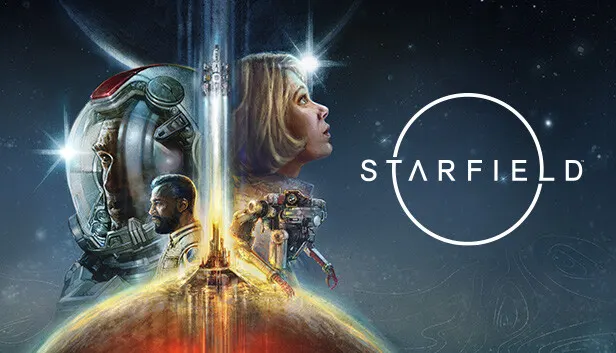
Starfield is set in the year 2330, when humanity has moved beyond the solar system and settled other planets. It is Bethesda Game Studios' first new universe in over 25 years and a role-playing game in which the character is defined by appearance, background and traits, with exploration built around free choice of activities. The player joins Constellation and sets out to answer humanity's greatest mystery. The game offers more than 1000 planets with cities, bases and strange worlds, where characters can be recruited, factions joined and quests completed. Ships can be customized in appearance and systems, crew members assigned, and enemy vessels boarded and taken. On planets, resources are gathered for crafting, outposts built with automated extraction and cargo links, and research projects pursued. Combat includes sniper rifles, lasers and explosives, while zero-gravity environments and boost packs change how fights play out. The game is single-player only.
Description from Steam
Starfield is the first new universe in over 25 years from Bethesda Game Studios, the award-winning creators of The Elder Scrolls V: Skyrim and Fallout 4. In this next generation role-playing game set amongst the stars, create any character you want and explore with unparalleled freedom as you embark on an epic journey to answer humanity’s greatest mystery.
In the year 2330, humanity has ventured beyond our solar system, settling new planets, and living as a spacefaring people. You will join Constellation – the last group of space explorers seeking rare artifacts throughout the galaxy – and navigate the vast expanse of space in Bethesda Game Studios’ biggest and most ambitious game.
Tell Your story
In Starfield the most important story is the one you tell with your character. Start your journey by customizing your appearance and deciding your Background and Traits. Will you be an experienced explorer, a charming diplomat, a stealthy cyber runner, or something else entirely? The choice is yours. Decide who you will be and what you will become.
Explore Outer Space
Venture through the stars and explore more than 1000 planets. Navigate bustling cities, explore dangerous bases, and traverse wild landscapes. Meet and recruit a memorable cast of characters, join in the adventures of various factions, and embark on quests across the Settled Systems. A new story or experience is always waiting to be discovered.
Captain the Ship Of Your Dreams
Pilot and command the ship of your dreams. Personalize the look of your ship, modify critical systems including weapons and shields, and assign crew members to provide unique bonuses. In deep space you will engage in high-stakes dogfights, encounter random missions, dock at star stations, and even board and commandeer enemy ships to add to your collection.
Discover, Collect, Build
Explore planets and discover the fauna, flora, and resources needed to craft everything from medicine and food to equipment and weapons. Build outposts and hire a crew to passively extract materials and establish cargo links to transfer resources between them. Invest these raw materials into research projects to unlock unique crafting recipes.
Lock and Load
Space can be a dangerous place. A refined combat system gives you the tools to deal with any situation. Whether you prefer long-range rifles, laser weapons, or demolitions, each weapon type can be modified to complement your playstyle. Zero G environments add a chaotic spectacle to combat, while boost packs give players freedom to maneuver like never before.
System requirements
WindowsQuestions and answers
Does Starfield have Russian language support?
Voice-over: English, Spanish, French, German, Japanese. Interface and subtitles: English, Spanish, French, German, Italian, Polish, Japanese, Simplified Chinese, Portuguese (Brazil).
Which regions does the key activate in?
Pick the region that matches your Steam account region — otherwise the code may not activate. Activation countries by region:
CIS — Russia, Ukr. UA, Kazakhstan, Belarus, Armenia and 6 more countries;
Global — in any country in the world.
Once activated, the game stays on your account for good.
How soon does the code arrive after payment?
Keys are issued automatically, around the clock: the code appears on the order page within 2–3 minutes.
What to do if the key does not activate?
First check your Steam account region: the key activates in the countries of its own region, and a mismatch is the most common reason activation fails. If the region is right, open “Orders” in the site header, pick the order and write in the chat — you can attach a screenshot of the error, and an operator will help you.
Completed orders only
Customer reviews
There are no reviews of Starfield yet. The store has 35 reviews of completed orders, 21 of them about Steam products.
Read reviewsSteam · PC
Similar games



Countries where the key activates
Key region: —