


Home · Steam games · Dragon's Dogma 2
Steam·activation key
Dragon's Dogma 2
How to redeem the key
- 1Open Steam and sign in to your account.
- 2In the top menu choose “Games” → “Activate a Product on Steam…”.
- 3Enter the code you received and confirm the activation.
- 4Once activated, the game appears in your library — download it and play.
Before buying, make sure the country of your account is supported by the key region.
Details and languages
- Developer
- CAPCOM Co., Ltd.
- Publisher
- CAPCOM Co., Ltd.
- Release date
- 21 Mar 2024
- Genres
- Action, RPG
- Russian language
- Yes, interface and subtitles
- Steam App ID
- 2054970
Voice-over
- English
- Japanese
Interface and subtitles
- Russian
- English
- Spanish
- French
- German
- Italian
- Polish
- Japanese
- Korean
- Simplified Chinese
- Arabic
- Spanish (Latin America)
- Traditional Chinese
- Portuguese (Brazil)
No information about supported languages.
Languages are listed as reported by Steam. Please check them before buying: a key cannot be refunded once activated.
Before you buy Dragon's Dogma 2
- Which key
- The “Dragon's Dogma 2” key, region “Rest of the world”: 2 190 ₽, cannot be activated in Russia.
- Game modes
- Single-player only.
- Gamepad
- Partial support, including DualSense and DualShock.
- Scores
- 76,248 reviews on Steam.
- Age rating
- 18+
About the game
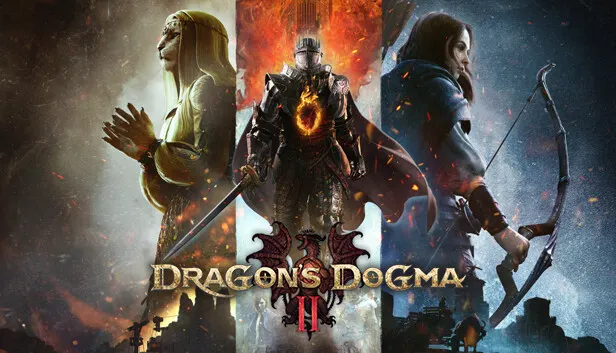
Dragon's Dogma 2 is a single-player role-playing game developed and published by CAPCOM in 2024 as a sequel to Dragon's Dogma. Set in a fantasy world, it follows the Arisen, whose appearance, vocation and combat style the player defines. Swords, bows and magick are at the character's disposal, and each vocation determines how battles are approached. During the solo journey a main Pawn created by the player stays at the Arisen's side, while up to two additional Pawns made by other players can be recruited over the network. Outside the town, various monsters inhabit the lands, and before fighting it is worth weighing the party's composition, the terrain and the creatures ahead. The locals pursue their own goals and feelings, and sometimes they approach with a request that turns into a quest.
Description from Steam
Note: There are other sets that include this item.
Set forth on your grand adventure, Arisen!
Dragon’s Dogma is a single player, narrative driven action-RPG series that challenges the players to choose their own experience – from the appearance of their Arisen, their vocation, their party, how to approach different situations and more. Now, in this long-awaited sequel, the deep, explorable fantasy world of Dragon’s Dogma 2 awaits.
On your journey, you’ll be joined by Pawns, mysterious otherworldly beings, in an adventure so unique you will feel as if accompanied by other players while on your own adventure.
All of these elements are elevated further through physics technology, artificial intelligence (AI) and the latest in graphics, to create a truly immersive fantasy world in Dragon’s Dogma 2.
Action that challenges your creativity
Wield swords, bows, and chant magick.
The vocations in Dragon's Dogma 2 give you the ability to approach combat the way you want.
Players can customize their own main Pawn, who will always accompany your Arisen,
and enter a covenant with up to 2 additional Pawns from other players through the network.
Beyond the town borders, you will encounter diverse monsters that inhabit the lands.
You will need to decide between engaging in battles or finding alternatives;
so be aware of your party’s setup, the terrain around you, and the monsters you face.
Travelers, merchants, soldiers and other folk go about their daily lives.
Preoccupied by their own objectives and motives, they all exhibit different emotions.
At times, they may lead you to a quest by approaching you and asking for a favor.
System requirements
WindowsRequires a 64-bit processor and operating system
Questions and answers
Does Dragon's Dogma 2 have Russian language support?
Voice-over: English, Japanese. Interface and subtitles: Russian, English, Spanish, French, German, Italian, Polish, Japanese, Korean, Simplified Chinese, Arabic, Spanish (Latin America), Traditional Chinese, Portuguese (Brazil).
Which regions does the key activate in?
Pick the region that matches your Steam account region — otherwise the code may not activate. Activation countries by region:
CIS — Russia, Ukr. UA, Kazakhstan, Belarus, Armenia and 6 more countries;
Rest of the world — Afghanistan, Åland Islands, Albania, American Samoa, Andorra and 184 more countries.
Once activated, the game stays on your account for good.
How soon does the code arrive after payment?
Keys are issued automatically, around the clock: the code appears on the order page within 2–3 minutes.
What to do if the key does not activate?
First check your Steam account region: the key activates in the countries of its own region, and a mismatch is the most common reason activation fails. If the region is right, open “Orders” in the site header, pick the order and write in the chat — you can attach a screenshot of the error, and an operator will help you.
Completed orders only
Customer reviews
There are no reviews of Dragon's Dogma 2 yet. The store has 35 reviews of completed orders, 21 of them about Steam products.
Read reviewsSteam · PC
Similar games










Countries where the key activates
Key region: —